
Clypt
Clypt: A focused podcast clipping workflow with review, branding, and social scheduling. Ranked #21 of 30 in Podcast Clip Makers by our editors (6.1/10); pricing: Paid; best for podcast teams needing review workflows.
At a glance
- Editor score6.1 / 10
- PricingPaid
- Best forPodcast teams needing review workflows
- Free planNo
- Paid from$41/mo
- Auto clip detectionYes
- Facts checked20 Sep 2026
Where it wins
- Ranks podcast clips and supports review, editing, skipping, and regeneration
- Adds captions, speaker tracking, reframing, branded end cards, and show notes
- Schedules finished clips to LinkedIn and X
Where it doesn't
- Starts at $49/month with no free plan
- Integrations center on YouTube, LinkedIn, X, and RSS
- Monthly plans cap production at 4, 10, or 25 episodes
Our verdict on Clypt
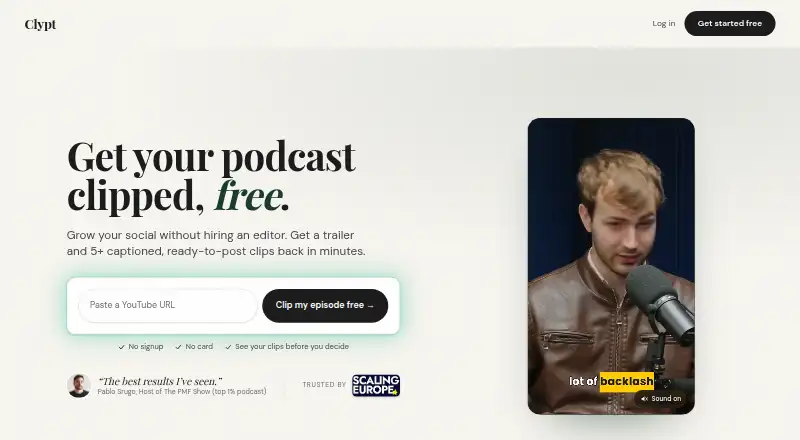
Clypt turns podcast episodes into ranked short-form clips and trailers for business podcasters, with a particular fit for VC, founder, investor, and B2B interview shows. It accepts a YouTube link or connected channel, transcribes the episode, identifies potential clips, and supports audio-only episodes with static-background video output. The workflow covers vertical and widescreen exports, captions, speaker tracking, branded end cards, show notes, review, editing, and social publishing.
Pricing is structured around monthly episode volume. Starter costs $49 per month for 4 episodes, with rollover up to 8 unused episodes. Growth costs $99 per month for 10 episodes and rollover up to 20 unused episodes, while Pro costs $199 per month for 25 episodes and rollover up to 50 unused episodes. The published plans show 9:16 and 16:9 exports, social media copy, a 60-second branded trailer, and YouTube auto-import on the monthly tiers. An annual Starter option is shown at $41 per month equivalent, and Clypt also describes a one-free-episode trial without a card.
Its strongest distinction is the podcast-specific production flow: AI selection and ranking are paired with word-by-word animated captions, automatic speaker tracking, vertical reframing, and regeneration after review. That makes Clypt a good fit for teams that want editorial control rather than a one-click export. Its platform reach is focused, with YouTube and RSS for source content and LinkedIn and X for scheduling. Teams needing broader publishing destinations, a free ongoing plan, or production beyond the plan limits should consider a wider or more flexible alternative. Clypt suits business podcast teams that prioritize repeatable review and branded social clips.
Your product? Our editors can test Clypt in depth and publish a review, labelled as paid · from $149/mo →
Clypt pricing
All 3 Clypt plans and prices →
Clypt fact sheet
| Free plan | No |
|---|---|
| Paid from | $41/mo |
| Auto clip detection | Yes |
| Captions | Yes |
| Video reframing | Yes |
| Clip length limit | Not verified |
| Caption languages | Not verified |
| Social publishing | Yes |
| Watermark on free plan | Not verified |
| Deployment | Cloud |
| Platforms | Web |
| Support | |
| Built for | Small business, Mid-market (editorial estimate) |
| Integrations | 4 integrations: YouTube, LinkedIn, X, RSS |
| Pricing | Paid (source) |
| Website | useclypt.com |
| Facts checked | 20 Sep 2026 |
Clypt integrations
Clypt lists 4 integrations on its own site.
- YouTube
- X
- RSS
Alternatives to Clypt
- OpusClipA full workflow for turning long-form video into branded, social-ready clips.9.1
- HeadlinerA versatile podcast repurposing suite with strong free and entry-level plans.8.8
- VizardA broad AI clipping workspace for turning long videos into social content.8.4



Used Clypt? Be the first to review it
The editor score above is our own research. What this page doesn't have yet is a reader's view — what you used Clypt for, what worked and what didn't. No stars are seeded and no review is paid for; an editor reads every one before it appears.
Write a reviewTwo minutes · verified accounts only · read by an editor before it appears
Featured on iTechGuides

Clypt is listed in our Podcast Clip Makers directory. Add the badge to your site — it links back to this page.
<a href="https://www.itechguides.com/products/clypt/"><img src="https://www.itechguides.com/best/badge/clypt.svg" alt="Featured on iTechGuides" width="230" height="46"></a>
Reviewed by iTechGuides Editors · Editorial team · Updated Oct 2026
Advertiser disclosure: iTechGuides is reader-supported. Vendors can pay for top positions in our rankings and for a place on other products' pages, and we may earn a commission when you click some links. Bought places stand at the number bought; this page and our disclosure say so. Paying vendors may get a fuller, more detailed review from our editors, and that review can change their score. How we rank.
Last updated · How we research and update