
Clipove
Clipove: A broad AI editing toolkit with a useful free tier and cloud-first workflow. Ranked #63 of 153 in Video Editing Software by our editors (3.1/10); pricing: Free plan; best for AI-assisted browser editing and repurposing.
At a glance
- Editor score3.1 / 10
- PricingFree plan
- Best forAI-assisted browser editing and repurposing
- Free planYes
- 4K exportYes
- Facts checked22 Sep 2026
Where it wins
- AI rough cuts, subtitles, dubbing, tracking, and enhancement
- Free plan includes 2 GB storage and 20+ AI templates
- Publishing integrations support YouTube, TikTok, Instagram, and more
Where it doesn't
- Free subtitle exports include a watermark
- No desktop or mobile app is listed
- Enterprise-only features include API access and unlimited storage
Our verdict on Clipove
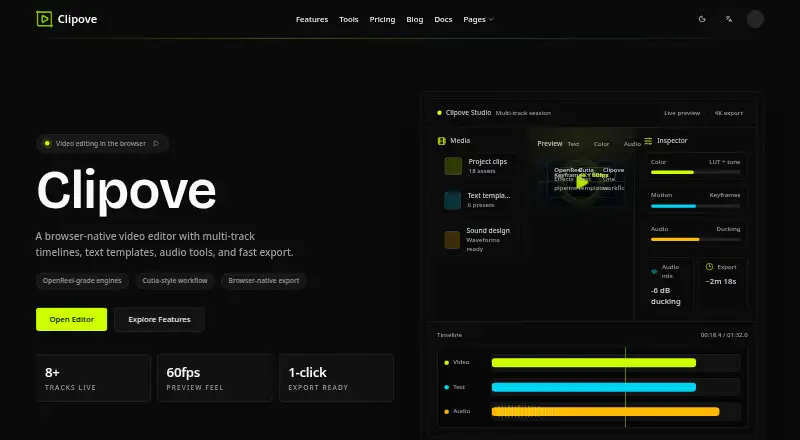
Clipove is a browser-based video editor for creators, media teams, brands, agencies, and developers. It runs in the cloud without desktop installation and combines footage upload, AI scene analysis, automatic rough cuts, subtitles, background removal, voice tools, smart reframing, enhancement, audio cleanup, templates, collaboration, and publishing. Its focus is broad: it handles both long-video editing and short-clip repurposing, including automatic highlight extraction and platform-aware formatting.
The free plan provides AI subtitle generation with a watermark, 20+ basic AI templates, up to 720p resolution, and 2 GB of cloud storage. The Pro plan adds unlimited export length, all AI features, 120+ AI scene templates, 4K export support, 100 GB of storage, and one-click multi-platform publishing. Enterprise is aimed at larger teams, adding multi-seat collaboration management, a custom brand kit, full REST API access, a dedicated customer success manager, a 99.9% SLA uptime guarantee, and unlimited storage. This makes the free tier a practical starting point, while Pro and Enterprise separate advanced production, publishing, collaboration, and infrastructure needs.
Clipove’s ecosystem includes YouTube, TikTok, Instagram, Bilibili, Xiaohongshu, and Douyin, with web and API access. Its feature set also covers subtitle generation and translation for 40+ languages, voice cloning, AI dubbing, automatic color grading, 4K upscaling, noise removal, and real-time team review. Choose Clipove if browser editing, AI-assisted repurposing, multilingual video, and social publishing are central to your workflow. It is less suitable for teams that require a desktop or mobile application, or that need Enterprise capabilities such as API access, unlimited storage, and dedicated customer success management.
Your product? Our editors can test Clipove in depth and publish a review, labelled as paid · from $149/mo →
Clipove pricing
All 3 Clipove plans and prices →
Clipove fact sheet
| Free plan | Yes |
|---|---|
| Paid from | Not verified |
| Desktop app | No |
| Web app | Yes |
| Mobile app | No |
| 4K export | Yes |
| Team collaboration | Yes |
| Included cloud storage | 2 GB |
| Deployment | Cloud, Browser extension |
| Platforms | Web |
| Support | Live chat, Docs |
| Built for | Solo, Small business, Mid-market, Enterprise (editorial estimate) |
| Integrations | 6 integrations: YouTube, TikTok, Instagram, Bilibili, Xiaohongshu, Douyin |
| Pricing | Free plan (source) |
| Website | clipove.com |
| Facts checked | 22 Sep 2026 |
Clipove integrations
Clipove lists 6 integrations on its own site.
- YouTube
- TikTok
- Bilibili
- Xiaohongshu
- Douyin
Alternatives to Clipove
- DaVinci ResolveA deep free editor with professional post-production tools across desktop and iPad.9.3
- Avid Media ComposerA deep editing suite with collaborative workflows, AI search, and a free entry option.9.2
- Final Cut ProA full-featured editor for Apple users who want desktop and iPad workflows.9.1


See all Clipove alternatives →
Used Clipove? Be the first to review it
The editor score above is our own research. What this page doesn't have yet is a reader's view — what you used Clipove for, what worked and what didn't. No stars are seeded and no review is paid for; an editor reads every one before it appears.
Write a reviewTwo minutes · verified accounts only · read by an editor before it appears
Featured on iTechGuides

Clipove is listed in our Video Editing Software directory. Add the badge to your site — it links back to this page.
<a href="https://www.itechguides.com/products/clipove/"><img src="https://www.itechguides.com/best/badge/clipove.svg" alt="Featured on iTechGuides" width="230" height="46"></a>
Reviewed by iTechGuides Editors · Editorial team · Updated Oct 2026
Advertiser disclosure: iTechGuides is reader-supported. Vendors can pay for top positions in our rankings and for a place on other products' pages, and we may earn a commission when you click some links. Bought places stand at the number bought; this page and our disclosure say so. Paying vendors may get a fuller, more detailed review from our editors, and that review can change their score. How we rank.
Last updated · How we research and update