
ClickCues
ClickCues: A focused web review workspace for teams that need context-rich feedback and workflow. Ranked #27 of 31 in Web Annotation Tools by our editors (6.5/10); pricing: 7-day trial; best for small teams wanting straightforward web review.
At a glance
- Editor score6.5 / 10
- Pricing7-day trial
- Best forSmall teams wanting straightforward web review
- Free planNo
- Paid from$276/yr
- Collaborative reviewYes
- Facts checked20 Sep 2026
Where it wins
- Captures clicked-element, page, browser, viewport, and screenshot context
- Lets guests leave feedback without creating reviewer accounts
- Combines Kanban workflow with assignments, priorities, filters, and AI summaries
Where it doesn't
- No free plan; paid access starts at $29 per month
- Integrations are not listed
- Screenshots are available only when supported
Our verdict on ClickCues
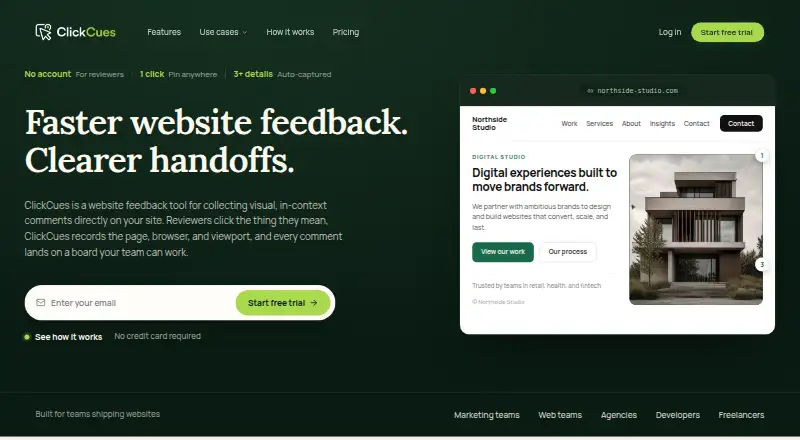
ClickCues is a hosted web feedback tool for freelancers, agencies, marketing teams, and web teams reviewing live or staging websites. Reviewers click an element and leave a comment without creating an account. The product records the page URL, clicked-element context, browser, operating system, viewport, and screenshots when supported. Teams can install a project-specific JavaScript widget or use a hosted feedback link, then manage submissions in project boards.
Pricing is structured across Freelancer, Agency, and Studio plans. Freelancer costs $29 per month or $276 per year and includes unlimited projects and websites, unlimited guest reviewers, pinned feedback with page and browser context, screenshots when supported, and a Kanban board with comments and status workflow. Agency costs $59 per month or $564 per year, adding concurrent website and campaign projects plus a setup guide and help. Studio costs $99 per month or $948 per year, adding onboarding help and support for high-volume and multi-site operations. A 7-day free trial is available, but there is no free plan.
Its strongest fit is collaborative website review where preserving visual and technical context matters more than connecting a broad software stack. Task comments, priorities, assignments, filters, and status workflows give teams a clear way to move feedback forward, while AI-generated summaries can condense review input. ClickCues is web-based and its project-specific JavaScript widget keeps the workflow centered on websites. Teams requiring listed integrations, broader platform coverage, or screenshot capture in every situation should consider another option. Small teams that want guest-friendly annotations and straightforward project workflow should find the feature set well aligned.
Your product? Our editors can test ClickCues in depth and publish a review, labelled as paid · from $149/mo →
ClickCues pricing
All 3 ClickCues plans and prices →
ClickCues fact sheet
| Free plan | No |
|---|---|
| Paid from | $276/yr |
| Annotation modes | Both |
| Collaborative review | Yes |
| Guest access | Yes |
| Document support | Webpages |
| Browser capture | Yes |
| Team seats | 5 seats |
| Export options | Data export from Settings; format not specified |
| Free trial | 7 days · no card needed |
| Deployment | Cloud |
| Platforms | Web |
| Support | Email, Docs |
| Built for | Solo, Small business, Mid-market (editorial estimate) |
| Pricing | 7-day trial (source) |
| Website | clickcues.com |
| Facts checked | 20 Sep 2026 |
Alternatives to ClickCues
- HypothesisA free, open-source annotation platform with strong education and collaboration features.9.3
- PinPointA free web annotation workspace combining collaborative review, PDF proofing, and AI QA.9.1
- PerusallA course-focused annotation platform combining discussion, assessment, analytics, and LMS sync.9.0



See all ClickCues alternatives →
Used ClickCues? Be the first to review it
The editor score above is our own research. What this page doesn't have yet is a reader's view — what you used ClickCues for, what worked and what didn't. No stars are seeded and no review is paid for; an editor reads every one before it appears.
Write a reviewTwo minutes · verified accounts only · read by an editor before it appears
Featured on iTechGuides

ClickCues is listed in our Web Annotation Tools directory. Add the badge to your site — it links back to this page.
<a href="https://www.itechguides.com/products/clickcues/"><img src="https://www.itechguides.com/best/badge/clickcues.svg" alt="Featured on iTechGuides" width="230" height="46"></a>
Reviewed by iTechGuides Editors · Editorial team · Updated Oct 2026
Advertiser disclosure: iTechGuides is reader-supported. Vendors can pay for top positions in our rankings and for a place on other products' pages, and we may earn a commission when you click some links. Bought places stand at the number bought; this page and our disclosure say so. Paying vendors may get a fuller, more detailed review from our editors, and that review can change their score. How we rank.
Last updated · How we research and update