
Click4Time
Click4Time: A web-based scheduling and charting platform for massage practices with prepaid-session tools. Ranked #18 of 27 in Massage Therapy Scheduling Software by our editors (7.6/10); pricing: 14-day trial; best for practices wanting charting and prepaid sessions.
At a glance
- Editor score7.6 / 10
- Pricing14-day trial
- Best forPractices wanting charting and prepaid sessions
- Free planNo
- Paid from$45/mo
- Online bookingYes
- Founded2010 · Vancouver, British Columbia, Canada
- Facts checked21 Sep 2026
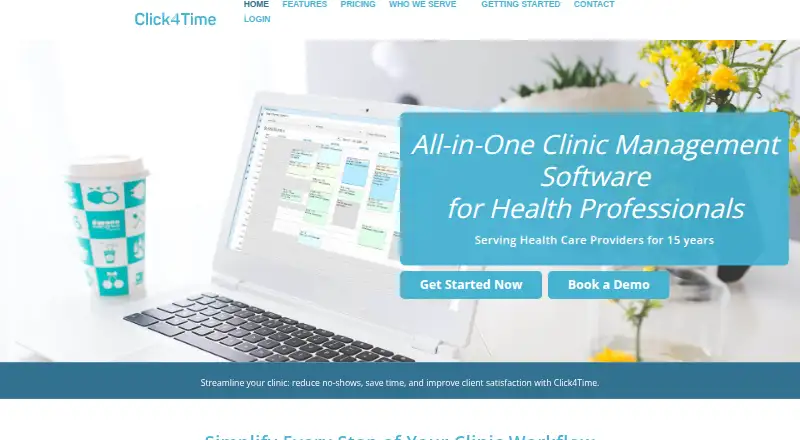
Where it wins
- Electronic charting and session notes support structured client records
- Packages and subscriptions help manage prepaid sessions
- Booking, forms, reminders, payments and reporting are included
Where it doesn't
- No free plan, with monthly pricing starting at $45
- Charting requires the $62.50 monthly plan
- Available on the web platform rather than across multiple listed platforms
Our verdict on Click4Time
Click4Time is cloud-based practice management software for massage therapists and other health, wellness and allied-health providers. It brings online appointment booking, availability rules, staff filtering, client records, digital intake and consent forms, invoices, receipts, payment processing, notifications and reporting into one system. Clients can book through a customizable public booking page, complete forms, manage appointments and download receipts. Its scope suits solo practitioners and multi-provider clinics that want scheduling connected to administrative and clinical records.
The published plans show two monthly options in USD for businesses outside Canada. No Charting costs $45 per month and includes unlimited appointments, all scheduling features, unlimited digital forms, a customizable public booking page, billing invoices and receipts, plus payments and secure credit card storage. With Charting costs $62.50 per month and adds eCharting and session notes. A 14-day trial is available without requiring a credit card until after the trial. Practices should choose the lower tier when scheduling, forms and payments are the priority; the higher tier is the relevant option for session documentation.
Click4Time’s strongest distinction is the connection between booking and practice administration. Email and SMS confirmations, changes and reminders support appointment communication, while custom client data fields, charting, invoices, stored client cards, financial reports and statistical reports extend beyond a basic calendar. Packages and subscriptions address prepaid sessions, and Zoom, MailChimp, Stripe, Google Calendar and Google Analytics are listed integrations. It is a fit for practices seeking a broad web-based workflow with charting and prepaid-session management. Practices wanting a free plan, a lower entry price or platforms beyond the web should look elsewhere.
Your product? Our editors can test Click4Time in depth and publish a review, labelled as paid · from $149/mo →
Click4Time pricing
All 2 Click4Time plans and prices →
Click4Time fact sheet
| Free plan | No |
|---|---|
| Paid from | $45/mo |
| Online booking | Yes |
| Client records | Yes |
| Automated reminders | Yes |
| Packages & memberships | Yes |
| Payment processing | Yes |
| Digital intake forms | Yes |
| Included staff accounts | 1 staff |
| Free trial | 14 days · no card needed |
| Deployment | Cloud |
| Platforms | Web |
| Compliance & security | HIPAA |
| Support | Email, Phone, Tickets, Docs |
| Built for | Solo, Small business, Mid-market (editorial estimate) |
| Integrations | 5 integrations: Zoom, MailChimp, Stripe, Google Calendar, Google Analytics |
| Pricing | 14-day trial (source) |
| Website | click4time.com |
| Facts checked | 21 Sep 2026 |
Click4Time integrations
Click4Time lists 5 integrations on its own site.
- Zoom
- MailChimp
- Stripe
- Google Calendar
- Google Analytics
Alternatives to Click4Time
- StillpointA strong-value massage practice platform with booking, clinical notes, payments, and a free plan.9.4
- MassageBookA massage-focused scheduler with room management, client records, payments, and memberships.9.2
- KneadlyA web-based scheduler with rooms, memberships, forms, payments, and team tools.9.1



See all Click4Time alternatives →
Used Click4Time? Be the first to review it
The editor score above is our own research. What this page doesn't have yet is a reader's view — what you used Click4Time for, what worked and what didn't. No stars are seeded and no review is paid for; an editor reads every one before it appears.
Write a reviewTwo minutes · verified accounts only · read by an editor before it appears
Featured on iTechGuides

Click4Time is listed in our Massage Therapy Scheduling Software directory. Add the badge to your site — it links back to this page.
<a href="https://www.itechguides.com/products/click4time/"><img src="https://www.itechguides.com/best/badge/click4time.svg" alt="Featured on iTechGuides" width="230" height="46"></a>
Reviewed by iTechGuides Editors · Editorial team · Updated Oct 2026
Advertiser disclosure: iTechGuides is reader-supported. Vendors can pay for top positions in our rankings and for a place on other products' pages, and we may earn a commission when you click some links. Bought places stand at the number bought; this page and our disclosure say so. Paying vendors may get a fuller, more detailed review from our editors, and that review can change their score. How we rank.
Last updated · How we research and update