
ClassLens
ClassLens: Grades varied student work against rubrics, with teacher approval before release. Ranked #20 of 33 in Automated Grading Software by our editors (7.2/10); pricing: Free plan · 30-day trial; best for teachers grading handwritten and multimedia work.
At a glance
- Editor score7.2 / 10
- PricingFree plan · 30-day trial
- Best forTeachers grading handwritten and multimedia work
- Free planYes
- Paid from$10/user/mo
- Programming autogradingNo
- Facts checked23 Sep 2026
Where it wins
- Grades documents, handwriting, diagrams, images, audio, and video
- Drafts personalized feedback and class-wide Knowledge Gap Reports
- Requires teacher approval before grades reach students
Where it doesn't
- Classroom imports and Sheets exports center the workflow on Google tools
- No LTI integration for learning management systems
- Individual plans limit monthly submission volume
Our verdict on ClassLens
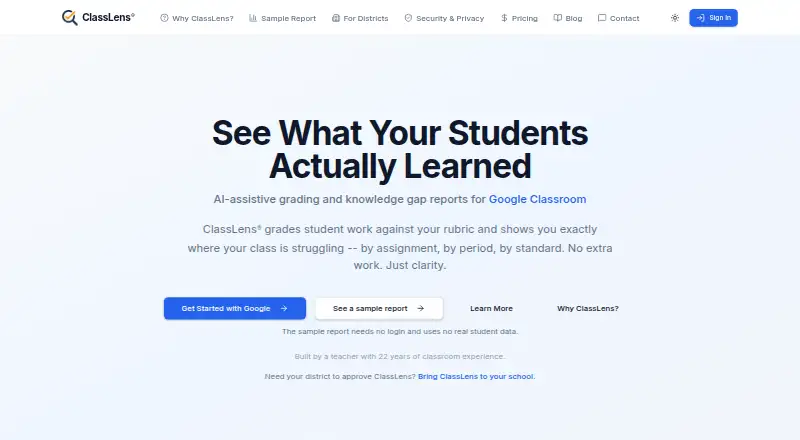
ClassLens helps teachers grade student work submitted through Google Classroom. It evaluates assignments against teacher-provided rubrics, drafts scores and personalized feedback, and produces Knowledge Gap Reports by assignment, period, and standard. Its supported work goes beyond typed documents: teachers can submit PDFs, images, handwriting, diagrams, and uploaded audio or video. Grading is not automatically released to students; teachers review and approve it first. That makes ClassLens a fit for educators handling varied work who want to retain control over final grades.
The workflow is most compelling when assignments already live in Google Classroom. ClassLens imports assignments and submissions there, and grading results can be exported to Google Sheets; Google Drive is also listed as an integration. Teachers can configure grading strictness, feedback style and length, and late-work policy. The product is cloud-based and web-based. Its focus is written and multimedia grading rather than programming autograding, and it does not offer LTI integration, so schools seeking a broader LMS-connected grading workflow may prefer another tool.
According to the vendor's pricing page, Free costs $0 per month and includes Google Classroom integration, standard-model AI grading, Knowledge Gap Reports, and teacher review. Pro is $10 per teacher per month, adding advanced AI model access while retaining Classroom integration and reports. Max is $20 per teacher per month and includes priority support, early access to new features, and advanced model access. Individual plans limit monthly submission volume; district licensing is available by request. A 30-day free trial is offered without a required card, and email support and SOC 2 compliance are listed. ClassLens suits teachers who want rubric-based help across varied submission formats, but is less suited to teams that need LTI or integrations beyond the Google-centered workflow.
Your product? Our editors can test ClassLens in depth and publish a review, labelled as paid · from $149/mo →
ClassLens pricing
All 3 ClassLens plans and prices →
ClassLens fact sheet
| Free plan | Yes |
|---|---|
| Paid from | $10/user/mo |
| Programming autograding | No |
| Math autograding | Not verified |
| Written-work OCR | Yes |
| LMS or LTI support | No |
| Question bank | Not verified |
| Supported code languages | Not verified |
| Free trial | 30 days · no card needed |
| Deployment | Cloud |
| Platforms | Web |
| Compliance & security | SOC 2 |
| Support | |
| Built for | Solo, Small business, Mid-market, Enterprise (editorial estimate) |
| Integrations | 3 integrations: Google Classroom, Google Sheets, Google Drive |
| Pricing | Free plan · 30-day trial (source) |
| Website | classlens.com |
| Facts checked | 23 Sep 2026 |
ClassLens integrations
ClassLens lists 3 integrations on its own site.
- Google Classroom
- Google Sheets
- Google Drive
Alternatives to ClassLens
- PrairieLearnA flexible grading platform for code, math, written work, and AI-assisted assessment.9.2
- GradescopeA broad grading platform for paper, online, programming, and written work.9.0
- CodeGradeBroad language coverage, LMS connectivity, and a useful free tier for programming courses.8.9



See all ClassLens alternatives →
Used ClassLens? Be the first to review it
The editor score above is our own research. What this page doesn't have yet is a reader's view — what you used ClassLens for, what worked and what didn't. No stars are seeded and no review is paid for; an editor reads every one before it appears.
Write a reviewTwo minutes · verified accounts only · read by an editor before it appears
Featured on iTechGuides

ClassLens is listed in our Automated Grading Software directory. Add the badge to your site — it links back to this page.
<a href="https://www.itechguides.com/products/classlens/"><img src="https://www.itechguides.com/best/badge/classlens.svg" alt="Featured on iTechGuides" width="230" height="46"></a>
Reviewed by iTechGuides Editors · Editorial team · Updated Oct 2026
Advertiser disclosure: iTechGuides is reader-supported. Vendors can pay for top positions in our rankings and for a place on other products' pages, and we may earn a commission when you click some links. Bought places stand at the number bought; this page and our disclosure say so. Paying vendors may get a fuller, more detailed review from our editors, and that review can change their score. How we rank.
Last updated · How we research and update