
ChordieApp
ChordieApp: A focused desktop tool for recognizing MIDI chords and viewing their notation and fretboard shapes. Ranked #27 of 27 in Chord Finder Software by our editors (6.3/10); pricing: Paid; best for desktop MIDI chord recognition.
At a glance
- Editor score6.3 / 10
- PricingPaid
- Best forDesktop MIDI chord recognition
- Free planNo
- Reverse chord lookupYes
- Facts checked21 Sep 2026
Where it wins
- Identifies MIDI chords and displays note names
- Combines grand-staff notation with guitar fretboard views
- Supports DAW, LoopMIDI, MIDI-controller, and QWERTY workflows
Where it doesn't
- Requires an external sound source or DAW for audio playback
- Available on Windows and macOS, with no mobile apps
- Does not generate chord progressions or export chord charts
Our verdict on ChordieApp
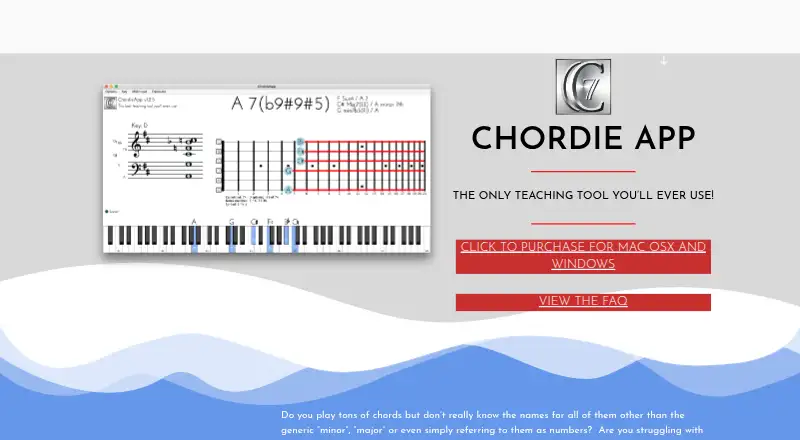
ChordieApp is desktop software for musicians, teachers, producers, and other music professionals who need to identify chords from incoming notes. It reads MIDI input, names the chord, displays its individual notes, and presents the result in grand-staff manuscript notation alongside a guitar fretboard visualization. Notes can come from a MIDI controller or the computer keyboard, making the app suitable for chord learning, music instruction, rehearsals, and tutorial-video production on Windows and macOS.
Its strongest feature is the combination of recognition and visual explanation. Multiple chord-name descriptions can help users compare how the same notes may be labeled, while the note-name display, staff notation, and guitar view connect theoretical identification with an instrument-oriented shape. The reverse-lookup workflow and voicing explorer support investigation of played voicings rather than only reading predefined chord charts. For teachers and learners, that makes the display-oriented approach more useful than a simple chord-name lookup.
ChordieApp also fits workflows that already include external music software. It supports DAW and MIDI-controller use, with LoopMIDI listed as an integration, but it does not generate audio itself: an external sound source or DAW is required for playback. The product is paid and has no free plan, and its scope stays focused on MIDI recognition, naming, notation, and visualization rather than mobile use, progression generation, or chord-chart export. Choose it for desktop-based MIDI analysis and teaching; choose an alternative if built-in playback, mobile access, progression creation, or chart export is central to the workflow.
Your product? Our editors can test ChordieApp in depth and publish a review, labelled as paid · from $149/mo →
ChordieApp pricing
ChordieApp fact sheet
| Free plan | No |
|---|---|
| Paid from | Not verified |
| Reverse chord lookup | Yes |
| Progression generator | No |
| Voicing explorer | Yes |
| Supported instruments | guitar |
| Chord chart export | No |
| Mobile apps | None |
| Chord audio playback | No |
| Deployment | Desktop |
| Platforms | Windows, macOS |
| Support | Email, Docs |
| Built for | Solo, Small business, Mid-market (editorial estimate) |
| Integrations | 2 integrations: DAW, LoopMIDI |
| Pricing | Paid |
| Website | chordieapp.com |
| Facts checked | 21 Sep 2026 |
ChordieApp integrations
ChordieApp lists 2 integrations on its own site.
- DAW
- LoopMIDI
Alternatives to ChordieApp
- ChordProgressions.orgA free, broad chord workspace for generating, identifying, analyzing, and exporting progressions.9.4
- OtoTheoryA focused chord workspace that combines analysis, suggestions, visualization, exports, and DAW integrations.9.2
- ChordifyA flexible chord finder for learning songs, practicing parts, and exporting progressions.9.1


See all ChordieApp alternatives →
Used ChordieApp? Be the first to review it
The editor score above is our own research. What this page doesn't have yet is a reader's view — what you used ChordieApp for, what worked and what didn't. No stars are seeded and no review is paid for; an editor reads every one before it appears.
Write a reviewTwo minutes · verified accounts only · read by an editor before it appears
Featured on iTechGuides

ChordieApp is listed in our Chord Finder Software directory. Add the badge to your site — it links back to this page.
<a href="https://www.itechguides.com/products/chordieapp/"><img src="https://www.itechguides.com/best/badge/chordieapp.svg" alt="Featured on iTechGuides" width="230" height="46"></a>
Reviewed by iTechGuides Editors · Editorial team · Updated Oct 2026
Advertiser disclosure: iTechGuides is reader-supported. Vendors can pay for top positions in our rankings and for a place on other products' pages, and we may earn a commission when you click some links. Bought places stand at the number bought; this page and our disclosure say so. Paying vendors may get a fuller, more detailed review from our editors, and that review can change their score. How we rank.
Last updated · How we research and update