
Bootstrap Studio
Bootstrap Studio: A focused offline Bootstrap builder with responsive design tools and one-time pricing. Ranked #4 of 40 in Web Design Software by our editors (8.8/10); pricing: Paid; best for offline Bootstrap-based website design.
At a glance
- Editor score8.8 / 10
- PricingPaid
- Best forOffline Bootstrap-based website design
- Free planNo
- Paid from$29 one-time
- Responsive designYes
- Facts checked20 Sep 2026
Where it wins
- Supports Bootstrap 3, 4 and 5 with responsive grid tools
- Exports HTML, CSS, JavaScript and images for independent hosting
- Stores projects offline with automatic backups and reusable components
Where it doesn't
- No free plan or trial is offered
- Desktop-only, with no browser-based editing
- Standard includes upgrades for one year; lifetime upgrades cost more
Our verdict on Bootstrap Studio
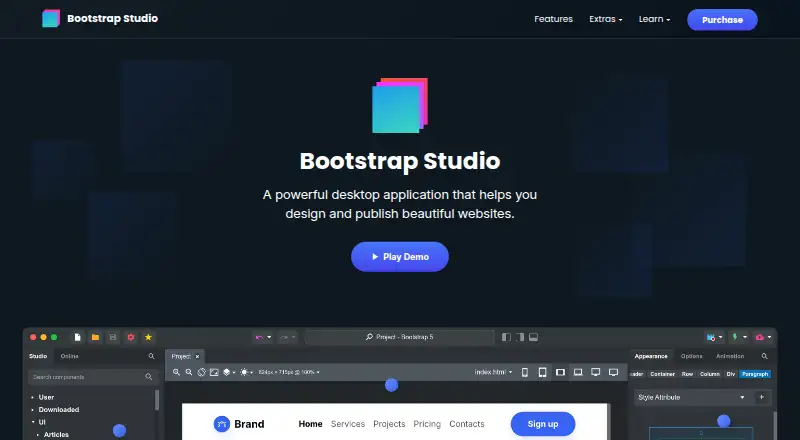
Bootstrap Studio is a desktop visual web design application for designers, developers, freelancers, students and individuals creating websites or web apps. Its drag-and-drop editor works with Bootstrap 3, 4 and 5 components, responsive grids, breakpoint tools, reusable components and code editing. Projects are stored locally, and completed sites can be exported as HTML, CSS, JavaScript and images for independent hosting. That makes it a fit for people who want a focused Bootstrap workflow without relying on a content management system or a constant internet connection.
Pricing is straightforward and one-time. The Standard plan costs $29 and includes free web hosting and Smart Forms for 1 year, 1 year of free upgrades, a 30 day refund policy, and support for Windows 10+, macOS and Linux. The Lifetime plan costs $59 and includes everything from Standard, free web hosting and Smart Forms for life, free upgrades forever, and the ability to build ecommerce stores. The official site states there is no trial, so the 30-day refund policy is the main lower-risk purchasing option. Standard suits projects with shorter upgrade needs, while Lifetime is more suitable for long-term use or ecommerce work.
The product’s strongest area is responsive, export-oriented design: users can preview work across browsers and devices, apply CSS animations, Lottie and parallax effects, and reuse linked components across projects. Offline storage and automatic backups also support local workflows. However, it is desktop-only and does not offer a free plan or trial. Teams seeking browser-based access or a collaboration-centered workflow should look elsewhere. Bootstrap Studio is a strong choice for individuals and small project teams who value local control, Bootstrap components and independent code export; it is less suitable for users who prefer cloud-first website builders or broader platform ecosystems.
Your product? Our editors can test Bootstrap Studio in depth and publish a review, labelled as paid · from $149/mo →
Bootstrap Studio pricing
All 2 Bootstrap Studio plans and prices →
Bootstrap Studio fact sheet
| Free plan | No |
|---|---|
| Paid from | $29 one-time |
| Responsive design | Yes |
| Prototype interactions | Yes |
| Code export | Yes |
| Design systems | Yes |
| Team collaboration | Yes |
| Included team seats | Not verified |
| Primary platform | Desktop |
| Money-back guarantee | 30 days |
| Deployment | Desktop |
| Platforms | Windows, macOS, Linux |
| Compliance & security | GDPR |
| Support | Email, Docs |
| Built for | Solo, Small business, Mid-market (editorial estimate) |
| Pricing | Paid (source) |
| Website | bootstrapstudio.io |
| Facts checked | 20 Sep 2026 |
Alternatives to Bootstrap Studio
- PlasmicA flexible visual builder for teams that need responsive, code-connected web experiences.9.4
- WYSIWYG Web BuilderA complete Windows visual builder with a low one-time price and broad publishing tools.9.2
- Xara Web DesignerA capable Windows website builder with responsive design, export, and marketing tools.9.0



See all Bootstrap Studio alternatives →
Bootstrap Studio vs the competition
- Bootstrap Studio vs Plasmic
- Bootstrap Studio vs WYSIWYG Web Builder
- Bootstrap Studio vs Xara Web Designer
- Bootstrap Studio vs Adobe Dreamweaver
- Bootstrap Studio vs Google Web Designer
- Bootstrap Studio vs TemplateToaster

Compare Bootstrap Studio with any tool side by side →
Also Ranked In
Bootstrap Studio is ranked in 2 of our directories.
Used Bootstrap Studio? Be the first to review it
The editor score above is our own research. What this page doesn't have yet is a reader's view — what you used Bootstrap Studio for, what worked and what didn't. No stars are seeded and no review is paid for; an editor reads every one before it appears.
Write a reviewTwo minutes · verified accounts only · read by an editor before it appears
Featured on iTechGuides

Bootstrap Studio is listed in our Web Design Software directory. Add the badge to your site — it links back to this page.
<a href="https://www.itechguides.com/products/bootstrap-studio/"><img src="https://www.itechguides.com/best/badge/bootstrap-studio.svg" alt="Featured on iTechGuides" width="230" height="46"></a>
Reviewed by iTechGuides Editors · Editorial team · Updated Oct 2026
Advertiser disclosure: iTechGuides is reader-supported. Vendors can pay for top positions in our rankings and for a place on other products' pages, and we may earn a commission when you click some links. Bought places stand at the number bought; this page and our disclosure say so. Paying vendors may get a fuller, more detailed review from our editors, and that review can change their score. How we rank.
Last updated · How we research and update