
Blocs
Blocs: A visual builder for responsive sites, with code export and CMS options on paid plans. Ranked #30 of 32 in Personal Website Builders by our editors (6.2/10); pricing: Free plan; best for mac users wanting visual code export.
At a glance
- Editor score6.2 / 10
- PricingFree plan
- Best forMac users wanting visual code export
- Free planYes
- Paid from$112.99 one-time
- Custom domainYes
- Founded2014 · Tyne and Wear, NE26 2JH, United Kingdom
- Facts checked19 Sep 2026
Where it wins
- Build unlimited websites on the Free plan
- Create responsive pages with reusable sections and components
- Export code or publish via FTP/SFTP on Standard
Where it doesn't
- Publishing requires user-provided hosting
- Standard costs $112.99 one time
- Custom interactions and WordPress theme building require Plus
Our verdict on Blocs
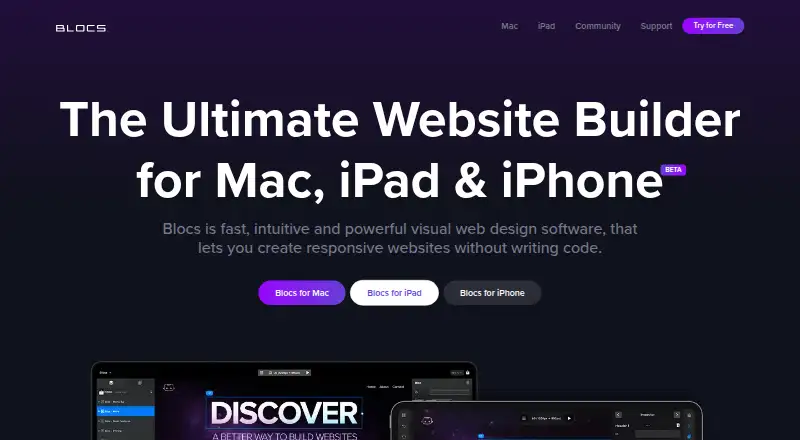
Blocs is visual website-building software for creating responsive pages from templates, stackable Bloc sections, and reusable Bric components. It suits Mac users who want visual control over layouts and styling, with options to add custom code or export a finished site. Styling includes typography, custom classes, filters, and animations; components include carousels, modals, tabs, and media players. The product also supports iOS, though the listed site-export and publishing workflow is described for the Mac version.
The Free plan includes unlimited website building, styling options, interactions, animations, scroll effects, add-ons, and project auto-backup. According to the vendor's current pricing page, Blocs 6 Standard costs $112.99 USD as a one-time purchase. It adds code export, publishing to user-provided hosting, custom fonts, browser preview, and developer inspector tools. Blocs 6 Plus costs $179.99 USD one time and adds custom interactions, WordPress theme building, content importing, advanced SEO features, and use on two Macs. This tier structure makes the free option useful for visual creation, while export and hosting workflows are part of Standard and more advanced WordPress work sits in Plus.
Blocs connects with WordPress, Volt CMS, Surreal CMS, and Cushy CMS, and supports FTP/SFTP publishing. Custom code zones, page-level code injection, and analytics tracking-code support give users ways to extend pages beyond the visual editor. The trade-off is that Blocs does not supply hosting: site publication depends on hosting the user provides. Its Mac-centered workflow is a natural fit for people building and managing sites in that environment, especially those who value exported code. Users seeking a builder with included hosting or a workflow centered on other desktop platforms should consider alternatives.
Your product? Our editors can test Blocs in depth and publish a review, labelled as paid · from $149/mo →
Blocs pricing
All 3 Blocs plans and prices →
Blocs fact sheet
| Free plan | Yes |
|---|---|
| Paid from | $112.99 one-time |
| Custom domain | Yes |
| Blogging | Not verified |
| AI site builder | No |
| Custom code | Yes |
| Built-in analytics | No |
| Page limit | Not verified |
| Deployment | Desktop, Mobile |
| Platforms | macOS, iOS |
| Integrations | 6 integrations: WordPress, Volt CMS, Surreal CMS, Cushy CMS, FTP, SFTP |
| Pricing | Free plan (source) |
| Website | blocsapp.com |
| Facts checked | 19 Sep 2026 |
Blocs integrations
Blocs lists 6 integrations on its own site.
- WordPress
- Volt CMS
- Surreal CMS
- Cushy CMS
- FTP
- SFTP
Alternatives to Blocs
- WordPress.comA managed website builder with a free plan and tools for publishing and growing an audience.9.3
- FramerA visual site builder with CMS, AI creation, and managed hosting for design-focused personal sites.9.1
- TildaA flexible visual builder for personal sites, with source-code export on Business.9.0



Used Blocs? Be the first to review it
The editor score above is our own research. What this page doesn't have yet is a reader's view — what you used Blocs for, what worked and what didn't. No stars are seeded and no review is paid for; an editor reads every one before it appears.
Write a reviewTwo minutes · verified accounts only · read by an editor before it appears
Featured on iTechGuides

Blocs is listed in our Personal Website Builders directory. Add the badge to your site — it links back to this page.
<a href="https://www.itechguides.com/products/blocs/"><img src="https://www.itechguides.com/best/badge/blocs.svg" alt="Featured on iTechGuides" width="230" height="46"></a>
Reviewed by iTechGuides Editors · Editorial team · Updated Oct 2026
Advertiser disclosure: iTechGuides is reader-supported. Vendors can pay for top positions in our rankings and for a place on other products' pages, and we may earn a commission when you click some links. Bought places stand at the number bought; this page and our disclosure say so. Paying vendors may get a fuller, more detailed review from our editors, and that review can change their score. How we rank.
Last updated · How we research and update