Blacksmith3D
Blacksmith3D: A free Windows texture painter with strong sculpting and UV tools, but no texture baking. Ranked #21 of 29 in 3D Texturing Software by our editors (6.7/10); pricing: Free plan; best for windows character and asset texture painters.
At a glance
- Editor score6.7 / 10
- PricingFree plan
- Best forWindows character and asset texture painters
- Free planYes
- Paid fromFree
- 3D texture paintingYes
- Facts checked20 Sep 2026
Where it wins
- Direct high-resolution painting with stacked image layers
- Real-time displacement, bump-map, morphing and hair tools
- Projection painting across seams plus automatic UV mapping
Where it doesn't
- Windows-only desktop availability
- No texture baking feature
- Free distribution may change in the future
Our verdict on Blacksmith3D
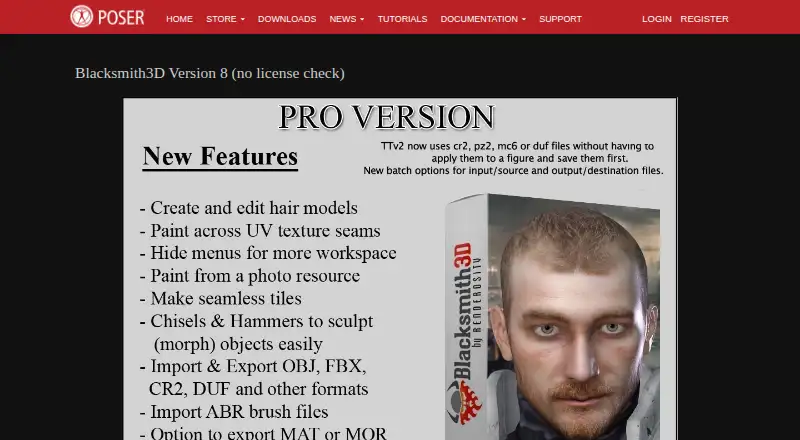
Blacksmith3D is a Windows desktop application for painting high-resolution textures directly on 3D models. It is aimed at artists working on characters and assets who need layered image editing, material-set assignment, UV preparation and texture adjustments inside a model-focused workflow. Its feature set includes stacked image layers with blending controls, real-time displacement and bump-map painting, projection painting across UV seams, and tools for morphing, hair creation and hair editing. The Paint Setup Wizard provides automatic UV mapping, while project templates and fixed-asset content management support repeatable asset work.
The published distribution is free and includes Version 8 with no license check. It is temporarily available for customers affected by older-version compatibility issues, and the vendor states that it may later be sold commercially or bundled with Poser. For artists seeking a free way to paint textures, assign material sets and edit surface detail on Windows, this makes Blacksmith3D a practical option. Buyers who need a stable long-term commercial plan structure should consider how that future distribution change could affect their workflow.
Blacksmith3D fits established 3D pipelines through compatibility with 3D Studio Max, Maya, LightWave, Cinema 4D, Photoshop, Poser, Daz Studio and OBJ-compatible applications. The Projection Brush helps paint across UV seams, and the Texture Transformer supports skin-texture conversion. The product is less suitable for workflows centered on texture baking or cross-platform production because texture baking is not included and the application is Windows-only. Choose it for direct character and asset texture painting with additional sculpting-oriented tools; choose an alternative when baking or broader platform coverage is essential.
Your product? Our editors can test Blacksmith3D in depth and publish a review, labelled as paid · from $149/mo →
Blacksmith3D pricing
All 1 Blacksmith3D plans and prices →
Blacksmith3D fact sheet
| Free plan | Yes |
|---|---|
| Paid from | Free |
| 3D texture painting | Yes |
| Procedural materials | Not verified |
| Texture baking | No |
| PBR workflow | Not verified |
| Node-based authoring | Not verified |
| Maximum texture resolution | Not verified |
| Supported platforms | windows |
| Deployment | Desktop |
| Platforms | Windows |
| Support | Tickets, Community |
| Built for | Solo, Small business (editorial estimate) |
| Integrations | 8 integrations: 3D Studio Max, Maya, LightWave, Cinema 4D, Photoshop, Poser … |
| Pricing | Free plan (source) |
| Website | posersoftware.com |
| Facts checked | 20 Sep 2026 |
Blacksmith3D integrations
Blacksmith3D lists 8 integrations on its own site.
- 3D Studio Max
- Maya
- LightWave
- Cinema 4D
- Photoshop
- Poser
- Daz Studio
- OBJ-compatible applications
Alternatives to Blacksmith3D
- InstaMATA cross-platform toolkit for procedural materials, texture painting, baking, and pipeline automation.9.4
- Mixos PaintA broad, cross-platform PBR texturing workspace with a capable free tier and paid 4K export.9.2
- MariA deep texturing tool for VFX teams that need UDIM scale and procedural control.9.1



See all Blacksmith3D alternatives →
Also Ranked In
Blacksmith3D is ranked in 2 of our directories.
Used Blacksmith3D? Be the first to review it
The editor score above is our own research. What this page doesn't have yet is a reader's view — what you used Blacksmith3D for, what worked and what didn't. No stars are seeded and no review is paid for; an editor reads every one before it appears.
Write a reviewTwo minutes · verified accounts only · read by an editor before it appears
Featured on iTechGuides

Blacksmith3D is listed in our 3D Texturing Software directory. Add the badge to your site — it links back to this page.
<a href="https://www.itechguides.com/products/blacksmith3d/"><img src="https://www.itechguides.com/best/badge/blacksmith3d.svg" alt="Featured on iTechGuides" width="230" height="46"></a>
Reviewed by iTechGuides Editors · Editorial team · Updated Oct 2026
Advertiser disclosure: iTechGuides is reader-supported. Vendors can pay for top positions in our rankings and for a place on other products' pages, and we may earn a commission when you click some links. Bought places stand at the number bought; this page and our disclosure say so. Paying vendors may get a fuller, more detailed review from our editors, and that review can change their score. How we rank.
Last updated · How we research and update