BIMP
BIMP: A free GIMP plugin for repeatable batch edits across common image tasks. Ranked #35 of 37 in Batch Photo Processing Software by our editors (5.8/10); pricing: Free plan; best for free GIMP-based batch edits.
At a glance
- Editor score5.8 / 10
- PricingFree plan
- Best forFree GIMP-based batch edits
- Free planYes
- Paid fromFree
- Facts checked22 Sep 2026
Where it wins
- Covers resizing, cropping, corrections, watermarking, and conversion
- Free and open source on Windows, macOS, and Linux
- Includes bulk renaming and multiple image manipulation operations
Where it doesn't
- Batch workflows are manual rather than automated
- Linux users must compile and install it from source
- Requires GIMP and is incompatible with GIMP 2.8 and older
Our verdict on BIMP
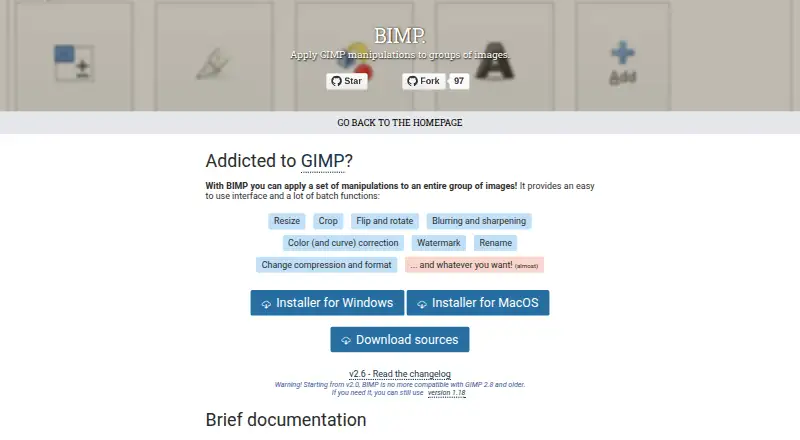
BIMP is a free, open-source GIMP plugin for applying image manipulations to groups of files. It suits photographers, designers, and other GIMP users who need repeatable edits across multiple images without moving to a separate batch-processing application. Its graphical workflow covers practical tasks including resizing, cropping, rotating, flipping, blurring, sharpening, color and curve correction, watermarking, renaming, compression, and format conversion.
The main strength is its fit within the GIMP ecosystem. BIMP operates inside GIMP and is available across Windows, macOS, and Linux. Windows and macOS users receive installers, while Linux users can compile and install the plugin from source. The published compatibility note states that BIMP 2.0 and newer do not work with GIMP 2.8 or older, so the GIMP version is an important part of setup. There is no paid tier or plan structure: BIMP is distributed as free, open-source software.
Its feature breadth is practical rather than expansive. Users can combine common corrections and file operations in a graphical batch workflow, including bulk renaming and compression or format conversion. However, the category specification identifies batch automation as manual, which makes BIMP a better fit for user-directed processing than unattended pipelines. It also has no AI features. Choose BIMP if you already work in GIMP and want a free way to process groups of images with familiar editing operations. Choose another tool if you need automation beyond a manual workflow or prefer batch processing that does not depend on GIMP.
Your product? Our editors can test BIMP in depth and publish a review, labelled as paid · from $149/mo →
BIMP pricing
BIMP fact sheet
| Free plan | Yes |
|---|---|
| Paid from | Free |
| RAW processing | Not verified |
| Bulk renaming | Yes |
| Bulk resizing | Yes |
| Output formats | Not verified |
| Supported platforms | windows, macos, linux |
| Watched folders | Not verified |
| Batch automation level | Manual |
| Deployment | Desktop |
| Platforms | Windows, macOS, Linux |
| Support | Community, Docs |
| Built for | Solo, Small business (editorial estimate) |
| Integrations | 1 integrations: GIMP |
| Pricing | Free plan |
| Website | alessandrofrancesconi.it |
| Facts checked | 22 Sep 2026 |
BIMP integrations
BIMP lists 1 integrations on its own site.
- GIMP
Alternatives to BIMP
- XnConvertA low-cost desktop tool for automated, multi-format batch image processing.9.4
- ImageMagickA capable command-line toolkit for developers building automated image pipelines.9.2
- BatchPhotoA capable desktop batch processor for high-volume conversion and repeatable image workflows.9.0


Used BIMP? Be the first to review it
The editor score above is our own research. What this page doesn't have yet is a reader's view — what you used BIMP for, what worked and what didn't. No stars are seeded and no review is paid for; an editor reads every one before it appears.
Write a reviewTwo minutes · verified accounts only · read by an editor before it appears
Featured on iTechGuides

BIMP is listed in our Batch Photo Processing Software directory. Add the badge to your site — it links back to this page.
<a href="https://www.itechguides.com/products/bimp/"><img src="https://www.itechguides.com/best/badge/bimp.svg" alt="Featured on iTechGuides" width="230" height="46"></a>
Reviewed by iTechGuides Editors · Editorial team · Updated Oct 2026
Advertiser disclosure: iTechGuides is reader-supported. Vendors can pay for top positions in our rankings and for a place on other products' pages, and we may earn a commission when you click some links. Bought places stand at the number bought; this page and our disclosure say so. Paying vendors may get a fuller, more detailed review from our editors, and that review can change their score. How we rank.
Last updated · How we research and update