
Awave Studio
Awave Studio: A focused Windows tool for broad format conversion and sampler-oriented audio work. Ranked #108 of 128 in Audio Editing Software by our editors (3.0/10); pricing: 30-day trial; best for windows audio-format conversion specialists.
At a glance
- Editor score3.0 / 10
- Pricing30-day trial
- Best forWindows audio-format conversion specialists
- Free planNo
- Paid from$99 one-time
- Third-party pluginsYes
- Facts checked20 Sep 2026
Where it wins
- Converts more than 400 input formats to more than 260 output formats
- Batch conversion supports optional effects processing
- Edits supported sampler, synthesizer, SF2, and SFZ formats
Where it doesn't
- Windows-only desktop software
- No multitrack editing or MIDI sequencing
- Costs $99 after the 30-day trial
Our verdict on Awave Studio
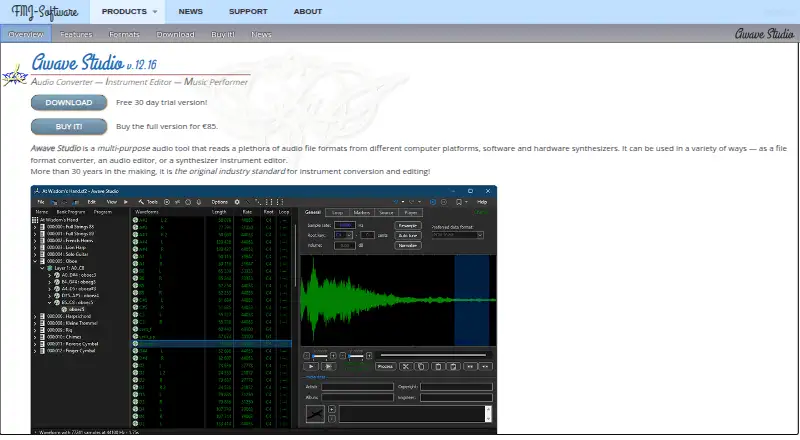
Awave Studio is a Windows desktop audio tool for converting audio and synthesizer file formats, editing audio and instruments, rendering MIDI songs through a built-in software synthesizer, and recording or sampling MIDI and VSTi instruments. It is aimed at musicians, sound designers, and audio professionals who work across varied sampler, synthesizer, and legacy audio formats. Its focus is specialist file handling rather than a general-purpose multitrack production environment.
Format support is the central strength. Awave Studio converts between more than 400 audio-related input formats and more than 260 output formats, while batch conversion can apply optional effects processing. Audio editing includes resampling, fading, merging, splitting, normalization, and effects. The software also supports SF2 and a large subset of SFZ v2, plus reading and writing sampler and synthesizer disk formats through supported hardware interfaces. MIDI songs can be rendered to audio clips with the built-in software synthesizer, and the application can record or automatically sample MIDI and VSTi instruments.
The published plan is straightforward: the Full version costs $99 as a one-time purchase and includes a single-user license, at least two years of free major-version upgrades, and no constant online connection requirement. A 30-day trial is available, but there is no free plan. Awave Studio is a strong fit when format conversion, batch processing, instrument-format editing, or sampling is the priority. Choose another category of tool if you need multitrack editing, MIDI sequencing, cloud collaboration, or a broader production workflow; the published specifications identify Awave Studio as a focused Windows utility rather than an all-purpose audio workstation.
Your product? Our editors can test Awave Studio in depth and publish a review, labelled as paid · from $149/mo →
Awave Studio pricing
All 1 Awave Studio plans and prices →
Awave Studio fact sheet
| Free plan | No |
|---|---|
| Paid from | $99 one-time |
| Supported platforms | Windows |
| Multitrack editing | No |
| MIDI sequencing | No |
| Third-party plugins | Yes |
| Noise reduction | Not verified |
| Video synchronization | Not verified |
| Cloud collaboration | No |
| Free trial | 30 days |
| Deployment | Desktop |
| Platforms | Windows |
| Built for | Solo, Small business (editorial estimate) |
| Pricing | 30-day trial (source) |
| Website | fmjsoft.com |
| Facts checked | 20 Sep 2026 |
Alternatives to Awave Studio
- Pro ToolsA broad workstation for studios spanning music production, audio post, and immersive mixing.9.4
- REAPERA flexible desktop DAW with broad audio and MIDI tools and a one-time license from $60.9.3
- Logic ProA broad audio and MIDI workstation for Apple-based producers and video composers.9.2


See all Awave Studio alternatives →
Used Awave Studio? Be the first to review it
The editor score above is our own research. What this page doesn't have yet is a reader's view — what you used Awave Studio for, what worked and what didn't. No stars are seeded and no review is paid for; an editor reads every one before it appears.
Write a reviewTwo minutes · verified accounts only · read by an editor before it appears
Featured on iTechGuides

Awave Studio is listed in our Audio Editing Software directory. Add the badge to your site — it links back to this page.
<a href="https://www.itechguides.com/products/awave-studio/"><img src="https://www.itechguides.com/best/badge/awave-studio.svg" alt="Featured on iTechGuides" width="230" height="46"></a>
Reviewed by iTechGuides Editors · Editorial team · Updated Oct 2026
Advertiser disclosure: iTechGuides is reader-supported. Vendors can pay for top positions in our rankings and for a place on other products' pages, and we may earn a commission when you click some links. Bought places stand at the number bought; this page and our disclosure say so. Paying vendors may get a fuller, more detailed review from our editors, and that review can change their score. How we rank.
Last updated · How we research and update