
AutoQ3D CAD
AutoQ3D CAD: A low-cost cross-device CAD editor for straightforward modeling and drafting. Ranked #133 of 147 in 3D Modeling Software by our editors (3.0/10); pricing: Paid; best for simple low-cost cross-device CAD modeling.
At a glance
- Editor score3.0 / 10
- PricingPaid
- Best forSimple low-cost cross-device CAD modeling
- Free planNo
- Paid from$29.99 one-time
- Platform accessDesktop
- Facts checked22 Sep 2026
Where it wins
- One-time $29.99 price across four platform options
- Works offline on Windows, macOS, iOS, and Android
- Includes drawing, editing, snapping, grouping, and measurement tools
Where it doesn't
- No free plan is offered
- Advanced rendering and printing are not central capabilities
- Modeling depth may not suit complex professional workflows
Our verdict on AutoQ3D CAD
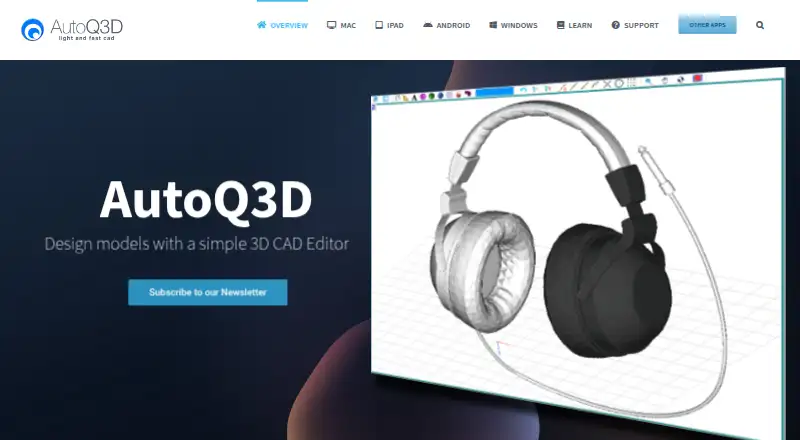
AutoQ3D CAD is a lightweight 2D and 3D CAD editor for professionals, architects, engineers, designers, students, and general users who want a straightforward modeling tool across desktop and mobile devices. It supports model creation, editing, viewing, sharing, and organization, with tools for lines, spheres, boxes, snapping, grouping, scaling, rotating, mirroring, arrays, and measurement. Offline use also suits work that does not depend on a continuous internet connection.
Pricing is simple: each platform option costs $29.99 as a one-time purchase. The Windows and Mac plans provide a 2D and 3D CAD editor, while the Mac plan is a native macOS application. The iPad and iPhone option provides a 2D and 3D CAD editor for iOS, and the Android option provides the equivalent editor for Android. There are no recurring fees, making the product easier to budget for than subscription-based CAD software. Cloud-storage integrations with iCloud, Google Drive, and Dropbox add practical options for saving and sharing files across supported devices.
The feature set is focused on core CAD tasks rather than a broad production pipeline. Preset orthogonal and isometric views, measurement tools for distance, area, and angles, export and save-as support, and common transformation operations cover basic drafting and model manipulation. Users who need simple cross-device access, offline work, and a low upfront cost should consider AutoQ3D CAD. Those choosing software for advanced rendering, demanding printing workflows, or deeper verified modeling capabilities should look for a more specialized alternative.
Your product? Our editors can test AutoQ3D CAD in depth and publish a review, labelled as paid · from $149/mo →
AutoQ3D CAD pricing
All 4 AutoQ3D CAD plans and prices →
AutoQ3D CAD fact sheet
| Free plan | No |
|---|---|
| Paid from | $29.99 one-time |
| Platform access | Desktop |
| Sculpting tools | Not verified |
| Animation tools | Not verified |
| Parametric modeling | Not verified |
| Render engine | Not verified |
| 3D print export | Not verified |
| Deployment | Desktop, Mobile |
| Platforms | Windows, macOS, iOS, Android |
| Support | Tickets, Community, Docs |
| Built for | Solo, Small business (editorial estimate) |
| Integrations | 3 integrations: iCloud, Google Drive, Dropbox |
| Pricing | Paid (source) |
| Website | autoq3d.com |
| Facts checked | 22 Sep 2026 |
AutoQ3D CAD integrations
AutoQ3D CAD lists 3 integrations on its own site.
- iCloud
- Google Drive
- Dropbox
Alternatives to AutoQ3D CAD
- BlenderA broad free 3D suite covering modeling, animation, rendering, scripting, and print export.9.3
- HoudiniA deep procedural 3D suite for VFX, animation, games, and technical art.9.1
- Autodesk MayaA mature desktop suite for studios handling modeling, animation, VFX, and rendering.9.0



See all AutoQ3D CAD alternatives →
Also Ranked In
AutoQ3D CAD is ranked in 2 of our directories.
Used AutoQ3D CAD? Be the first to review it
The editor score above is our own research. What this page doesn't have yet is a reader's view — what you used AutoQ3D CAD for, what worked and what didn't. No stars are seeded and no review is paid for; an editor reads every one before it appears.
Write a reviewTwo minutes · verified accounts only · read by an editor before it appears
Featured on iTechGuides

AutoQ3D CAD is listed in our 3D Modeling Software directory. Add the badge to your site — it links back to this page.
<a href="https://www.itechguides.com/products/autoq3d-cad/"><img src="https://www.itechguides.com/best/badge/autoq3d-cad.svg" alt="Featured on iTechGuides" width="230" height="46"></a>
Reviewed by iTechGuides Editors · Editorial team · Updated Oct 2026
Advertiser disclosure: iTechGuides is reader-supported. Vendors can pay for top positions in our rankings and for a place on other products' pages, and we may earn a commission when you click some links. Bought places stand at the number bought; this page and our disclosure say so. Paying vendors may get a fuller, more detailed review from our editors, and that review can change their score. How we rank.
Last updated · How we research and update