
Artlandia SymmetryWorks
Artlandia SymmetryWorks: A mature Illustrator plug-in with unusually broad repeat and symmetry controls. Ranked #6 of 24 in Pattern Design Software by our editors (6.6/10); pricing: Paid; best for illustrator-based professional pattern designers.
At a glance
- Editor score6.6 / 10
- PricingPaid
- Best forIllustrator-based professional pattern designers
- Free planNo
- Paid from$124.50 one-time
- Seamless repeatYes
- Founded1995 · Champaign, Illinois, United States
- Facts checked20 Sep 2026
Where it wins
- 17 symmetry controls and many built-in repeat types
- Live editing keeps motif elements linked during revisions
- Exports pattern swatches directly to Adobe Illustrator
Where it doesn't
- No free plan; the demo is limited trial mode
- Requires Adobe Illustrator on Windows or macOS
- Student version includes restrictions
Our verdict on Artlandia SymmetryWorks
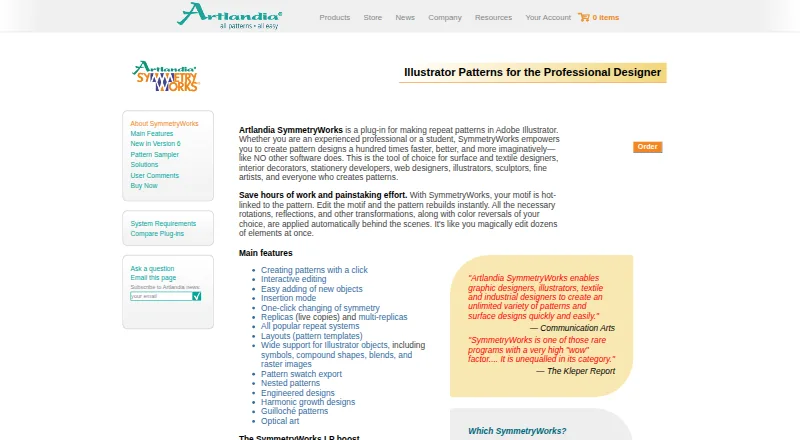
Artlandia SymmetryWorks is a desktop plug-in for Adobe Illustrator that turns vector artwork and raster images into editable repeat patterns. It is suited to surface, textile, quilt, wallpaper, stationery, web, and related pattern-design work, with support for freelance designers, students, professional creatives, and larger organizations using site licenses. Illustrator users who want repeat construction inside an established drawing environment will find the product’s scope particularly relevant.
Its strongest area is repeat and symmetry control. SymmetryWorks provides 17 symmetry controls, one-click symmetry changes, replicas and multi-replicas, and built-in drop, brick, spot, step, composite, all-over, tossed, gradation, optical, rotational, spiral, mosaic, check, and kaleidoscope repeats. Live interactive editing keeps pattern construction linked to motif elements, while color reversals, counterchange patterns, nested patterns, and engineered designs extend the workflow beyond simple tiling. It can work with Illustrator paths, masks, symbols, blends, gradients, meshes, type, and raster images, giving designers broad control over source artwork and pattern structure.
Pricing is paid and one-time. The SymmetryWorks 6.5 Student Version costs $124.50 and is download-only with restrictions. The Full Version costs $249 for download or $275 for a shipped copy, with both full versions supporting Macintosh or Windows. There is no free plan, although the demo operates in a limited trial mode. The product’s 1995 founding year and Windows/macOS support indicate a long-running desktop focus, while Adobe Illustrator and Artlandia LivePresets define its ecosystem fit. Choose SymmetryWorks for deep repeat construction and Illustrator export; choose another option if you need a standalone tool, a free plan, or AI features.
Your product? Our editors can test Artlandia SymmetryWorks in depth and publish a review, labelled as paid · from $149/mo →
Artlandia SymmetryWorks pricing
All 3 Artlandia SymmetryWorks plans and prices →
Artlandia SymmetryWorks fact sheet
| Free plan | No |
|---|---|
| Paid from | $124.50 one-time |
| Seamless repeat | Yes |
| Colorway tools | Yes |
| Vector editing | Yes |
| Repeat types | Simple shift, drop, brick, half-drop, quarter-drop, spot/sateen, step/sliding, composite, all-over, tossed, gradation, optical, rotational, spiral, mosaic, check, and kaleidoscope |
| Supported platforms | Windows and macOS desktop plug-in for Adobe Illustrator |
| Export formats | Adobe Illustrator swatch, JPEG, TIFF, PNG, and GIF |
| Deployment | Desktop |
| Platforms | Windows, macOS |
| Support | Docs |
| Built for | Solo, Small business, Mid-market, Enterprise (editorial estimate) |
| Integrations | 2 integrations: Adobe Illustrator, Artlandia LivePresets |
| Pricing | Paid (source) |
| Website | artlandia.com |
| Facts checked | 20 Sep 2026 |
Artlandia SymmetryWorks integrations
Artlandia SymmetryWorks lists 2 integrations on its own site.
- Adobe Illustrator
- Artlandia LivePresets
Alternatives to Artlandia SymmetryWorks
- KXStitchA free Linux desktop app for creating, editing, and printing cross-stitch patterns.7.9
- MediaChance Pattern StudioA focused editor for tileable textures, layered artwork, and material maps.7.9
- AVA CAD/CAMA deep Mac-only toolkit for textile design, colour management and print production.6.9

See all Artlandia SymmetryWorks alternatives →
Artlandia SymmetryWorks vs the competition
- Artlandia SymmetryWorks vs KXStitch
- Artlandia SymmetryWorks vs MediaChance Pattern Studio
- Artlandia SymmetryWorks vs AVA CAD/CAM
- Artlandia SymmetryWorks vs NedGraphics Design & Repeat
- Artlandia SymmetryWorks vs TUKAstudio
- Artlandia SymmetryWorks vs ArahWeave



Compare Artlandia SymmetryWorks with any tool side by side →
Used Artlandia SymmetryWorks? Be the first to review it
The editor score above is our own research. What this page doesn't have yet is a reader's view — what you used Artlandia SymmetryWorks for, what worked and what didn't. No stars are seeded and no review is paid for; an editor reads every one before it appears.
Write a reviewTwo minutes · verified accounts only · read by an editor before it appears
Featured on iTechGuides

Artlandia SymmetryWorks is listed in our Pattern Design Software directory. Add the badge to your site — it links back to this page.
<a href="https://www.itechguides.com/products/artlandia-symmetryworks/"><img src="https://www.itechguides.com/best/badge/artlandia-symmetryworks.svg" alt="Featured on iTechGuides" width="230" height="46"></a>
Reviewed by iTechGuides Editors · Editorial team · Updated Oct 2026
Advertiser disclosure: iTechGuides is reader-supported. Vendors can pay for top positions in our rankings and for a place on other products' pages, and we may earn a commission when you click some links. Bought places stand at the number bought; this page and our disclosure say so. Paying vendors may get a fuller, more detailed review from our editors, and that review can change their score. How we rank.
Last updated · How we research and update