
Artivive Bridge
Artivive Bridge: A focused browser editor for turning images and print into interactive AR experiences. Ranked #14 of 25 in AR Creation Software by our editors (7.6/10); pricing: Free plan; best for image-triggered AR campaigns.
At a glance
- Editor score7.6 / 10
- PricingFree plan
- Best forImage-triggered AR campaigns
- Free planYes
- Paid from€11.66/mo
- Visual editorYes
- Founded2017 · Vienna, Austria
- Facts checked22 Sep 2026
Where it wins
- Builds scenes with image, video, audio, and 3D layers
- Includes animation timelines, interactive sequences, and templates
- Publishes experiences through QR codes, URLs, or the Artivive app
Where it doesn't
- Basic limits usage to 50 lifetime views
- WebAR and statistics start with the Pro Plus plan
- Higher tiers are needed for larger memory limits and commercial licensing
Our verdict on Artivive Bridge
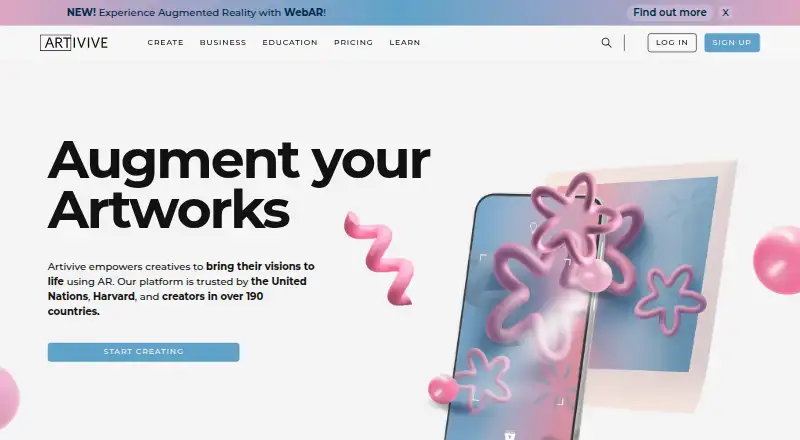
Artivive Bridge is a browser-based, no-code AR editor for artists, museums, galleries, educators, and businesses. Its workflow starts with an uploaded trigger image, then adds digital layers such as images, video, audio, or 3D objects. Users can arrange scenes in 2D or 3D, apply transforms, preview results, and publish experiences for viewing through the Artivive mobile app or WebAR. It is particularly suited to image-triggered campaigns built around physical artworks, printed materials, exhibitions, or educational projects.
The standout feature is the layer-based creation workflow. Bridge combines an elements library, AR layer templates, move, rotate, and scale controls, a no-code animation timeline, interactive sequences, spatial audio, and particle effects. Preview mode and AR testing support the move from a concept to a published experience without requiring code. WebAR publishing through QR codes or URLs broadens access beyond the separate iOS and Android scanning app, while the web-based editor keeps creation centered in the browser.
Pricing ranges from a free Basic plan to paid tiers with higher view limits and memory allowances. Basic includes unlimited artworks, 50 lifetime views, and a 1 MB memory limit. Pro costs €11.66 per month or €139.90 per year and includes 1,000 monthly views, a 3 MB memory limit, and support. Pro Plus costs €33.33 monthly or €399.90 yearly, adding 5,000 monthly views, a 5 MB limit, WebAR, Timeline, and statistics. Business adds 15,000 monthly views, multi-language artworks, insights, a commercial licence, and priority support. Enterprise adds fair-use unlimited views, a 10 MB limit, white-label branded WebAR, and removal of Artivive branding. Bridge fits teams creating visual AR content; alternatives may suit projects that need broader platforms or different publishing requirements.
Questions about Artivive Bridge
Does Artivive Bridge have a free plan? Yes: the Basic plan is free; paid plans start at €11.66/mo (Pro).
How much does Artivive Bridge cost? Artivive Bridge lists 4 paid plans; the lowest is Pro at €11.66/mo.
What does Artivive Bridge run on? Web, iOS and Android. It runs in the cloud and as a mobile app.
Who is Artivive Bridge built for? Solo users, small businesses, mid-market companies and enterprises (our editorial estimate).
Your product? Our editors can test Artivive Bridge in depth and publish a review, labelled as paid · from $149/mo →
Artivive Bridge pricing
All 5 Artivive Bridge plans and prices →
Artivive Bridge fact sheet
| Free plan | Yes |
|---|---|
| Paid from | €11.66/mo |
| Visual editor | Yes |
| Face tracking | Not verified |
| Image tracking | Yes |
| World tracking | Not verified |
| Publishing channels | Not verified |
| Project limit | Not verified |
| Deployment | Cloud, Mobile |
| Platforms | Web, iOS, Android |
| Support | Email, Phone, Docs |
| Built for | Solo, Small business, Mid-market, Enterprise (editorial estimate) |
| Pricing | Free plan (source) |
| Website | artivive.com |
| Facts checked | 22 Sep 2026 |
Alternatives to Artivive Bridge
- Lens StudioA broad, free AR toolkit for creators targeting Snapchat, web, mobile, and wearable experiences.9.4
- KivicubeA broad no-code WebAR toolkit with strong tracking, publishing, and AI features.9.2
- MyWebARA broad no-code WebAR toolkit with tracking, analytics, AI tools, and advanced tiers.9.0



See all Artivive Bridge alternatives →
Used Artivive Bridge? Be the first to review it
The editor score above is our own research. What this page doesn't have yet is a reader's view — what you used Artivive Bridge for, what worked and what didn't. No stars are seeded and no review is paid for; an editor reads every one before it appears.
Write a reviewTwo minutes · verified accounts only · read by an editor before it appears
Featured on iTechGuides

Artivive Bridge is listed in our AR Creation Software directory. Add the badge to your site — it links back to this page.
<a href="https://www.itechguides.com/products/artivive-bridge/"><img src="https://www.itechguides.com/best/badge/artivive-bridge.svg" alt="Featured on iTechGuides" width="230" height="46"></a>
Reviewed by iTechGuides Editors · Editorial team · Updated Nov 2026
Advertiser disclosure: iTechGuides is reader-supported. Vendors can pay for top positions in our rankings and for a place on other products' pages, and we may earn a commission when you click some links. Bought places stand at the number bought; this page and our disclosure say so. Paying vendors may get a fuller, more detailed review from our editors, and that review can change their score. How we rank.
Last updated · How we research and update