
Arnold
Arnold: A mature renderer for production artists who need deep CPU and GPU capabilities. Ranked #2 of 46 in 3D Rendering Software by our editors (9.2/10); pricing: 30-day trial; best for production studios needing mature rendering tools.
At a glance
- Editor score9.2 / 10
- Pricing30-day trial
- Best forProduction studios needing mature rendering tools
- Free planNo
- GPU renderingYes
- Founded1982 · San Francisco, California
- Facts checked20 Sep 2026
Where it wins
- CPU and GPU rendering with interactive previews and denoising
- Supports volumes, hair and fur, motion blur, USD and OSL
- Integrates with Maya, 3ds Max, Houdini, Cinema 4D and Katana
Where it doesn't
- No free plan is available
- Every listed plan is a single-user subscription
- Advanced production features may exceed simpler visualization needs
Our verdict on Arnold
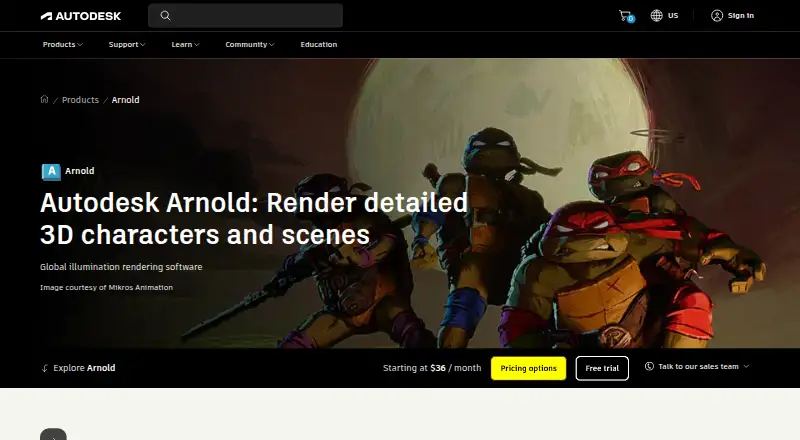
Arnold is a Monte Carlo ray-tracing renderer from Autodesk for realistic 3D characters, designs and complex scenes. It is aimed at film, television, games, design visualization and production artists, including modelers, animators, lighting artists and FX artists. Support for Windows, macOS and Linux gives studios flexibility across common production environments, while CPU and GPU rendering address different rendering workflows.
Its standout strength is rendering depth. Arnold combines physically based shading with subsurface scattering, volumetric rendering, hair and fur rendering, motion blur, interactive rendering and previews, and integrated denoising. Open Shading Language and USD support extend its fit for structured production pipelines. The command-line renderer and C/Python API also support technical workflows beyond an application's standard interface. Integrations with Maya, 3ds Max, Houdini, Cinema 4D and Katana make Arnold relevant to teams already working across these digital content creation applications. Cloud rendering is part of its category specification, with Flow Render documented as a cloud-rendering tech preview.
The published plans are Arnold Annual, Arnold Monthly and Arnold 3-year, each described as a single-user subscription. Autodesk offers a 30-day free trial, while the product is otherwise positioned as paid software without a free plan. That model suits production studios and individual artists who need Arnold's rendering features and application integrations over a defined subscription term. Smaller teams seeking a simpler renderer, a free plan or a workflow centered on basic visualization should look elsewhere. Arnold is the stronger fit when volumes, hair, USD, scripting, denoising and CPU/GPU rendering are central requirements rather than occasional extras.
Your product? Our editors can test Arnold in depth and publish a review, labelled as paid · from $149/mo →
Arnold pricing
All 3 Arnold plans and prices →
Arnold fact sheet
| Free plan | No |
|---|---|
| Paid from | Not verified |
| Rendering mode | Path_tracing |
| GPU rendering | Yes |
| Cloud rendering | Yes |
| Animation rendering | Yes |
| Denoising | Yes |
| Supported platforms | Windows, macOS, Linux |
| Free trial | 30 days |
| Deployment | Cloud, Desktop |
| Platforms | Windows, macOS, Linux |
| Support | Tickets, Docs · 24/7 |
| Built for | Solo, Small business, Mid-market, Enterprise (editorial estimate) |
| Integrations | 5 integrations: Maya, 3ds Max, Houdini, Cinema 4D, Katana |
| Pricing | 30-day trial (source) |
| Website | autodesk.com |
| Facts checked | 20 Sep 2026 |
Arnold integrations
Arnold lists 5 integrations on its own site.
- Maya
- 3ds Max
- Houdini
- Cinema 4D
- Katana
Alternatives to Arnold
- RenderManA production-focused renderer with deep shading, compositing, and render-management tools.9.3
- RedshiftA GPU-focused renderer for production-quality images, animation, VFX, and design workflows.9.1
- AMD Radeon ProRenderA free CPU/GPU renderer with broad DCC integrations and animation support.9.0


Arnold vs the competition
- Arnold vs RenderMan
- Arnold vs Redshift
- Arnold vs AMD Radeon ProRender
- Arnold vs NVIDIA Iray
- Arnold vs Autodesk VRED
- Arnold vs Enscape

Compare Arnold with any tool side by side →
Also Ranked In
Arnold is ranked in 2 of our directories.
Used Arnold? Be the first to review it
The editor score above is our own research. What this page doesn't have yet is a reader's view — what you used Arnold for, what worked and what didn't. No stars are seeded and no review is paid for; an editor reads every one before it appears.
Write a reviewTwo minutes · verified accounts only · read by an editor before it appears
Featured on iTechGuides

Arnold is listed in our 3D Rendering Software directory. Add the badge to your site — it links back to this page.
<a href="https://www.itechguides.com/products/arnold/"><img src="https://www.itechguides.com/best/badge/arnold.svg" alt="Featured on iTechGuides" width="230" height="46"></a>
Reviewed by iTechGuides Editors · Editorial team · Updated Oct 2026
Advertiser disclosure: iTechGuides is reader-supported. Vendors can pay for top positions in our rankings and for a place on other products' pages, and we may earn a commission when you click some links. Bought places stand at the number bought; this page and our disclosure say so. Paying vendors may get a fuller, more detailed review from our editors, and that review can change their score. How we rank.
Last updated · How we research and update