
ArmorPaint
ArmorPaint: A broad, low-cost 3D texturing tool with desktop, mobile, and neural texture workflows. Ranked #4 of 29 in 3D Texturing Software by our editors (8.9/10); pricing: Paid; best for budget-conscious artists needing broad platform coverage.
At a glance
- Editor score8.9 / 10
- PricingPaid
- Best forBudget-conscious artists needing broad platform coverage
- Free planNo
- Paid from$19 one-time
- 3D texture paintingYes
- Facts checked20 Sep 2026
Where it wins
- Direct painting, procedural materials, and node-based authoring
- GPU and ray-traced baking with PBR texture export
- Windows, Linux, macOS, iOS, and Android coverage
Where it doesn't
- No free plan is available
- iOS and Android builds are experimental or early access
- Live-link plugins cover Blender, Unreal Engine, and Unity
Our verdict on ArmorPaint
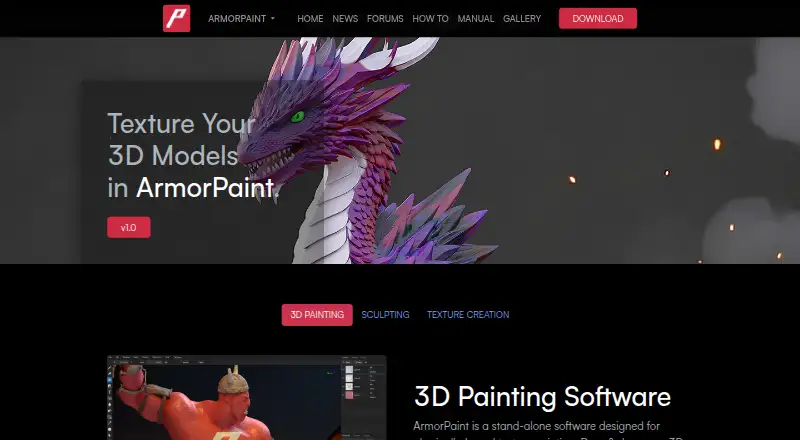
ArmorPaint is a standalone 3D texture-painting application for artists and technical users creating physically based materials on imported 3D models. Its core workflow combines direct painting with layers, masks, decals, fills, and filters, while procedural materials, brushes, and node-based authoring support more controlled material construction. The platform scope is unusually broad: desktop builds cover Windows, Linux, and macOS with Apple silicon, while mobile builds are available for iOS and Android. It suits creators who want a focused texturing application rather than a broader 3D production suite.
Pricing is straightforward for desktop use. The Desktop plan costs $19 USD as a one-time license and includes Windows, Linux, and Apple-silicon macOS builds, with all updates included for free. There is no free plan. The iOS plan supports iPhone and iPad, PBR texture painting, and texture-map baking on supported iPads. Android is also supported as an experimental or early-access platform. This structure makes ArmorPaint particularly appealing to budget-conscious artists who need several operating-system options, although mobile users should expect a less established experience than desktop users.
Its strongest technical range covers GPU-accelerated and ray-traced texture baking, PBR export, path-traced viewport rendering, and local neural texture creation, editing, and upscaling. Live-link plugins connect it with Blender, Unreal Engine, and Unity, giving it a practical place in workflows built around those tools. The project is open source, and its feature set reaches from hand-painted assets to procedural and node-authored materials. Choose ArmorPaint for broad platform coverage, low desktop cost, and varied texturing methods. Consider an alternative if you require a free plan, mature mobile builds, or integrations beyond its listed live-link plugins.
Your product? Our editors can test ArmorPaint in depth and publish a review, labelled as paid · from $149/mo →
ArmorPaint pricing
All 2 ArmorPaint plans and prices →
ArmorPaint fact sheet
| Free plan | No |
|---|---|
| Paid from | $19 one-time |
| 3D texture painting | Yes |
| Procedural materials | Yes |
| Texture baking | Yes |
| PBR workflow | Yes |
| Node-based authoring | Yes |
| Maximum texture resolution | Not verified |
| Supported platforms | Windows, Linux, macOS, iOS, Android |
| Deployment | Desktop, Mobile |
| Platforms | Windows, macOS, Linux, iOS, Android |
| Built for | Solo, Small business (editorial estimate) |
| Integrations | 3 integrations: Blender, Unreal Engine, Unity |
| Pricing | Paid (source) |
| Website | armorpaint.org |
| Facts checked | 20 Sep 2026 |
ArmorPaint integrations
ArmorPaint lists 3 integrations on its own site.
- Blender
- Unreal Engine
- Unity
Alternatives to ArmorPaint
- InstaMATA cross-platform toolkit for procedural materials, texture painting, baking, and pipeline automation.9.4
- Mixos PaintA broad, cross-platform PBR texturing workspace with a capable free tier and paid 4K export.9.2
- MariA deep texturing tool for VFX teams that need UDIM scale and procedural control.9.1



See all ArmorPaint alternatives →
ArmorPaint vs the competition
- ArmorPaint vs InstaMAT
- ArmorPaint vs Mixos Paint
- ArmorPaint vs Mari
- ArmorPaint vs Texel
- ArmorPaint vs Wafer
- ArmorPaint vs Material Maker



Compare ArmorPaint with any tool side by side →
Also Ranked In
ArmorPaint is ranked in 2 of our directories.
Used ArmorPaint? Be the first to review it
The editor score above is our own research. What this page doesn't have yet is a reader's view — what you used ArmorPaint for, what worked and what didn't. No stars are seeded and no review is paid for; an editor reads every one before it appears.
Write a reviewTwo minutes · verified accounts only · read by an editor before it appears
Featured on iTechGuides

ArmorPaint is listed in our 3D Texturing Software directory. Add the badge to your site — it links back to this page.
<a href="https://www.itechguides.com/products/armorpaint/"><img src="https://www.itechguides.com/best/badge/armorpaint.svg" alt="Featured on iTechGuides" width="230" height="46"></a>
Reviewed by iTechGuides Editors · Editorial team · Updated Oct 2026
Advertiser disclosure: iTechGuides is reader-supported. Vendors can pay for top positions in our rankings and for a place on other products' pages, and we may earn a commission when you click some links. Bought places stand at the number bought; this page and our disclosure say so. Paying vendors may get a fuller, more detailed review from our editors, and that review can change their score. How we rank.
Last updated · How we research and update