
Annotate-Lab
Annotate-Lab: A focused, free self-hosted annotator with useful exports but no collaboration layer. Ranked #26 of 28 in Image Annotation Software by our editors (6.4/10); pricing: Free plan; best for developers wanting a minimal self-hosted tool.
At a glance
- Editor score6.4 / 10
- PricingFree plan
- Best forDevelopers wanting a minimal self-hosted tool
- Free planYes
- Paid fromFree
- Model-assisted labelingYes
- Facts checked24 Sep 2026
Where it wins
- Configurable polygon and bounding-box region annotation tools
- History, revert, masks, settings and YOLO exports support dataset workflows
- Optional Segment Anything Model can assist bounding-box selection
Where it doesn't
- Self-hosted deployment requires local installation and configuration
- No collaboration features for team annotation workflows
- No API access limits automated integrations
Our verdict on Annotate-Lab
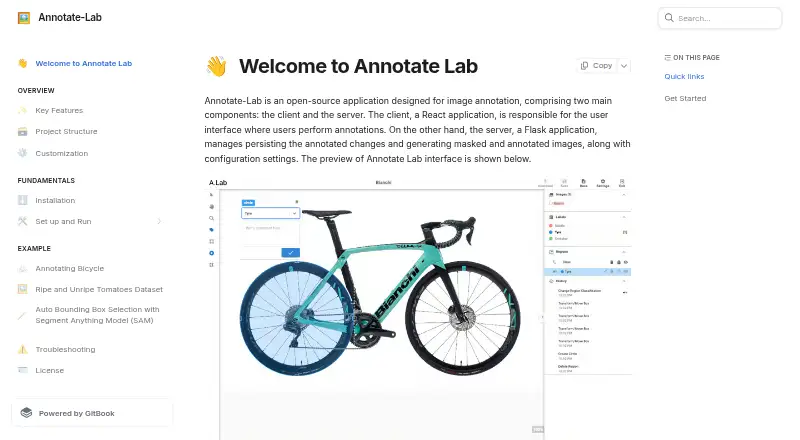
Annotate-Lab is an open-source image annotation application for developers and small teams that want a minimal, self-hosted workspace. Its React client and Flask server run locally, with annotation performed in a browser. Users configure images, labels and region tools, then create labeled datasets using polygon, bounding-box and other configured regions. The product fits solo practitioners and small groups that prefer control over deployment and project files rather than a hosted service.
Its annotation workflow covers practical dataset management. Regions can be locked, deleted or hidden, while annotation history supports reviewing actions and reverting changes. Progress can be saved during a session, and completed work can be downloaded as annotated images, masks and annotation settings. YOLO-format output is also described, giving computer-vision workflows a direct export option. When enabled in configuration, optional Segment Anything Model support provides automatic bounding-box selection to assist labeling.
Setup is centered on repository installation and local execution, including Docker, so teams must manage their own deployment. The published positioning describes self-hosted use without collaboration or API access, which keeps the scope narrow for individual annotators and small projects. Choose Annotate-Lab when configurable regions, history, local control and straightforward exports matter more than shared workspaces or programmatic connectivity. Teams coordinating annotation across users, or integrating labeling into a broader service through an API, should choose a product designed around those requirements.
Your product? Our editors can test Annotate-Lab in depth and publish a review, labelled as paid · from $149/mo →
Annotate-Lab pricing
Annotate-Lab fact sheet
| Free plan | Yes |
|---|---|
| Paid from | Free |
| Annotation types | Configured region annotations, including polygon and bounding-box regions; circle tool shown in example |
| Image formats | Not verified |
| Model-assisted labeling | Yes |
| Dataset export | Annotated image, mask, annotation settings; YOLO format |
| Team collaboration | No |
| API access | Not verified |
| Deployment | Self-hosted |
| Platforms | Web |
| Built for | Solo, Small business (editorial estimate) |
| Pricing | Free plan |
| Website | annotate-docs.dwaste.live |
| Facts checked | 24 Sep 2026 |
Alternatives to Annotate-Lab
- PixanoA flexible open-source choice for teams annotating 2D and 3D vision datasets.9.0
- CVATA broad CV workflow spanning manual, AI-assisted, collaborative, and programmatic annotation.8.9
- Label StudioFlexible image annotation with open-source deployment, AI assistance, and broad exports.8.8


See all Annotate-Lab alternatives →
Used Annotate-Lab? Be the first to review it
The editor score above is our own research. What this page doesn't have yet is a reader's view — what you used Annotate-Lab for, what worked and what didn't. No stars are seeded and no review is paid for; an editor reads every one before it appears.
Write a reviewTwo minutes · verified accounts only · read by an editor before it appears
Featured on iTechGuides

Annotate-Lab is listed in our Image Annotation Software directory. Add the badge to your site — it links back to this page.
<a href="https://www.itechguides.com/products/annotate-lab/"><img src="https://www.itechguides.com/best/badge/annotate-lab.svg" alt="Featured on iTechGuides" width="230" height="46"></a>
Reviewed by iTechGuides Editors · Editorial team · Updated Oct 2026
Advertiser disclosure: iTechGuides is reader-supported. Vendors can pay for top positions in our rankings and for a place on other products' pages, and we may earn a commission when you click some links. Bought places stand at the number bought; this page and our disclosure say so. Paying vendors may get a fuller, more detailed review from our editors, and that review can change their score. How we rank.
Last updated · How we research and update