
Anchorsmith
Anchorsmith: A focused browser vector editor with strong constraints, tracing, and SVG workflows. Ranked #17 of 51 in Vector Graphics Software by our editors (6.8/10); pricing: Free plan; best for constraint-based browser vector design.
At a glance
- Editor score6.8 / 10
- PricingFree plan
- Best forConstraint-based browser vector design
- Free planYes
- Paid from$12/mo
- SVG exportYes
- Facts checked20 Sep 2026
Where it wins
- CAD constraints and driving dimensions support precise vector work
- Free plan includes full editing and watermark-free SVG export
- AI-agent action API adds programmatic control to vector workflows
Where it doesn't
- Browser-only access with no desktop app
- Free plan is limited to one cloud document and two layers
- Integrations and collaboration features are not included
Our verdict on Anchorsmith
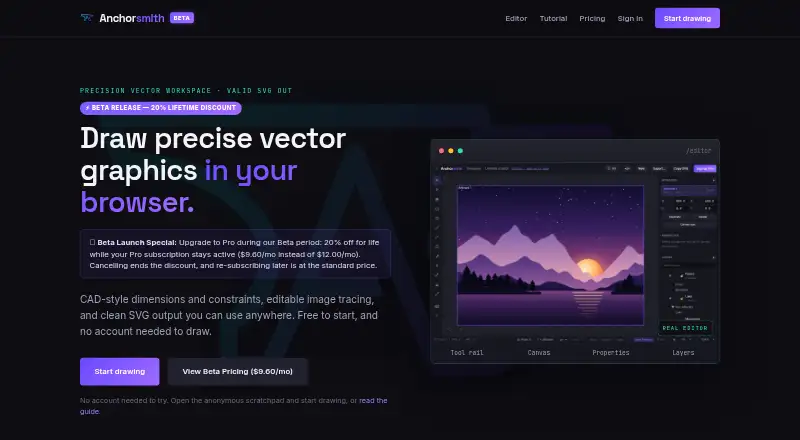
Anchorsmith is a browser-based vector editor for designers, makers, indie developers, and artists who need structured drawing tools without installing a desktop application. Its core workspace includes Bézier pen, shape, and text tools, direct node and path editing, editable native-path SVG import, raster-image auto-tracing, layers, multiple artboards, gradients, and stroke controls. CAD constraints and driving dimensions give it a more measurement-oriented workflow than a basic shape-and-path editor, while the programmatic action API supports AI-agent interactions.
The pricing structure is straightforward. The Free plan costs $0 forever and includes the full vector editor, SVG export without watermarks, one cloud document, and up to two layers. Pro costs $12 per month when billed monthly. It adds high-resolution PNG and PDF export, advanced boolean and path-effect tools, unlimited cloud documents and layers, and self-serve billing. For buyers who mainly need native vector editing and SVG output, the Free plan covers a meaningful workflow. Pro is the more practical choice for larger documents, layered work, and raster or PDF deliverables.
Anchorsmith fits users who prefer a browser workflow and value constraints, tracing, standards-valid SVG export, and direct path control. Its feature set spans general vector drawing, CAD-style precision, image conversion, and AI-agent automation, but the product remains focused rather than ecosystem-oriented. It has no desktop app, and integrations and collaboration are not part of the offering. Teams seeking shared workflows or broader connected tooling should choose an alternative. Anchorsmith is better suited to individual creators and technically minded designers who can work within a web app and want a permanent free entry point with a clear Pro upgrade path.
Your product? Our editors can test Anchorsmith in depth and publish a review, labelled as paid · from $149/mo →
Anchorsmith pricing
All 2 Anchorsmith plans and prices →
Anchorsmith fact sheet
| Free plan | Yes |
|---|---|
| Paid from | $12/mo |
| SVG export | Yes |
| Browser app | Yes |
| Desktop app | No |
| Real-time collaboration | Not verified |
| PDF export | Yes |
| Animation tools | Not verified |
| Maximum artboards | Not verified |
| Deployment | Cloud |
| Platforms | Web |
| Pricing | Free plan (source) |
| Website | anchorsmith.app |
| Facts checked | 20 Sep 2026 |
Alternatives to Anchorsmith
- Adobe IllustratorA deep vector design suite for teams that need advanced artwork and typography tools.9.4
- AffinityA broad free desktop suite for designers who need vector, pixel and layout tools together.9.2
- InkscapeA capable no-cost SVG editor for designers who want desktop flexibility.9.0



See all Anchorsmith alternatives →
Used Anchorsmith? Be the first to review it
The editor score above is our own research. What this page doesn't have yet is a reader's view — what you used Anchorsmith for, what worked and what didn't. No stars are seeded and no review is paid for; an editor reads every one before it appears.
Write a reviewTwo minutes · verified accounts only · read by an editor before it appears
Featured on iTechGuides

Anchorsmith is listed in our Vector Graphics Software directory. Add the badge to your site — it links back to this page.
<a href="https://www.itechguides.com/products/anchorsmith/"><img src="https://www.itechguides.com/best/badge/anchorsmith.svg" alt="Featured on iTechGuides" width="230" height="46"></a>
Reviewed by iTechGuides Editors · Editorial team · Updated Oct 2026
Advertiser disclosure: iTechGuides is reader-supported. Vendors can pay for top positions in our rankings and for a place on other products' pages, and we may earn a commission when you click some links. Bought places stand at the number bought; this page and our disclosure say so. Paying vendors may get a fuller, more detailed review from our editors, and that review can change their score. How we rank.
Last updated · How we research and update