AllyCat
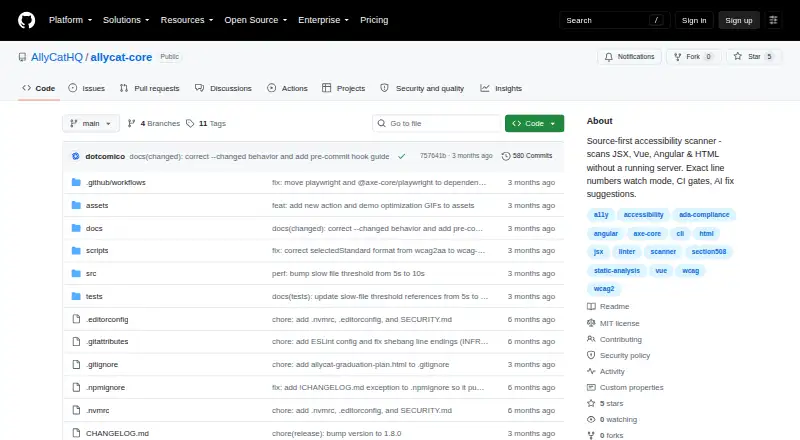
AllyCat: A developer-focused CLI for finding and fixing accessibility issues in source code. Ranked #77 of 129 in Website Accessibility Tools by our editors (3.0/10); pricing: Open source; best for frontend teams fixing source-level violations.
At a glance
- Editor score3.0 / 10
- PricingOpen source
- Best forFrontend teams fixing source-level violations
- Paid fromFree
- WCAG versionWcag 2.2
- Facts checked22 Sep 2026
Where it wins
- Scans HTML, JSX, TSX, Vue, and Angular source files
- Pinpoints violations with source lines and clickable VS Code links
- Supports baselines, CI gates, reports, and AI-ready fix prompts
Where it doesn't
- Requires a Node.js and command-line workflow
- Full browser scans depend on Playwright
- Focused on source and browser testing, not audit management
Our verdict on AllyCat
AllyCat is an open-source command-line accessibility scanner for developers working on HTML, JSX, TSX, Vue, and Angular projects. It analyzes source files without requiring a deployed application, making it suited to frontend teams that want accessibility checks close to the code, including during local development, pre-commit workflows, and continuous integration. Its published scope covers WCAG 2.2 checks and source-linked findings rather than a broad accessibility program for managing audits, ownership, or remediation portfolios.
The tool’s strongest fit is a development workflow that already uses common JavaScript testing and CI tools. Quick scans run through JSDOM without a browser, while full browser scans use Playwright for contrast checking. Integrations include VS Code links, GitHub Actions, GitLab CI, and Jenkins. Watch mode identifies new and fixed violations, and changed-file scoping helps teams focus checks on current work. JSON and self-contained HTML reports provide output for automation and review, while configurable CI exit gates can enforce project-specific quality thresholds.
AllyCat stands out through the connection between detection and code repair: findings include exact source line numbers, clickable editor links, and AI-ready fix prompts. Baselines can help teams separate existing violations from newly introduced ones. The trade-off is its narrow, developer-centered focus. Teams looking for source-level scanning, browser-based contrast checks, and CI enforcement should consider AllyCat; organizations that need a hosted service or a full audit-management platform should choose a broader category solution instead.
Your product? Our editors can test AllyCat in depth and publish a review, labelled as paid · from $149/mo →
AllyCat pricing
AllyCat fact sheet
| Free plan | Not verified |
|---|---|
| Paid from | Free |
| WCAG version | Wcag 2.2 |
| Scan scope | Not verified |
| Scan limit | Not verified |
| Scheduled scans | Not verified |
| Browser extension | Not verified |
| CI/CD integration | Yes |
| API access | Not verified |
| Built for | Solo, Small business, Mid-market (editorial estimate) |
| Integrations | 6 integrations: Playwright, JSDOM, VS Code, GitHub Actions, GitLab CI, Jenkins |
| Pricing | Open source |
| Website | github.com |
| Facts checked | 22 Sep 2026 |
AllyCat integrations
AllyCat lists 6 integrations on its own site.
- Playwright
- JSDOM
- VS Code
- GitHub Actions
- GitLab CI
- Jenkins
Alternatives to AllyCat
- Octopus Scanner (formerly A11y Scanner)A free desktop scanner for detailed local audits of complex websites.9.3
- WAVEA flexible accessibility suite spanning free page checks, browser extensions, APIs, and CI workflows.9.1
- IBM Equal Access Accessibility CheckerA technically focused toolkit for browser, batch, and CI/CD accessibility checks.9.0


See all AllyCat alternatives →
Used AllyCat? Be the first to review it
The editor score above is our own research. What this page doesn't have yet is a reader's view — what you used AllyCat for, what worked and what didn't. No stars are seeded and no review is paid for; an editor reads every one before it appears.
Write a reviewTwo minutes · verified accounts only · read by an editor before it appears
Featured on iTechGuides

AllyCat is listed in our Website Accessibility Tools directory. Add the badge to your site — it links back to this page.
<a href="https://www.itechguides.com/products/allycat/"><img src="https://www.itechguides.com/best/badge/allycat.svg" alt="Featured on iTechGuides" width="230" height="46"></a>
Reviewed by iTechGuides Editors · Editorial team · Updated Oct 2026
Advertiser disclosure: iTechGuides is reader-supported. Vendors can pay for top positions in our rankings and for a place on other products' pages, and we may earn a commission when you click some links. Bought places stand at the number bought; this page and our disclosure say so. Paying vendors may get a fuller, more detailed review from our editors, and that review can change their score. How we rank.
Last updated · How we research and update