
Acrolinx
Acrolinx: Deep enterprise style governance with broad editor support and sales-led pricing. Ranked #1 of 29 in Writing Style Checkers by our editors (9.4/10); pricing: Pricing on request; best for enterprise content governance teams.
At a glance
- Editor score9.4 / 10
- PricingPricing on request
- Best forEnterprise content governance teams
- Custom style guideYes
- Facts checked20 Sep 2026
Where it wins
- Custom style guides, terminology, brand voice, and inclusive-language rules
- Quality gates, analytics, APIs, and command-line automation for governance
- Guidance across Microsoft, Google, Adobe, Figma, Oxygen, and other editors
Where it doesn't
- Pricing requires contacting sales
- No trial is offered
- Its enterprise scope may exceed smaller teams' needs
Our verdict on Acrolinx
Acrolinx is an enterprise content governance platform for marketing, technical documentation, support, localization, and quality teams. It checks style, terminology, brand voice, tone, grammar, spelling, clarity, readability, inclusivity, and regulatory requirements. Teams can digitize style guides and terminology sets, receive clickable suggestions in supported editors, and manage quality across human- and AI-generated content.
Pricing is contact-sales rather than self-serve, with prospects directed to request a demo. Acrolinx does not offer a trial. Its editor coverage is broad: Microsoft Word, Excel, PowerPoint, and Outlook; Google Docs, Sheets, and Slides; Adobe FrameMaker; Arbortext Editor; Figma; MadCap Flare; Oxygen XML Author, Editor, and Web Author; and Visual Studio Code. The published integration list also includes XMetaL in its editor-support specification. API access and command-line automation support teams that need to connect governance checks with repositories or publishing workflows.
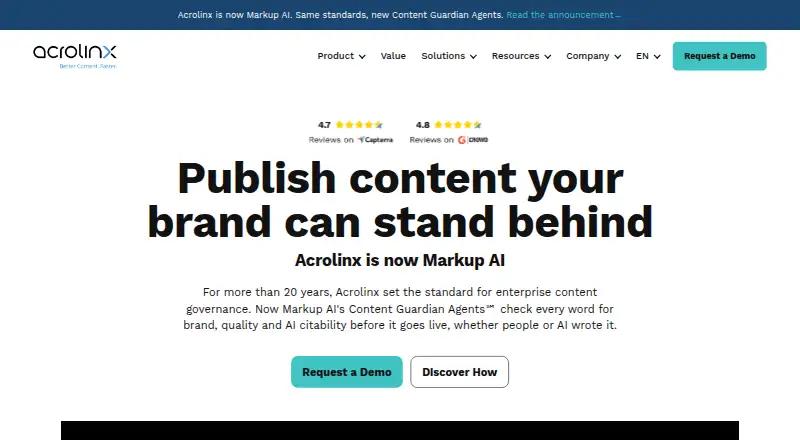
The standout capability is the combination of custom rules, terminology management, brand voice checking, inclusive-language guidance, automated publishing quality gates, and content-quality analytics. AI-assisted generation, rewriting, summarization, and guardrails extend that governance approach to AI-supported content. Acrolinx is a strong fit for organizations coordinating content standards across multiple teams, formats, and authoring environments. Smaller teams or buyers seeking a low-commitment writing checker should look elsewhere, particularly if a public trial or self-serve purchase is important. The website also announces that Acrolinx is becoming Markup AI.
Your product? Our editors can test Acrolinx in depth and publish a review, labelled as paid · from $149/mo →
Acrolinx pricing
Acrolinx fact sheet
| Free plan | Not verified |
|---|---|
| Paid from | Not verified |
| Custom style guide | Yes |
| Terminology management | Yes |
| Brand voice rules | Yes |
| Editor support | Adobe FrameMaker, Arbortext Editor, Figma, Google Docs, Google Sheets, Google Slides, MadCap Flare, Microsoft Excel, Microsoft Outlook, Microsoft PowerPoint, Microsoft Word, Oxygen XML Author, Oxygen XML Editor, Oxygen XML Web Author, Visual Studio Code, XMetaL |
| Rule action | Not verified |
| Team workflow | Yes |
| API access | Yes |
| Deployment | Cloud |
| Compliance & security | ISO 27001 |
| Support | Docs |
| Built for | Enterprise (editorial estimate) |
| Integrations | 40+ integrations: Adobe FrameMaker, Arbortext Editor, Figma, Google Docs, Google Sheets, Google Slides … See all → |
| Pricing | Pricing on request |
| Website | acrolinx.com |
| Facts checked | 20 Sep 2026 |
Acrolinx integrations
Acrolinx lists 40+ integrations on its own site — the 20 named here are the ones its pages call out.
- Adobe FrameMaker
- Arbortext Editor
- Figma
- Google Docs
- Google Sheets
- Google Slides
- MadCap Flare
- Microsoft Excel
- Microsoft Outlook
- Microsoft PowerPoint
- Microsoft Word
- Oxygen XML Author
- Oxygen XML Editor
- Oxygen XML Web Author
- Visual Studio Code
- XMetaL
- Adobe Experience Manager
- GitHub
- Salesforce
- SharePoint Online
See all Acrolinx integrations →
Alternatives to Acrolinx
- ValeA programmable prose linter with YAML rules, editor diagnostics, and CI workflows.9.2
- Congree Authoring ServerEnterprise authoring checks with terminology control, reusable approved text, and broad editor integrations.8.9
- ClaritarA focused web tool for measuring and enforcing brand voice across content.8.7


See all Acrolinx alternatives →
Acrolinx vs the competition
- Acrolinx vs Vale
- Acrolinx vs Congree Authoring Server
- Acrolinx vs Claritar
- Acrolinx vs StyleMCP
- Acrolinx vs Markup AI
- Acrolinx vs WRITER


Compare Acrolinx with any tool side by side →
Also Ranked In
Acrolinx is ranked in 2 of our directories.
Used Acrolinx? Be the first to review it
The editor score above is our own research. What this page doesn't have yet is a reader's view — what you used Acrolinx for, what worked and what didn't. No stars are seeded and no review is paid for; an editor reads every one before it appears.
Write a reviewTwo minutes · verified accounts only · read by an editor before it appears
Featured on iTechGuides

Acrolinx is listed in our Writing Style Checkers directory. Add the badge to your site — it links back to this page.
<a href="https://www.itechguides.com/products/acrolinx/"><img src="https://www.itechguides.com/best/badge/acrolinx.svg" alt="Featured on iTechGuides" width="230" height="46"></a>
Reviewed by iTechGuides Editors · Editorial team · Updated Oct 2026
Advertiser disclosure: iTechGuides is reader-supported. Vendors can pay for top positions in our rankings and for a place on other products' pages, and we may earn a commission when you click some links. Bought places stand at the number bought; this page and our disclosure say so. Paying vendors may get a fuller, more detailed review from our editors, and that review can change their score. How we rank.
Last updated · How we research and update