
Accessibility Visualizer
Accessibility Visualizer: A free visual inspection aid for understanding accessibility semantics on pages. Ranked #123 of 129 in Website Accessibility Tools by our editors (3.0/10); pricing: Free plan; best for inspecting accessibility semantics visually in a browser.
At a glance
- Editor score3.0 / 10
- PricingFree plan
- Best forInspecting accessibility semantics visually in a browser
- Free planYes
- Paid fromFree
- Facts checked22 Sep 2026
Where it wins
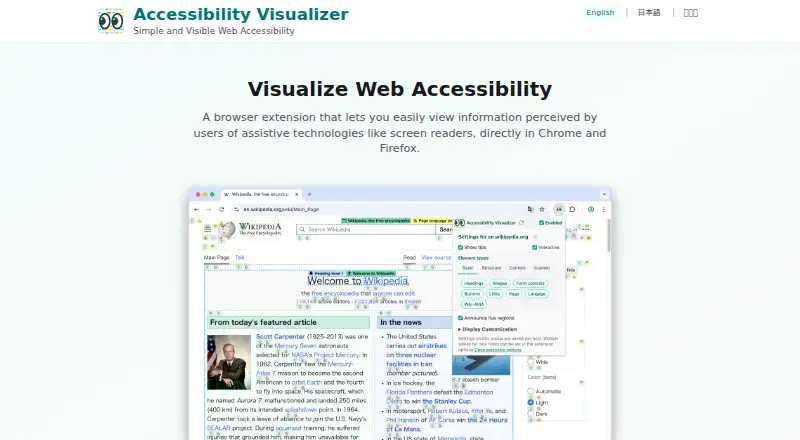
- Overlays accessible names, image alt text, headings, and form labels
- Visualizes live regions, tables, lists, language, and WAI-ARIA details
- Open-source MIT-licensed extension with customizable settings and presets
Where it doesn't
- Inspects page content rather than scanning an entire site
- Does not provide automated audits, monitoring, or remediation workflows
- Focused on visual inspection instead of broader accessibility management
Our verdict on Accessibility Visualizer
Accessibility Visualizer is an open-source browser extension for developers and accessibility reviewers who need to inspect accessibility information directly on web pages. It makes semantics visible by overlaying accessible names and image alt text, displaying heading levels, and showing form labels and controls. The tool is intended for Chrome or Firefox workflows and also has an Android context, with distribution under the MIT License.
Its standout strength is the breadth of information it can expose during page review. Accessibility Visualizer can highlight warning and error states, visualize live-region updates, inspect tables and list structures, and display language attributes and WAI-ARIA information. Custom display settings and presets let reviewers adjust how this information appears, which is useful when examining different interface patterns or focusing on a particular semantic layer. This makes the product especially suitable for visual investigation of how page structure and accessible information are represented.
Accessibility Visualizer is deliberately narrower than a full accessibility testing platform. Its page-level inspection model helps reviewers understand what is present on an individual page, but it is not positioned as an automated site scanner, audit system, monitoring service, or remediation platform. Teams looking for visual insight into names, labels, headings, live regions, tables, lists, and ARIA details should consider it; teams needing broader site coverage or workflow management should choose a product built for scanning, reporting, monitoring, or remediation instead. As an open-source tool, it offers a focused way to inspect accessibility semantics without adding a paid plan structure.
Your product? Our editors can test Accessibility Visualizer in depth and publish a review, labelled as paid · from $149/mo →
Accessibility Visualizer pricing
Accessibility Visualizer fact sheet
| Free plan | Yes |
|---|---|
| Paid from | Free |
| WCAG version | Not verified |
| Scan scope | Page |
| Scan limit | Not verified |
| Scheduled scans | Not verified |
| Browser extension | Yes |
| CI/CD integration | Not verified |
| API access | Not verified |
| Deployment | Browser extension |
| Platforms | Chrome extension, Android |
| Support | Docs |
| Built for | Solo, Small business (editorial estimate) |
| Pricing | Free plan |
| Website | ymrl.github.io |
| Facts checked | 22 Sep 2026 |
Alternatives to Accessibility Visualizer
- Octopus Scanner (formerly A11y Scanner)A free desktop scanner for detailed local audits of complex websites.9.3
- WAVEA flexible accessibility suite spanning free page checks, browser extensions, APIs, and CI workflows.9.1
- IBM Equal Access Accessibility CheckerA technically focused toolkit for browser, batch, and CI/CD accessibility checks.9.0


See all Accessibility Visualizer alternatives →
Used Accessibility Visualizer? Be the first to review it
The editor score above is our own research. What this page doesn't have yet is a reader's view — what you used Accessibility Visualizer for, what worked and what didn't. No stars are seeded and no review is paid for; an editor reads every one before it appears.
Write a reviewTwo minutes · verified accounts only · read by an editor before it appears
Featured on iTechGuides

Accessibility Visualizer is listed in our Website Accessibility Tools directory. Add the badge to your site — it links back to this page.
<a href="https://www.itechguides.com/products/accessibility-visualizer/"><img src="https://www.itechguides.com/best/badge/accessibility-visualizer.svg" alt="Featured on iTechGuides" width="230" height="46"></a>
Reviewed by iTechGuides Editors · Editorial team · Updated Oct 2026
Advertiser disclosure: iTechGuides is reader-supported. Vendors can pay for top positions in our rankings and for a place on other products' pages, and we may earn a commission when you click some links. Bought places stand at the number bought; this page and our disclosure say so. Paying vendors may get a fuller, more detailed review from our editors, and that review can change their score. How we rank.
Last updated · How we research and update