AccelaReader
AccelaReader: A focused RSVP reader with flexible pacing and premium web-content tools. Ranked #15 of 27 in Speed Reading Apps by our editors (7.9/10); pricing: Free plan; best for simple RSVP reading with web capture.
At a glance
- Editor score7.9 / 10
- PricingFree plan
- Best forSimple RSVP reading with web capture
- Free planYes
- Comprehension exercisesNo
- Facts checked22 Sep 2026
Where it wins
- Configurable speed, chunk size, pauses, and stopword skipping
- Bookmarklet preloads highlighted text from web pages
- Free web app with Chrome extension availability
Where it doesn't
- No guided training or comprehension exercises
- URL extraction and AI passage generation require premium access
- Focused on RSVP rather than broader reading practice
Our verdict on AccelaReader
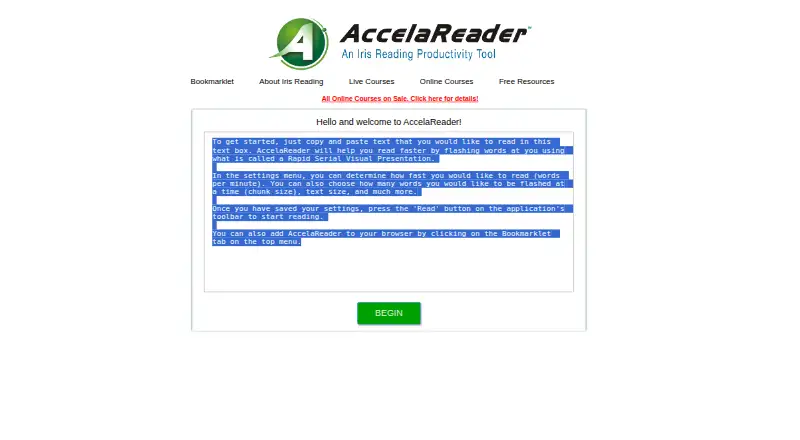
AccelaReader is a browser-based speed-reading tool from Iris Reading for people who want to read pasted text or selected web content through rapid serial visual presentation (RSVP). Words or chunks appear sequentially at a configurable words-per-minute rate, making it suited to readers who prefer a focused playback experience rather than a broader training program. It is available on the web and through a Chrome extension, with a free plan for core reading functionality.
The main strength is control over the reading display and pace. Readers can adjust chunk size, text and reader-window appearance, and pauses at sentences, paragraphs, and punctuation. Stopword skipping can reduce the visual emphasis on common words, while keyboard playback and navigation controls support quick movement through a passage. The bookmarklet can preload highlighted text from a web page, and users can also paste text directly. These features make AccelaReader a practical fit for browser-based reading workflows and short sessions.
Its paid additions broaden content access rather than adding a full learning curriculum. The current Iris Reading version identifies URL extraction and AI-generated passages as premium features, while the published details do not state a price. AccelaReader remains a narrow RSVP reader: it does not provide guided training or comprehension exercises. Choose it if configurable pacing, web capture, and straightforward text playback are the priority. Readers seeking structured instruction, comprehension practice, or a wider set of reading-development tools should consider an alternative with those capabilities.
Your product? Our editors can test AccelaReader in depth and publish a review, labelled as paid · from $149/mo →
AccelaReader pricing
AccelaReader fact sheet
| Free plan | Yes |
|---|---|
| Paid from | Not verified |
| Pacing methods | Rsvp |
| Comprehension exercises | No |
| Content import | Yes |
| Advertised speed ceiling | Not verified |
| Guided training | No |
| Supported platforms | web, chrome_extension |
| Deployment | Cloud, Browser extension |
| Platforms | Web, Chrome extension |
| Support | |
| Built for | Solo, Small business (editorial estimate) |
| Pricing | Free plan |
| Website | accelareader.com |
| Facts checked | 22 Sep 2026 |
Alternatives to AccelaReader
- SpreederA broad, cross-platform speed-reading toolkit with a useful free starting point.9.4
- FastReadiA feature-rich iOS reader for learners who want speed, comprehension, and study tools.9.3
- OutreadA focused Apple speed-reading app with guided training, imports and comprehension tools.9.2


See all AccelaReader alternatives →
Used AccelaReader? Be the first to review it
The editor score above is our own research. What this page doesn't have yet is a reader's view — what you used AccelaReader for, what worked and what didn't. No stars are seeded and no review is paid for; an editor reads every one before it appears.
Write a reviewTwo minutes · verified accounts only · read by an editor before it appears
Featured on iTechGuides

AccelaReader is listed in our Speed Reading Apps directory. Add the badge to your site — it links back to this page.
<a href="https://www.itechguides.com/products/accelareader/"><img src="https://www.itechguides.com/best/badge/accelareader.svg" alt="Featured on iTechGuides" width="230" height="46"></a>
Reviewed by iTechGuides Editors · Editorial team · Updated Oct 2026
Advertiser disclosure: iTechGuides is reader-supported. Vendors can pay for top positions in our rankings and for a place on other products' pages, and we may earn a commission when you click some links. Bought places stand at the number bought; this page and our disclosure say so. Paying vendors may get a fuller, more detailed review from our editors, and that review can change their score. How we rank.
Last updated · How we research and update