
Ableton Note
Ableton Note: A focused iOS sketchpad for beatmakers who develop projects in Ableton Live. Ranked #15 of 31 in Beat Making Software by our editors (7.5/10); pricing: Paid; best for iOS beatmakers connected to Ableton Live.
At a glance
- Editor score7.5 / 10
- PricingPaid
- Best foriOS beatmakers connected to Ableton Live
- Free planNo
- PlatformsMobile
- Founded1999 · Berlin, Germany
- Facts checked20 Sep 2026
Where it wins
- Transfers Note Sets to Ableton Live through Ableton Cloud
- Combines beat grids, melody grids, MIDI editing and sampling
- Includes eight-track Session View with clips and scenes
Where it doesn't
- Available only on iPhone and iPad
- The Session View is limited to eight tracks
- No free plan and no plugin support
Our verdict on Ableton Note
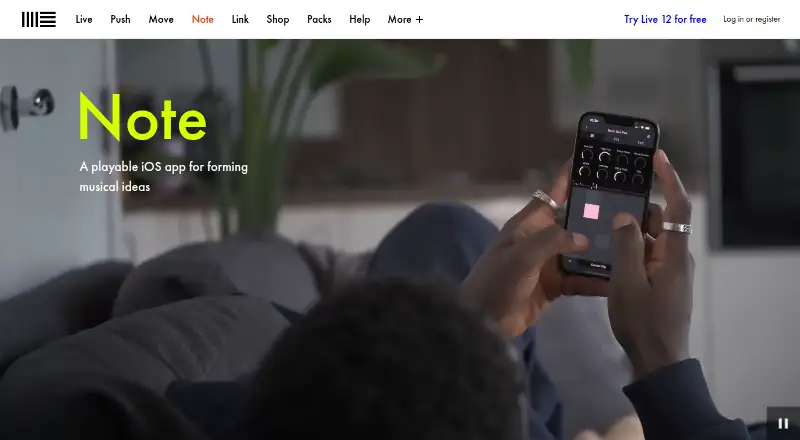
Ableton Note is a paid iPhone and iPad app for sketching beats, melodies and song ideas. It suits beatmakers who want drum kits, synths, melodic instruments, samplers, effects, MIDI editing and audio recording in a mobile workspace. Its eight-track Session View supports clips and scenes, while Capture can record improvisations after playing. Note can work independently, but its clearest audience is musicians who develop projects further in Ableton Live.
The strongest case for Note is its fit with Ableton’s ecosystem. Ableton Cloud transfers Note Sets to Live, and Ableton Link supports connected musical workflows. MIDI controller support adds another input option, while the MIDI Editor provides sequencing and note editing inside the app. Sample import and recording support keeps the core workflow open to original audio, and WAV and M4A export make it possible to share rendered material outside the Live transfer path. These features give Note useful range without moving beyond its mobile sketching focus.
The trade-off is scope. Note is iOS-only, has no free plan, offers no plugin support, and its Session View tops out at eight tracks. That makes it better suited to developing ideas, patterns and compact arrangements than serving as a full replacement for a larger production environment. Choose it if you want a focused mobile companion with direct Ableton Live transfer, MIDI tools, sampling and audio export. Choose another beat-making option if you need broader platform coverage, plugin support or more than eight tracks within the same workspace.
Your product? Our editors can test Ableton Note in depth and publish a review, labelled as paid · from $149/mo →
Ableton Note pricing
All 1 Ableton Note plans and prices →
Ableton Note fact sheet
| Free plan | No |
|---|---|
| Paid from | Not verified |
| Platforms | Mobile |
| Plugin support | No |
| MIDI support | Yes |
| Sample import | Yes |
| Track limit | 8 tracks |
| Audio export | WAV, M4A, .ablbundle |
| Deployment | Mobile |
| Platforms | iOS |
| Compliance & security | GDPR |
| Support | Docs, Community |
| Built for | Solo, Small business (editorial estimate) |
| Integrations | 4 integrations: Ableton Live, Ableton Cloud, Ableton Link, MIDI controllers |
| Pricing | Paid (source) |
| Website | ableton.com |
| Facts checked | 20 Sep 2026 |
Ableton Note integrations
Ableton Note lists 4 integrations on its own site.
- Ableton Live
- Ableton Cloud
- Ableton Link
- MIDI controllers
Alternatives to Ableton Note
- FL StudioA mature beat-making DAW with deep arrangement, plugin, recording, and mixing tools.9.4
- MASCHINEA capable beat-making system for producers who want sampling, sequencing, and hardware-style workflows.9.2
- Serato StudioA sample-focused desktop workstation with sequencing, stem separation and DJ-ready exports.9.0



See all Ableton Note alternatives →
Used Ableton Note? Be the first to review it
The editor score above is our own research. What this page doesn't have yet is a reader's view — what you used Ableton Note for, what worked and what didn't. No stars are seeded and no review is paid for; an editor reads every one before it appears.
Write a reviewTwo minutes · verified accounts only · read by an editor before it appears
Featured on iTechGuides

Ableton Note is listed in our Beat Making Software directory. Add the badge to your site — it links back to this page.
<a href="https://www.itechguides.com/products/ableton-note/"><img src="https://www.itechguides.com/best/badge/ableton-note.svg" alt="Featured on iTechGuides" width="230" height="46"></a>
Reviewed by iTechGuides Editors · Editorial team · Updated Oct 2026
Advertiser disclosure: iTechGuides is reader-supported. Vendors can pay for top positions in our rankings and for a place on other products' pages, and we may earn a commission when you click some links. Bought places stand at the number bought; this page and our disclosure say so. Paying vendors may get a fuller, more detailed review from our editors, and that review can change their score. How we rank.
Last updated · How we research and update