A-PDF Merger
A-PDF Merger: A Windows PDF merger with flexible merge methods, page control, and output security. Ranked #35 of 36 in PDF Merger Software by our editors (6.0/10); pricing: Paid; best for windows users needing advanced merge methods.
At a glance
- Editor score6.0 / 10
- PricingPaid
- Best forWindows users needing advanced merge methods
- Free planNo
- Paid from$35 one-time
- Facts checked20 Sep 2026
Where it wins
- Supports Whole, Part, Mix, Mix reverse, and Repeat merge methods
- Inserts or appends pages and joins bookmarks from source PDFs
- Configures numbering, security, viewer settings, and PDF properties
Where it doesn't
- Windows-only desktop software
- Documented requirements extend to legacy Windows versions
- A-PDF Office to PDF is needed for Office file processing
Our verdict on A-PDF Merger
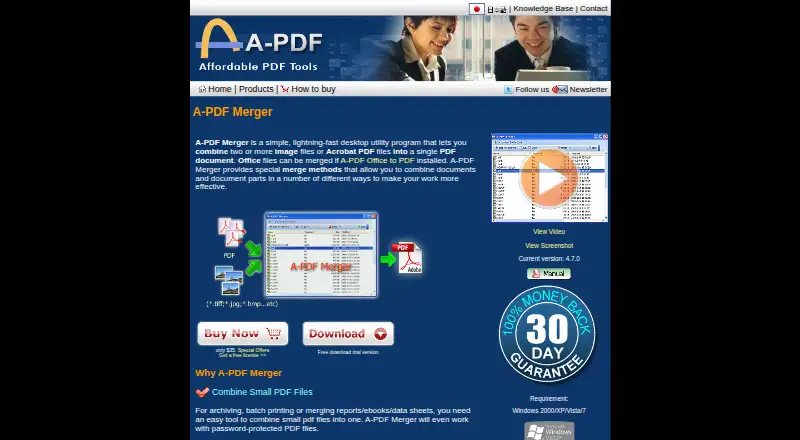
A-PDF Merger is a Windows desktop utility for combining two or more PDF or image files into one PDF document. It suits users who need more control than basic file concatenation, including page selection, file reordering, folder import, bookmark handling, and output configuration. Its workflow supports drag-and-drop file selection and can process password-protected PDF files. Image conversion to PDF also gives it a broader input range than a PDF-only merger.
The product uses a single paid plan priced at a one-time USD 35. That purchase includes PDF and image merging, file ordering, multiple merge methods, page insertion, bookmark joining, customized page numbering, and output security and viewer settings. The plan structure is straightforward: there are no separate paid tiers to compare, and there is no free plan. A trial download is available, while the purchase model avoids recurring subscription charges. Users who only need occasional basic merging may find the feature set more extensive than necessary, but buyers needing repeatable control over how pages are combined get the relevant tools in one package.
Its standout capability is the range of merge methods: Whole, Part, Mix, Mix reverse, and Repeat. Alongside page insertion and reordering, these options support more deliberate document assembly than a simple append operation. The integration with A-PDF Office to PDF can extend processing to Office files when that separate software is installed. The main fit constraint is platform and age: A-PDF Merger is Windows-only, and its documented requirements include Windows 2000, XP, Vista, and 7. Choose it for a Windows workflow centered on controlled PDF assembly; choose another merger if you need a current cross-platform application or built-in Office conversion.
Your product? Our editors can test A-PDF Merger in depth and publish a review, labelled as paid · from $149/mo →
A-PDF Merger pricing
All 1 A-PDF Merger plans and prices →
A-PDF Merger fact sheet
| Free plan | No |
|---|---|
| Paid from | $35 one-time |
| Batch merging | Not verified |
| Page selection | Yes |
| Files per merge | Not verified |
| Maximum file size | Not verified |
| Primary platform | Desktop |
| Cloud storage support | Not verified |
| Deployment | Desktop |
| Platforms | Windows |
| Integrations | 1 integrations: A-PDF Office to PDF |
| Pricing | Paid (source) |
| Website | a-pdf.com |
| Facts checked | 20 Sep 2026 |
A-PDF Merger integrations
A-PDF Merger lists 1 integrations on its own site.
- A-PDF Office to PDF
Alternatives to A-PDF Merger
- PDFsam BasicA free, open-source PDF toolkit with detailed merging controls and offline processing.9.4
- PDF24 CreatorA mature free PDF toolkit that goes far beyond merging, but works only on Windows.9.3
- PDFtkA precise PDF toolkit for users who need page-level control and command-line processing.9.1


See all A-PDF Merger alternatives →
Used A-PDF Merger? Be the first to review it
The editor score above is our own research. What this page doesn't have yet is a reader's view — what you used A-PDF Merger for, what worked and what didn't. No stars are seeded and no review is paid for; an editor reads every one before it appears.
Write a reviewTwo minutes · verified accounts only · read by an editor before it appears
Featured on iTechGuides

A-PDF Merger is listed in our PDF Merger Software directory. Add the badge to your site — it links back to this page.
<a href="https://www.itechguides.com/products/a-pdf-merger/"><img src="https://www.itechguides.com/best/badge/a-pdf-merger.svg" alt="Featured on iTechGuides" width="230" height="46"></a>
Reviewed by iTechGuides Editors · Editorial team · Updated Oct 2026
Advertiser disclosure: iTechGuides is reader-supported. Vendors can pay for top positions in our rankings and for a place on other products' pages, and we may earn a commission when you click some links. Bought places stand at the number bought; this page and our disclosure say so. Paying vendors may get a fuller, more detailed review from our editors, and that review can change their score. How we rank.
Last updated · How we research and update