3D Sculptor
3D Sculptor: A focused browser-based choice for SOLIDWORKS-connected surface modeling. Ranked #54 of 147 in 3D Modeling Software by our editors (4.0/10); pricing: Paid; best for cloud-based SOLIDWORKS surface modeling.
At a glance
- Editor score4.0 / 10
- PricingPaid
- Best forCloud-based SOLIDWORKS surface modeling
- Platform accessBrowser
- Founded1981 · Vélizy-Villacoublay, France
- Facts checked21 Sep 2026
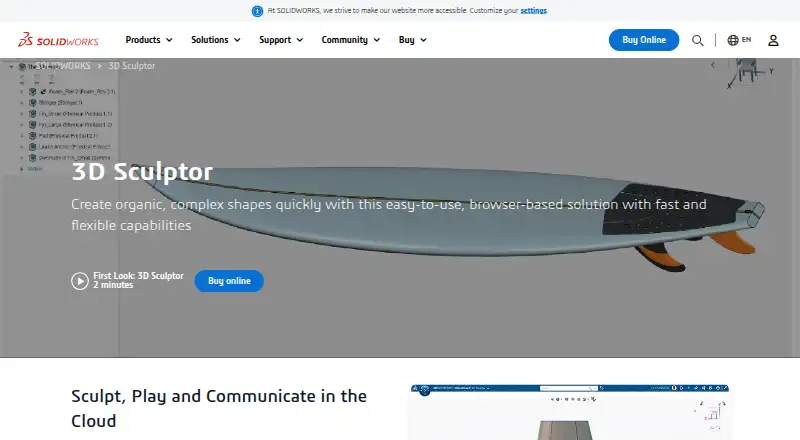
Where it wins
- Subdivision and push-pull tools support complex organic shapes.
- Automatic subdivision-to-NURBS conversion connects sculpted and engineering workflows.
- Cloud collaboration, review, version control, and data management are built in.
Where it doesn't
- Browser-only access may not suit teams requiring desktop software.
- Its focus is narrower than a full general-purpose 3D production suite.
- Paid access may require evaluating fit before broader team adoption.
Our verdict on 3D Sculptor
3D Sculptor is a paid, browser-based design role from Dassault Systèmes for industrial designers, mechanical engineers, and digital artists. Through the xShape application, it focuses on subdivision surface modeling for complex organic and stylized shapes. Push-and-pull editing, sketch and image guides, direct import and export, and automatic subdivision-to-NURBS conversion support workflows that move from visual form development toward engineering-ready geometry. It is particularly suited to teams working with SOLIDWORKS and 3DEXPERIENCE Works solutions.
Its strongest differentiator is the connection between surface creation and the broader SOLIDWORKS ecosystem. Interoperability with SOLIDWORKS, 3D Creator, and 3DEXPERIENCE Works can help teams connect shape development with related design workflows. Built-in version control and data management add structure to design iteration, while cloud collaboration and review workflows support shared evaluation of models. For organizations already aligned with Dassault Systèmes tools, that ecosystem fit is a central reason to consider 3D Sculptor.
The trade-off is focus. 3D Sculptor is designed around browser-based subdivision and push-pull modeling rather than presenting itself as a broad, all-purpose 3D production environment. Its browser-only platform access may be less suitable for teams that require desktop software, while its focused modeling role may not match workflows centered on a wider range of production tasks. Choose it for cloud-connected organic surface development, especially alongside SOLIDWORKS and 3DEXPERIENCE products; consider an alternative if your priority is a broader standalone 3D toolset.
Your product? Our editors can test 3D Sculptor in depth and publish a review, labelled as paid · from $149/mo →
3D Sculptor pricing
3D Sculptor fact sheet
| Free plan | Not verified |
|---|---|
| Paid from | Not verified |
| Platform access | Browser |
| Sculpting tools | Yes |
| Animation tools | Not verified |
| Parametric modeling | Yes |
| Render engine | Not verified |
| 3D print export | Not verified |
| Deployment | Cloud |
| Platforms | Web |
| Support | Community, Docs |
| Built for | Small business, Mid-market, Enterprise (editorial estimate) |
| Integrations | 3 integrations: SOLIDWORKS, 3D Creator, 3DEXPERIENCE Works |
| Pricing | Paid |
| Website | solidworks.com |
| Facts checked | 21 Sep 2026 |
3D Sculptor integrations
3D Sculptor lists 3 integrations on its own site.
- SOLIDWORKS
- 3D Creator
- 3DEXPERIENCE Works
Alternatives to 3D Sculptor
- BlenderA broad free 3D suite covering modeling, animation, rendering, scripting, and print export.9.3
- HoudiniA deep procedural 3D suite for VFX, animation, games, and technical art.9.1
- Autodesk MayaA mature desktop suite for studios handling modeling, animation, VFX, and rendering.9.0



See all 3D Sculptor alternatives →
Used 3D Sculptor? Be the first to review it
The editor score above is our own research. What this page doesn't have yet is a reader's view — what you used 3D Sculptor for, what worked and what didn't. No stars are seeded and no review is paid for; an editor reads every one before it appears.
Write a reviewTwo minutes · verified accounts only · read by an editor before it appears
Featured on iTechGuides

3D Sculptor is listed in our 3D Modeling Software directory. Add the badge to your site — it links back to this page.
<a href="https://www.itechguides.com/products/3d-sculptor/"><img src="https://www.itechguides.com/best/badge/3d-sculptor.svg" alt="Featured on iTechGuides" width="230" height="46"></a>
Reviewed by iTechGuides Editors · Editorial team · Updated Oct 2026
Advertiser disclosure: iTechGuides is reader-supported. Vendors can pay for top positions in our rankings and for a place on other products' pages, and we may earn a commission when you click some links. Bought places stand at the number bought; this page and our disclosure say so. Paying vendors may get a fuller, more detailed review from our editors, and that review can change their score. How we rank.
Last updated · How we research and update