3D CAD Converter
3D CAD Converter: A practical Windows converter for batch CAD, mesh repair, and command-line workflows. Ranked #21 of 31 in 3D File Converter Software by our editors (7.2/10); pricing: 30-day trial; best for low-cost Windows batch CAD conversion.
At a glance
- Editor score7.2 / 10
- Pricing30-day trial
- Best forLow-cost Windows batch CAD conversion
- Free planNo
- Format scopeMixed
- Facts checked22 Sep 2026
Where it wins
- Batch-converts entire folders with watch-folder automation
- Mesh repair, tessellation controls, and unit conversion
- $179 lifetime plan includes perpetual updates and 3-PC activation
Where it doesn't
- Windows 10/11 only
- Supports 15+ formats rather than a broader format range
- Trial conversion is limited to 3 files per session after 30 days
Our verdict on 3D CAD Converter
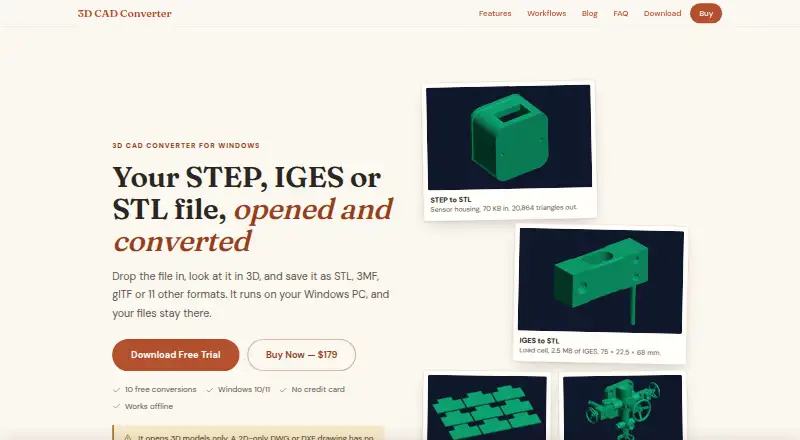
3D CAD Converter is a Windows desktop application for manufacturing engineers, CAD interoperability, 3D printing, BIM, game and web 3D workflows, and archival conversion. It handles STEP, IGES, STL, OBJ, 3MF, glTF, FBX, and other 3D formats, with folder-based batch processing, automatic mesh repair, tessellation controls, unit and coordinate-system conversion, assembly hierarchy preservation, and 3D preview. Processing is local, and the software operates offline.
Pricing is structured around Quarterly, Yearly, and Lifetime plans. The Quarterly and Yearly plans include all 15+ formats, one year of updates, standard support, and a commercial license. The Lifetime plan costs $179 as a one-time payment and adds perpetual updates, priority support, and multi-PC activation for three PCs. A 30-day trial is available; after the trial, conversion is limited to three files per session. This makes the product particularly relevant to users who need recurring batch work and prefer a permanent license over an ongoing subscription.
Its strongest fit is Windows-based conversion work where control over geometry, units, hierarchy, and processing automation matters. The command-line interface, watch-folder automation, and MCP server for AI-agent integration extend it beyond a basic desktop converter. The trade-off is scope: platform support is limited to Windows 10/11, and the published format range is 15+ CAD and mesh formats. Users working within that supported range should find the feature set well aligned with batch conversion and interoperability tasks; teams needing another operating system or a wider format ecosystem should consider a different converter.
Your product? Our editors can test 3D CAD Converter in depth and publish a review, labelled as paid · from $149/mo →
3D CAD Converter pricing
All 3 3D CAD Converter plans and prices →
3D CAD Converter fact sheet
| Free plan | No |
|---|---|
| Paid from | Not verified |
| Format scope | Mixed |
| Animation conversion | Not verified |
| Batch conversion | Yes |
| API access | Not verified |
| Maximum file size | Not verified |
| Supported platforms | Windows 10/11 |
| Free trial | 30 days · no card needed |
| Money-back guarantee | 30 days |
| Deployment | Desktop |
| Platforms | Windows |
| Built for | Small business, Mid-market (editorial estimate) |
| Pricing | 30-day trial (source) |
| Website | contenta-software.com |
| Facts checked | 22 Sep 2026 |
Alternatives to 3D CAD Converter
- 3D_EvolutionA professional CAD conversion suite for complex engineering workflows and enterprise validation.9.4
- 3D InterOpA broad engineering SDK for integrating high-volume CAD and BIM translation.9.3
- HOOPS ExchangeA broad CAD/BIM conversion SDK for engineering software teams.9.2



See all 3D CAD Converter alternatives →
Used 3D CAD Converter? Be the first to review it
The editor score above is our own research. What this page doesn't have yet is a reader's view — what you used 3D CAD Converter for, what worked and what didn't. No stars are seeded and no review is paid for; an editor reads every one before it appears.
Write a reviewTwo minutes · verified accounts only · read by an editor before it appears
Featured on iTechGuides

3D CAD Converter is listed in our 3D File Converter Software directory. Add the badge to your site — it links back to this page.
<a href="https://www.itechguides.com/products/3d-cad-converter/"><img src="https://www.itechguides.com/best/badge/3d-cad-converter.svg" alt="Featured on iTechGuides" width="230" height="46"></a>
Reviewed by iTechGuides Editors · Editorial team · Updated Oct 2026
Advertiser disclosure: iTechGuides is reader-supported. Vendors can pay for top positions in our rankings and for a place on other products' pages, and we may earn a commission when you click some links. Bought places stand at the number bought; this page and our disclosure say so. Paying vendors may get a fuller, more detailed review from our editors, and that review can change their score. How we rank.
Last updated · How we research and update