
Recommended Free Tools
iTechGuides is reader-supported. When you buy through links on our site, we may earn an affiliate commission. As an Amazon Associate I earn from qualifying purchases. Learn more
NVIDIA’s AI-factory investment thesis is that returns depend on three things working together: how much useful output a system can produce, how long its infrastructure remains economically useful, and how many kinds of work it can serve. NVIDIA calls those qualities productive, durable, and fungible. They are a framework for evaluating an investment—not a project-level ROI calculation or a guarantee of profit.
What does “productive, durable, and fungible” mean?
In its October 1, 2026 article, Productive, Durable, Fungible: How NVIDIA AI Factories Maximize Return on Investment, NVIDIA frames an AI factory’s earning capacity as what it could earn in a year if it sold every token it could produce. That is a theoretical ceiling: actual results also depend on demand, utilization, pricing, and the costs of operating the installation.
- Productive: It can deliver valuable output efficiently within constraints such as power, latency, and cost.
- Durable: Its equipment can continue to do useful work economically over time, including after newer systems arrive.
- Fungible: Its capacity can be redirected among workloads when demand changes, if the operator has workloads available and the systems can support them.
The factors interact. High throughput does not create revenue if capacity sits idle or tokens cannot be sold; demand does not ensure a return if the system cannot serve it at acceptable cost. NVIDIA’s framing does not provide a complete discounted cash-flow model, so a buyer still needs to calculate project-specific capital costs, operating expenses, revenue or internal value, and risk.
The Tool Desk
Outbyte Driver Updater FREEFix the driver behind crashes, sound loss and screen glitchesFind Drivers →Outbyte PC Repair FREERepair Windows errors before they cause bigger problemsFix Now →How should you measure an AI factory’s productivity?
Compare useful output within the power envelope
For inference, NVIDIA argues that tokens per second per megawatt and cost per token reveal more about earning capacity than headline compute specifications alone. Its tokenomics guide also emphasizes throughput per megawatt and cost per token. Both are NVIDIA materials, so their example comparisons should be treated as vendor-presented rather than neutral cross-vendor results.
#1 Best Overall

- NVIDIA Volta GV100 Architecture — 4,608 CUDA Cores, 640 1st-Gen Tensor Cores delivering 14 TFLOPS FP32 and 112 TFLOPS deep learning performance for AI training, inference, HPC, and scientific computing workloads
- 32GB HBM2 ECC Memory — 900 GB/s Bandwidth — High-bandwidth memory on a 4096-bit bus with ECC error correction provides the memory capacity and throughput required for the largest AI models, simulations, and datasets
- PCIe 3.0 x16 Interface — 250W TDP — Standard PCIe Gen3 connectivity with passive cooling designed for enterprise rack server deployment in HPE ProLiant, Dell PowerEdge, and Supermicro platforms with adequate chassis airflow
- NVLink — Scale to 96GB Unified Memory — Connect two V100 GPUs via NVLink at 300 GB/s bi-directional bandwidth to scale GPU memory from 32GB to 96GB for larger AI training and HPC workloads
- Multi-Precision Computing — Supports FP64 (7 TFLOPS), FP32 (14 TFLOPS), FP16 (112 TFLOPS) and INT8 precision modes for flexible deployment across training, inference, and scientific simulation workloads
Power matters because a system’s peak capability is not the same as the useful output a facility can deliver. NVIDIA’s article calls power “the binding constraint on an AI factory”; that is NVIDIA’s characterization, not a universal rule for every location or project. Site power availability, cooling, networking, and the IT load that can actually be deployed all affect the result.
Match the benchmark to the service you need
A credible comparison should use the same model, precision, context length, request or batch shape, output quality, and target latency. Measure throughput at the required service level, not just peak throughput. Then calculate cost per million tokens or completed task using an explicit utilization assumption and including software, facility overhead, and other relevant costs. A result based on one workload or utilization level may not predict another.
NVIDIA’s October 1, 2026 article reports, citing SemiAnalysis AgentX, that Vera Rubin NVL72 has over 30 times higher throughput per megawatt than GB300 NVL72 and up to 45 times lower cost per million tokens on DeepSeek V4 Pro. Those figures apply to that named comparison and model; the article does not detail the underlying methodology. They should not be generalized to all workloads or treated as a complete deployment-cost comparison.
Do these 3 things before closing this tab:
1Scan for outdated or missing drivers - takes under a minute2Repair Windows errors before they cause bigger problems3Fix the driver behind crashes, sound loss and screen glitchesRank #2

- GPU-Modell: Gefoce RTX 3080
- Memory Type: GDDR6X Memory Capacity: 20GB Memory Bus Width: 320bit Output Interfaces: 3*DP + HDMI Core Clock: 1710MHz Memory Clock: 19Gbps Power Interface: 8+8pin Recommended Power Supply: 850W or higher
NVIDIA’s tokenomics guide separately presents an illustrative comparison involving 2 times compute cost, 2 times FLOPS per dollar, 25 times lower cost per million tokens, and 25 times token output per second per megawatt. These are figures from that guide’s assumptions and benchmark setup, not interchangeable with the Vera Rubin–GB300 figures.
Account for the cost of building the facility
NVIDIA estimated on October 1, 2026, that an AI factory costs roughly $60 million per megawatt. The article does not break down the estimate or specify exactly which facility and equipment costs it includes. Use it as NVIDIA’s rough estimate, not as a universal construction price or a substitute for a site-specific budget.
How can older systems remain useful?
Durability is about economic usefulness, not merely whether hardware still powers on. A system may retain value if it can serve workloads at acceptable performance and cost, has suitable software support, and can be maintained. Physical service life, accounting depreciation, and resale value are different measures; none alone establishes how long a particular installation will earn a return.
Rank #3
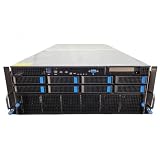
- No Processor Installed; Supports 2x AMD EPYC 9004 Series Processors
- No Memory Installed; Supports 24x DDR5 4400/4800 Regsitered Memory Modules
- 8x 3.5" Trays; (Bring Your Own SATA/NVMe Drives)
- 4x H200 NVL Tensor Core 141GB HBM3e PCI Express 5.0 x16 GPU Accelerator Card
- In Original Packaging; Includes Rails and ASUS GPU Cables
| Example reported by NVIDIA | What the figure describes | How to interpret it |
|---|---|---|
| A100, first shipped in 2020 | NVIDIA said A100 systems were still in commercial service in 2026. | An example of continued use, not a promise that every A100 system will remain viable for the same period. |
| CoreWeave bookings | NVIDIA said CoreWeave extended bookings for units introduced in 2020 through 2029. | A reported customer example; it does not establish utilization or profitability for other operators. |
| Eight-GPU H100 system | Barkr estimated a useful life of five to six years, as reported by NVIDIA on October 1, 2026; the estimate was based on resale value. | An attributed estimate, not a service-life guarantee. |
| GB300 NVL72 | Barkr estimated a useful life of nine to 10 years, as reported by NVIDIA on October 1, 2026; the estimate was based on resale value. | An attributed estimate, not a forecast applicable to every operator or workload. |
| Six-year-old A100 | Silicon Data estimated its value at one quarter of original cost, as reported by NVIDIA on October 1, 2026. | A market estimate, not a guaranteed resale price. NVIDIA contrasted it with a five-year depreciation schedule that would have reduced book value to zero more than a year earlier. |
| A100 rental contract | NVIDIA said Ornn Data offered a five-year rental contract at 80% of its one-month rental price. | This is the pricing example as NVIDIA reported it; it is not a general rental-market rate. |
The examples illustrate why a fixed depreciation schedule may not match an asset’s continued commercial use or market value. But resale assumptions can change, and a system’s later usefulness depends on the workloads it can still serve, its support and maintenance needs, and the costs of keeping it operational.
What makes an AI factory fungible?
Workload flexibility gives an operator more ways to keep installed capacity busy when demand shifts. NVIDIA says its platform serves AI training and inference as well as data processing, scientific computing, simulation, graphics, and other workloads. That breadth can create more opportunities to use a fleet, but it does not create demand by itself: operators need real access to suitable work, and the hardware must meet each workload’s requirements.
NVIDIA also cites more than 1,000 CUDA-X libraries and more than 10 million developers as company-stated ecosystem figures. These figures describe the scale NVIDIA attributes to its ecosystem; they do not, by themselves, establish that a particular deployment can switch workloads without engineering effort or cost.
Rank #4

- 【Brilliant AI Performance for production】 on-device processing with up to 100 TOPS AI performance with low power and low latency, Due to the high thermal demands of Super mode, only the J30 Series supports upgrading to Super mode via the JetPack 6.2 update
- 【Hand-size edge AI device】 compact size at 130mm x120mm x 58.5mm, includes NVIDIA Jetson Orin NX 16GB production module, a cooling fan with a heatsink, enclosure, and a power adapter. Support desktop, wall mount, fit in anywhere
- 【Expandable with rich I/Os】4x USB 3.2, HDMI 2.1, 2xCSI, 1xRJ45 for GbE, M.2 Key E, M.2 Key M, CAN, and GPIO
- 【Accelerate solution to market】pre-installed Jetpack with NVIDIA JetPack 5.1 on the included 128GB NVMe SSD, Linux OS BSP, 128GB SSD, support Jetson software and leading AI frameworks and software platforms
- 【Comprehensive certificates】FCC, CE, RoHS, UKCA
For a specific example of utilization, NVIDIA reported that a Texas A&M supercomputer program achieved 95–98% utilization across 26 projects and seven institutions. That is a particular program example, not a baseline to assume for a commercial AI factory. Utilization still depends on scheduling, workload supply, maintenance, and how closely incoming demand matches available capacity.
Independent reader supportYour contribution helps us test, update, and keep practical guides available for everyone.What does a full AI-factory deployment involve?
An AI factory is more than a GPU purchase. NVIDIA’s enterprise validated design combines Blackwell accelerated computing, BlueField DPUs, Spectrum-X networking, NVIDIA AI Enterprise software, and partner systems. NVIDIA’s deployment guidance also treats power, cooling, and management as parts of the system.
Quick wins for a faster PC:
Repair Windows errors before they cause bigger problemsFix Now →Fix the driver behind crashes, sound loss and screen glitchesFind Drivers →Clear out junk files and repair common Windows errorsFree Scan →When evaluating a proposed deployment, check whether the facility can support the total system power and required cooling, whether networking and management are sized for the workload, and whether the software and partner systems fit the operator’s production needs. A server’s advertised performance does not establish that the complete installation can deliver that performance at the site.
How do you compare two AI infrastructure options?
Use a workload-specific comparison rather than ranking systems by a single peak-performance figure. Record assumptions so the comparison can be revisited when demand, prices, or facility conditions change.
- Define the workload: Specify the model, precision, context length, request pattern, output-quality target, and required latency.
- Measure delivered performance: Compare throughput while meeting the production service target, not just peak throughput.
- Estimate demand and utilization: Forecast paid or internally valuable workload volume, ramp-up timing, idle capacity, and variability.
- Calculate unit economics: Estimate cost per million tokens or completed task at a stated utilization, including serving software and facility overhead assumptions.
- Check the site fit: Evaluate system power, cooling method and capacity, networking, site constraints, and how much capacity can actually be deployed within the power envelope.
- Model useful life: Consider workload compatibility across generations, software support, maintenance, resale assumptions, and accounting policy separately.
- Test flexibility against real work: Identify which other AI phases or non-AI accelerated workloads the fleet can run and whether the operator has credible access to them.
NVIDIA’s material supports a workload-aware, system-level evaluation, but it does not establish a neutral cost model comparing competing platforms. A decision-maker should validate vendor claims against the actual workload, facility design, and financial assumptions for the project.
Quick Recap
Product prices and availability are accurate as of the date/time indicated and are subject to change. Any price and availability information displayed on Amazon at the time of purchase will apply.

