
Quick wins for a faster PC:
Fix the driver behind crashes, sound loss and screen glitchesFind Drivers →Clear out junk files and repair common Windows errorsFree Scan →Scan for outdated or missing drivers - takes under a minuteDriver Scan →iTechGuides is reader-supported. When you buy through links on our site, we may earn an affiliate commission. As an Amazon Associate I earn from qualifying purchases. Learn more
Splitting a large multicolor model into color-specific parts can reduce repeated filament changes within each part—but it is not a guaranteed way to save material. Compare the slicer’s purge, tower, support, and total estimates for both designs before printing. A split can add seams, connectors, supports, assembly work, and extra setup, so the better approach depends on the model and printer.
Why splitting a model can reduce purge
On a single-hotend printer, each filament change requires purging or priming material to clear or stabilize the melt path. A wipe or prime tower is one way to handle that transition. If a model contains many color regions, dividing it into parts that each use fewer colors may reduce the number of transitions during those prints.
That does not mean a large object inherently wastes more filament. Prusa Research says wipe-tower size depends on the number of color changes, not the object’s size. Printing larger objects or multiple copies can therefore make the tower’s material burden smaller relative to the finished output. See the Prusa wipe-tower documentation.
There is no published test here showing that splitting a particular model saves a fixed amount. Treat the result as model- and profile-specific: compare the sliced totals, then validate the approach with a small trial rather than assuming a universal waste percentage.
#1 Best Overall

- Colorful Variety 4 Pack: Each color weighs 200 g, providing a total of 800 g. Dive into the vibrant world of 3D printing with AMOLEN silk multicolor PLA filament pack, featuring stunning shades. Even small models can display multiple colors
- Silk Dual Color PLA: Experiment with multiple hues without the commitment of larger spools. You can print beautiful multicolors in one PLA filament, perfect for arts, crafts, DIY. Whether you're crafting Easter decorations, designing Halloween costumes, creating Christmas ornaments, or making Valentine’s surprises, this filament delivers stunning results every time
- Precision Printing: Achieve flawless prints with shiny silk dual color PLA filament, engineered for ease of use and exceptional precision. With a product diameter of 1.75 mm and precision tolerance of +/- 0.02 mm, smooth and consistent results
- Smooth and Reliable Printing: Experience smooth printing with AMOLEN silk PLA filament. Good shaping, strong toughness, no bubble, no jamming, no warping, melt well, feed smoothly and constantly without clogging the nozzle or extruder
- After-sales Service: AMOLEN is focused on innovative and better quality 3d printing filaments. Stand behind the quality and performance of our 3D printer filament. Provide professional 3D printing technical guidance and good 24/7 customer service
Compare the complete sliced jobs before choosing
In your slicer, inspect the preview and estimate for each approach. Compare model material, purge or flush, tower, supports, and total material and time. For a split design, include connectors or alignment features and account for printing the color groups separately.
- Keep the model in one piece when avoiding seams and assembly matters, or when the tower and purge estimates are already acceptable.
- Split by color when the geometry permits clean color-specific parts and the reduction in changes outweighs added connectors, supports, and setup.
- Batch copies when making several of the same object: a shared tower can serve multiple objects, improving filament efficiency per copy.
Splitting can affect fit, strength, print orientation, surface finish, and how much support each part needs. Those costs are particular to the geometry; they are not captured by purge volume alone.
Rank #2

- 【Strong Toughness without Breakage】Compare with other PLA filament, the Creality Ender PLA+ filament enhances the toughness of the filament. It can be repeated bending with less susceptible to breakage, and the firm model is firmer and not easy to damage
- 【High-quality & Easy to Print】No clogging, no bubbling, no knotting, smooth printing! Designed and Manufactured with Clog-Free patent to guarantee a smooth and stable printing experience. The good fluidity enables PLA+ filament bundle to be extruded evenly and smoothly during printing. No clogging to the nozzle, and improving the printing success rate
- 【Dimensional Accuracy & Consistency】The PLA Plus filament, 1 kg spool (2.2lbs) of 1.75mm diameter, Minimum dimensional tolerance ±0.02mm. It has wide compatibility making it suitable for almost 1.75mm FDM 3D printers due to the small diameter error
- 【High Compatibility & Environmental Material】Rainbow Ender PLA+ filament perfectly compatible with Creality 3D printers Ender series, CR series, Fully-Enclosed series and compatible with 99% FDM Printers in the market. Made from environmentally friendly materials, the 3D printers filament does not have odor, pollution and toxic during the printing
- 【Vacuum-sealed with Desiccant】Creality plafilament 1.75mm, preventing moisture absorption, allowing for high-detail resolution for more printing scenarios, such as educational toys, machine parts, home accessories and functional parts etc
Route some purge into infill or supports
OrcaSlicer documents options to flush into infill or supports rather than sending all purge material to a tower. Its documentation says these options can reduce waste and print time, but they require an enabled prime tower. A minimum amount may still be primed into the tower before purge is redirected to infill or a sacrificial object. Check the current OrcaSlicer multimaterial documentation for the controls and behavior in your version.
Use this cautiously where walls are thin or light-colored: mixed-color infill can show through. Preview the affected areas and retain enough walls to conceal it; hidden infill is only useful if the color change does not compromise the visible surface.
Rank #3

- Tri-color Design: The silk PLA combines three colors into a single filament, resulting in a unique multicolor effect in the printed object. The vibrant and contrasting colors create a striking visual impact, offering more creativity and aesthetic appeal from different viewing angles.
- Silky Glossy Finish: The silk texture delivers a smooth, glossy surface, giving the model a polished look without the need for post-processing. It's perfect for high-quality displays and decorative projects.
- Clog-free and Low Stringing: This PLA is precisely manufactured to ensure that no clogging occurs during printing, minimizing stringing and ensuring a smooth printing process. It's ideal for long-duration prints and complex models, ensuring consistent high-quality results.
- Tangle-free Winding: The silk PLA is wound in a neat and orderly manner, preventing knots or uneven winding during printing. This ensures smooth feeding of the filament, reducing the risk of print interruptions or errors due to poor winding.
- High Precision and Stability: With a diameter tolerance of less than ±0.02mm, the silk PLA ensures smooth and stable filament flow during printing. It delivers clear details, strong layer adhesion, and a smooth, even surface for excellent print quality.
Use a wipe object or PrusaSlicer infill wiping selectively
PrusaSlicer can wipe into infill or a sacrificial wipe object to reduce material deposited on the tower. A tower may still be needed when the model does not have enough infill to absorb the purge, and purge can show through light-colored walls. A wipe object can also have color mixing or other artifacts. The Prusa wipe-tower guide describes these trade-offs.
Prusa reports that its experimental “wipe tower without sparse layers” option reduced total print time by 3.16% and filament deposited on the wipe tower by 16.17% across its set of multimaterial projects. Those figures apply to that feature and project set, not to splitting models or to every print. Prusa also notes a possible collision concern for certain configurations, so check the current documentation and your slicer version before enabling it.
Rank #4

- Toughness PLA Filament: FLASHFORGE premium PLA filaments offer excellent ease of use, optimized printing quality, and minimal shrinkage. These filaments are perfect for your functional solidworks projects as they provide improved toughness and stability during printing.
- Clog-Free & Bubble-Free: Manufactured using clog-resistant methods to guarantee a seamless and steady printing experience with these PLA filaments. Thoroughly dried for 24 hours before packaging and vacuum sealed with desiccant to safeguard the filament from moisture and achieve precise printing.
- Tangle-Free and Easy for Using: Automatic winding with supplementary manual detection, to ensure that the line is tidy and less tangled to avoid possible snagging and line breakage. Additionally, FLASHFORGE PLA 1.75mm filament offers enhanced flowability and is compatible with 99% of FDM 3D printers available on the market.
- High Printing Performance: FLASHFORGE 3D printer filament 1.75mm PLA is designed to meet the needs of highly detailed printing and ensure a consistent color, dimensional accuracy, and no warping, no jamming, or layer delamination issues. It provides the best printing experience for 3D printing enthusiasts.
- After-sales Support: All flashforge 3d printer filaments are provided a two-month warranty and also a 30-day Money-back if you are not satisfied. We provide 24-hour online customer service, if you have any questions regarding product issues please feel free to contact us.
Do not generalize the Original Prusa XL tower-free method
Prusa’s guidance for printing without a purge tower is specific to the Original Prusa XL’s multi-tool setup. It is not a universal setting for single-nozzle systems that switch filament through one hotend. Prusa recommends dry filament and regular monitoring when using the XL method; its default tower remains intended to provide broader material coverage and reliability. Read the Original Prusa XL guidance and follow the instructions for the printer and configuration in use.
What’s actually slowing this PC down?
Pick the symptom - the matching free tool is one click away.
Quick Recap
Best Value
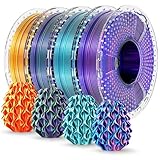
- Dynamic Color Shifts: This dual/tri color silk PLA+ filament delivers a unique visual effect—colors shift as your model rotates, creating prints that look different from every angle. Perfect for eye-catching models, cosplay props, or artistic creations that demand attention.
- Silky Finish with Vivid Shine: With a smooth, satin-like surface and rich, vibrant tones, this silk PLA filament produces a polished look right off the printer—no sanding or finishing required. Ideal for display models and decorative prints.
- Enhanced Toughness & Durability: Made from upgraded PLA Plus (PLA+), this filament offers significantly improved impact resistance and flexibility compared to standard PLA. Prints are less likely to crack or snap, making it a more durable option for functional or intricate parts.
- Tangle-Free, Precision-Wound Spools: Each 250g spool is neatly machine-wound to ensure smooth, consistent feeding without tangles or interruptions. Filament diameter is precisely controlled at 1.75mm with a ±0.02mm tolerance for stable, high-quality prints.
- Small Spools, Big Value: Each set includes four 250g mini spools—perfect for multi-color projects or trying out different combinations without committing to full-size rolls. Vacuum-sealed in reusable storage bags with desiccant to protect against moisture.
Make the decision from your own preview
- Slice the intact model with your normal profile and note the estimates for model, purge or flush, tower, supports, total filament, and time.
- Make a color-based split only where the parts can be joined and still meet the model’s fit and strength needs. Include seams, connectors, and any additional supports in the new design.
- Slice the split version with the same printer, materials, and relevant settings. Compare the total job estimates, including extra bed setups and any sacrificial parts.
- If testing purge-to-infill or a wipe object, inspect the preview for visible contamination and confirm the tower-dependent options are configured as documented.
- Print a small trial when the estimates are close or surface quality and reliability are important. Slicer estimates are a useful comparison, not a guarantee of final material use.
Product prices and availability are accurate as of the date/time indicated and are subject to change. Any price and availability information displayed on Amazon at the time of purchase will apply.

