
Outdated Drivers Are Slowing You Down
One free scan finds every outdated or missing driver and matches the right update for your exact hardware.Free scan · exact hardware matchPC Slower Than It Used to Be?
A free scan shows the junk files, broken settings and background clutter dragging Windows down - then fixes them in one click.Free scan · Windows 10 & 11iTechGuides is reader-supported. When you buy through links on our site, we may earn an affiliate commission. As an Amazon Associate I earn from qualifying purchases. Learn more
Mirobot Simulator is a project-specific simulator for the WLKATA Mirobot 6-DOF educational robot arm. Its project description reports a real-time 3D model, forward and inverse kinematics, joint and Cartesian jogging, taught targets, path simulation, WLKATA G-code import and export, and serial communication. INEX is credited with developing and producing the simulator; WLKATA with the underlying robot platform and design.
What Mirobot Simulator does
The simulator is intended to represent and work with the WLKATA Mirobot, rather than serve as a general-purpose environment for arbitrary robot arms. WLKATA’s official GitHub organization identifies Mirobot as a 6DOF educational robotic arm.
A project article published by Krittamet Thawong on DEV Community on September 23, 2025 describes the simulator as built with Vue, Electron, and Three.js, and identifies version 2.4.7. That is the version stated in the article, not confirmation of the latest available release. The same article credits Innovative Experiment Co., Ltd. (INEX), Thailand, with development and production, and WLKATA Robotics with the original robot platform and design. Read the project description.
Reported features
The project article lists these functions; they are project-reported capabilities, not independently verified performance results.
#1 Best Overall
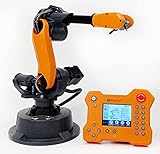
- WLKATA Mirobot Professional Kit. This Professional Kit includes everything in the Education Kit , plus a wireless Bluetooth controller.Part list:Robot arm,Power supply & High-speed USB cable & IDC cable, Pen holding, Micro servo gripper module,Pneumatic set, Multifunctional box,Mirobot Mecha sticker,Handbook,Wireless Bluetooth controller.
- Multiple control methods: computer terminal WLKATA Studio software control, APP mobile phone control, APP mobile phone control, three-dimensional virtual control (V-Rep Ros Matlab),Contains a matching robot controller for better and more comprehensive control
- WLkata Mirobot equipped with laser engraving, writing and drawing, handling and palletizing, mobile app control, etc. Multiple functions, reserved multiple expansion interfaces to support secondary development. Users can develop more application scenarios through software programming and hardware expansion to meet the needs of students of different ages.
- Desktop-level lightweight industrial robotic arm prototype, safe operation, comprehensive functions, freely set actions, add accessories arbitrarily, one arm has unlimited creativity!
- WLKATA is suitable for teaching and training scenarios, color sensor training, multi-fixture coordination training, joint training of six-axis robotic arms and code wheel robotic arms, scene training, painting and calligraphy art training, artificial intelligence voice training, etc.If you have any questions about installation or use, please check the manual or contact us, we will serve you wholeheartedly.
- 3D visualization: a real-time model of the Mirobot.
- Kinematics: forward and inverse kinematics.
- Jogging: joint-space and Cartesian movement controls.
- Targets and paths: taught target points and trajectory simulation. The article says version 2.4.7 expanded support for Jog and Path simulation.
- G-code: import and export for WLKATA G-code.
- Serial communication: communication with a robot over a serial connection is listed as a capability.
How to try it
- Open the Mirobot Simulator demo to see whether the online demo is currently available.
- If you want to inspect or run the project from its source, visit the public source repository and use its current project instructions. The available project description does not establish supported operating systems, installation steps, or licensing terms.
- Check the demo or repository for current release information; version 2.4.7 is the version identified in the September 2025 project article.
The cited material does not establish that every feature requires a physical Mirobot, so ownership should not be treated as a prerequisite for trying the simulator. It also does not establish that simulated movement guarantees safe or accurate behavior on real hardware.
How it fits the WLKATA software ecosystem
WLKATA’s official Python SDK repository describes controlling Mirobot and other WLKATA products through G-code over a serial connection. That provides context for the simulator’s G-code and serial features, but the available sources do not say that the simulator depends on the SDK.
Quick Recap
Best Value

- The WLKATA AI Development Suite includes 9 sensor modules for students to explore every aspect of AI. This suite also supports Open Source platform so users can adopt products supporting Arduino, RS485, Modbus, etc, with this suite, and program them all together in a creative way.
- The WLKATA AI Development Suite features a WLKATA AI Board for MEGA2560, which enables users to program and control multiple (max 99) WLKATA Mirobot robotic arms at the same time .
- Parts List: 1. WLKATA AI Board with screen based on MEGA2560 X 1 2. Sensors Package X 1 (Including 9 sensors: Mpu6050 six axis gyroscope; 5V relay module; Rotate potentiometer module; Two-axis keystroke rocker module; Color recognition sensor; LED (green); LED (red); Button (green); Button (red); 3. Wires Pacakge X1 4. Manual X1 5. Digital textbook with experiments for educators X 1
- The experiment textbook helps educators and students quickly get started with controlling the robot arms, sensors, sliding rails ect to extend their innovative thinking.
- Packing: plastic box with handle + foam filling, easy to carry and take, not easy to damage, safe and guaranteed. When taking it, please handle it with care and place it in a dry and dust-free place
Rank #4

- 【15DOFs】Compared with microbit XGO V1, the XGO robot dog kit V2 has three more high-quality digital servos on the head, forming a mechanical arm structure, which can realize more operation possibilities.
- 【Intelligent Robotic Arm】XGO Robot Dog Kit V2 for micro:bit is equipped with a 3-axis robotic arm, which can realize intelligent gripping, pushing, and handling. Intelligent gripping.
- 【Exclusive Expansion Board】Our technical experts have designed a new generation of expansion boards, which are compatible with golden finger motherboards such as micro:bit motherboards. The inatallation is more convenient and the head will not be more bulky.
- 【19+ Build-in Actions】 The build-in actions are 19+ kinds such as to get down, shake hands, pee and look for food, it is easy to operate via APP ,or ELECFREAKS joystick and microbit makecode program.
- 【TIPS】(1)WITHOUT micro: bit!!! (2)Wiki Tutorial Get: Pls enter "wiki.elecfreaks.com/en/microbit/robot/xgo-robot-kit-v2/" to learn. (3)Strong Technical Support—Pls click “elecfreaks” amazon store and click “Ask a question” to email us! Looking for your consultation!
Rank #3
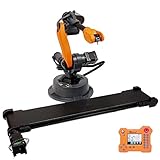
- WLKATA Mirobot Professional Kit. This Professional Kit includes everything in the Education Kit , plus a wireless Bluetooth controller.Part list:Robot arm,Power supply & High-speed USB cable & IDC cable, Pen holding, Micro servo gripper module,Pneumatic set, Multifunctional box,Mirobot Mecha sticker,Handbook,Wireless Bluetooth controller. Conveyor Belt Set.WLKATA conveyor belt set includes conveyor belt and color recognition sensor."
- Multiple control methods: computer terminal WLKATA Studio software control, APP mobile phone control, APP mobile phone control, three-dimensional virtual control (V-Rep Ros Matlab),Contains a matching robot controller for better and more comprehensive control. The conveyor belt set is compatible with WLKATA Mirobot. It can be controlled by WLKATA Studio and programmed by Blockly, Python, taught and played."
- WLkata Mirobot equipped with laser engraving, writing and drawing, handling and palletizing, mobile app control, etc. Multiple functions, reserved multiple expansion interfaces to support secondary development. Users can develop more application scenarios through software programming and hardware expansion to meet the needs of students of different ages. Conveyor Belt can designed as programmable conveyor belt, with adjustable speed and stable performance. "
- Desktop-level lightweight industrial robotic arm prototype, safe operation, comprehensive functions, freely set actions, add accessories arbitrarily, one arm has unlimited creativity! Color recognition sensor can recognize RGB color in the front and within a short distance."
- "WLKATA is suitable for teaching and training scenarios, color sensor training, multi-fixture coordination training, joint training of six-axis robotic arms and code wheel robotic arms, scene training, painting and calligraphy art training, artificial intelligence voice training, etc. Production line with WLKATA Mirobot and this conveyor belt set and experience the fun of playing with one's own automotive mini-factory."
Rank #2

- WLkata Mirobot is a multifunctional high-precision desktop-level robotic arm that provides a broad platform for the development and construction of robot education such as big data applications, smart factories, and Industry 4.0.
- Multiple control methods: computer terminal WLKATA Studio software control, APP mobile phone control, APP mobile phone control, three-dimensional virtual control (V-Rep Ros Matlab),Contains a matching robot controller for better and more comprehensive control
- WLkata Mirobot equipped with laser engraving, writing and drawing, handling and palletizing, mobile app control, etc. Multiple functions, reserved multiple expansion interfaces to support secondary development. Users can develop more application scenarios through software programming and hardware expansion to meet the needs of students of different ages.
- Desktop-level lightweight industrial robotic arm prototype, safe operation, comprehensive functions, freely set actions, add accessories arbitrarily, one arm has unlimited creativity!
- WLKATA is suitable for teaching and training scenarios, color sensor training, multi-fixture coordination training, joint training of six-axis robotic arms and code wheel robotic arms, scene training, painting and calligraphy art training, artificial intelligence voice training, etc.
What to verify before relying on it
- Confirm that the current demo or repository version supports the task you want to try.
- Verify any required connection, hardware, and operating-system details in the current project documentation; the cited project description does not specify them.
- Treat 3D visualization and trajectory simulation as planning or learning tools, not as proof of physical safety, measured accuracy, or guaranteed sim-to-real behavior.
- Do not assume compatibility with robot arms other than the WLKATA Mirobot; the described project is specific to that platform.
Product prices and availability are accurate as of the date/time indicated and are subject to change. Any price and availability information displayed on Amazon at the time of purchase will apply.
Recommended Free Tools

