
Do these 3 things before closing this tab:
1Fix the driver behind crashes, sound loss and screen glitches2Repair Windows errors before they cause bigger problems3Scan for outdated or missing drivers - takes under a minuteiTechGuides is reader-supported. When you buy through links on our site, we may earn an affiliate commission. As an Amazon Associate I earn from qualifying purchases. Learn more
This Mellanox ConnectX-4 Lx Mini-Review Ubiquitous 25GbE verdict is straightforward: the dual-port MCX4121A-ACAT remains a capable 1/10/25GbE SFP28 PCIe adapter, but NVIDIA now lists the ConnectX-4 Lx Ethernet line as end-of-life. It is attractive as a carefully verified used card, not as a current-production purchase.
The card reviewed by ServeTheHome on March 1, 2019, was the Ethernet-focused Mellanox ConnectX-4 Lx MCX4121A-ACAT, also identified as CX4121A. It has two SFP28 ports, a PCIe 3.0 x8 host interface, and support for 1, 10, and 25Gb/s Ethernet. The original review found strong throughput, latency, feature, and value results; the 2026 buying decision additionally depends on the exact OPN, firmware, OEM identity, bracket, cooling, operating system, and cable or optic compatibility.
Key takeaways
- The reviewed MCX4121A-ACAT is a dual-port SFP28 Ethernet adapter supporting 1, 10, and 25Gb/s over a PCIe Gen 3.0 x8 interface.
- A 25GbE link has 2.5 times the nominal line rate of 10GbE, while two active ports provide up to 50Gb/s of aggregate line rate before protocol and hardware overhead.
- ServeTheHome’s March 1, 2019 review awarded the adapter an overall 9.4 score, but that historical result is not a guarantee of performance on current platforms.
- NVIDIA’s current ConnectX-4 Lx Ethernet documentation identifies the product line as end-of-life, so used-market condition and support expectations are central to its value.
- “ConnectX-4” alone is not a sufficient buying description: buyers must distinguish ConnectX-4 Lx Ethernet, InfiniBand or VPI, SFP28, QSFP28, OEM, and OCP variants.
- Short SFP28 DAC links are usually the simplest setup, but cable coding, FEC, switch restrictions, firmware, and transceiver qualification can prevent a physically compatible link from operating.
Mellanox ConnectX-4 Lx Mini-Review Ubiquitous 25GbE: what is the verdict?
The ConnectX-4 Lx is still a good low-cost route to 25GbE when a reliable used card is substantially cheaper than a newer adapter and the buyer can verify the hardware. The card is a poor choice for a deployment requiring current manufacturer lifecycle support, a new warranty, predictable future firmware releases, or guaranteed vendor-qualified optics.
Free tools Windows power users keep installed
One-click scans. No signup required.
The most important distinction is between the original technical review and a current buying recommendation. The 2019 ServeTheHome review established that the adapter was a broadly useful dual-port 25GbE NIC for servers, virtualization, storage, and NAS workloads. NVIDIA’s current ConnectX-4 Lx documentation now labels the Ethernet product line end-of-life. Those facts are compatible: the hardware can remain useful after its product lifecycle ends, but the lifecycle status changes how much a buyer should pay and how much deployment risk is acceptable.
#1 Best Overall
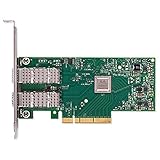
- Open compute project form factor
- Industry-leading throughput and low latency for web access and storage performance
- Maximizing data centers' return on investment (ROI) with multi-host technology
- Smart interconnect for x86, Power, ARM, and GPU-based compute and storage platform
- Cutting-edge performance in virtualized overlay networks
What exactly was reviewed?
The reviewed adapter was the Mellanox ConnectX-4 Lx MCX4121A-ACAT, or CX4121A, an Ethernet-focused card rather than a generic representative of every ConnectX-4 product. The card has two SFP28 cages and a PCIe Gen 3.0 x8 host connection. The relevant specifications are summarized below.
| Specification | MCX4121A-ACAT review configuration | Buying implication |
|---|---|---|
| Family | Mellanox ConnectX-4 Lx EN | Do not confuse it with non-Lx ConnectX-4, InfiniBand, or VPI variants. |
| Network ports | Two SFP28 ports | Uses SFP28 DACs, AOCs, or optical transceivers; it is not a dual-QSFP28 card. |
| Ethernet rates | 1, 10, and 25Gb/s, subject to the exact model and link hardware | It can connect to suitable 10GbE infrastructure, but it cannot turn a 10GbE-only switch into a 25GbE switch. |
| Host interface | PCIe Gen 3.0 x8 | Check the slot’s negotiated generation and lane width rather than only its physical length. |
| Form factor | Low-profile card; listings may include tall and short brackets | Verify that the required bracket is present for the server, NAS, or workstation. |
| Physical dimensions | Approximately 68.90 × 142.24 mm for the cited low-profile card | Check chassis clearance and airflow before installing in a compact system. |
| Operating temperature | 0–55°C in the cited NVIDIA specifications | A silent desktop or NAS may not provide the airflow expected in a server. |
For exact protocol, environmental, dimensional, and power information, use NVIDIA’s model-specific ConnectX-4 Lx specifications. NVIDIA lists approximately 8.9 W for the single-port MCX4111A-ACAT with passive cables, but that figure should not be transferred to the dual-port MCX4121A-ACAT. Dual-port consumption varies with the precise OPN, link speed, and cable or optic.
Which ConnectX-4 Lx model numbers support 25GbE?
The full ordering part number matters more than the family name. The following legacy OPNs are the most useful distinctions for buyers comparing listings.
Quick wins for a faster PC:
Clear out junk files and repair common Windows errorsFree Scan →Scan for outdated or missing drivers - takes under a minuteDriver Scan →Repair Windows errors before they cause bigger problemsFix Now →| Model | Port and interface description | What to know |
|---|---|---|
| MCX4111A-ACAT | Single-port 25GbE SFP28, PCIe 3.0 x8 | Useful when one link is sufficient; do not pay for a dual-port card that the listing does not actually contain. |
| MCX4121A-ACAT | Dual-port 25GbE SFP28, PCIe 3.0 x8 | The model covered by the original mini-review. |
| MCX4111A-ACUT | Single-port 25GbE variant with UEFI | UEFI capability is part of the model identity, not a reason to assume all variants behave identically. |
| MCX4121A-ACUT | Dual-port 25GbE variant with UEFI | Confirm firmware and PSID on an OEM or refurbished card. |
| MCX4121A-ACHT | Dual-port 25GbE with host management and UEFI | Host-management features may matter in server deployments. |
| MCX4121A-ACST | Dual-port 25GbE with secure firmware | Firmware replacement and OEM restrictions require particular care. |
| MCX4131A-BCAT | 40GbE QSFP28 model with lower Ethernet rates | It is not the same physical interface as a dual-SFP28 25GbE card. |
| MCX4131A-GCAT | 50GbE QSFP28 model | It belongs to a different connector and deployment category. |
The NVIDIA legacy adapter manual identifies these as legacy or end-of-life ordering part numbers. A listing that says only “Mellanox ConnectX-4 25G” is incomplete. Request a clear photograph of the PCB label, full OPN, port cages, bracket, and any OEM markings before buying.
Why does 25GbE matter compared with 10GbE?
25GbE matters because one 25GbE link has 2.5 times the nominal line rate of a 10GbE link. The difference is meaningful for parallel storage, virtual-machine traffic, high-bitrate media, and server-to-server workloads that can actually supply or consume the additional bandwidth.
| Link arrangement | Nominal aggregate line rate | Typical reason to choose it | Important limitation |
|---|---|---|---|
| One 10GbE port | 10Gb/s | Existing switch and cable infrastructure | Can constrain fast NVMe, storage replication, and multi-client workloads. |
| One 25GbE port | 25Gb/s | High-speed host or storage uplink | Requires a suitable SFP28-capable port, cable or optic, and compatible FEC behavior. |
| Two 25GbE ports | Up to 50Gb/s aggregate line rate | Two independent links, redundancy, or link aggregation | Two ports do not automatically make one workload twice as fast; switch, protocol, CPU, and storage configuration matter. |
The PCIe Gen 3.0 x8 interface is appropriate for the reviewed dual-port configuration under practical conditions, but “PCIe x8” is not a promise that every system will deliver the same result. A slot operating at fewer lanes, an unusual PCIe topology, remote NUMA placement, or contention with storage devices can reduce effective performance.
25GbE is especially useful when a server has fast NVMe storage, several virtual machines, a high-throughput NAS workload, Ceph or ZFS traffic, networked filesystems, or substantial east-west traffic. 25GbE is less compelling when the storage is slower than the network, the workload is mostly latency-insensitive, the switch remains 10GbE-only, or only one low-demand host needs an upgrade.
The Tool Desk
Outbyte PC Repair FREERepair Windows errors before they cause bigger problemsFix Now →Outbyte Driver Updater FREEFix the driver behind crashes, sound loss and screen glitchesFind Drivers →How did the original ConnectX-4 Lx performance test hold up?
The original review is historical evidence, not a current benchmark. ServeTheHome tested the adapters in multiple server platforms and CPU architectures using iperf3, comparing 10GbE and 25GbE operation. The review reported a large throughput advantage for 25GbE and improved latency attributed to the higher signaling rate.
Rank #2

- 1. CX4121A is a dual 25GbE SFP28 fiber port intelligent RDMA Ethernet adapter with a PCIE Gen 3.0 x8 interface. Based on the Mellanox ConnectX-4 Lx EN MT27711A0 converged Ethernet controller, it provides a cost-effective and flexible Ethernet solution for Web 2.0, cloud, data analytics, database, and storage platforms.
- 2. Ethernet Controller: Mellanox ConnectX-4 Lx EN MT27711A0;Bus Interface: PCIE 3.0 x8; Ethernet Speed: 2x 25GbE; Connector Type: 2x SFP28 Fiber Ports; Remote Boot: RoCE, PXE, iSCSI; Supports RDMA over RoCE; Support I/O Virtualization and SR-IOV; Support Overlay Networks by providing advanced NVGRE, VXLAN and GENEVE.
- 3. Supports IEEE 802.3by, 25 Gb/s; IEEE 802.3ae 10Gb/s; IEEE 802.3az Energy Efficient Ethernet; IEEE 802.3ap; IEEE 802.3ad; 802.1AX; IEEE 802.1Q; 802.1P VLAN tags and priority; IEEE 802.1Qaz; IEEE 802.1Qbb; IEEE 802.1Qbg; IEEE 1588V2; Support Jumbo frame (9.6KB).
- 4. PCIE Gen 3.0 Standard, 8Gb/s Per Lane. PCIE x8 Interface, 64Gb/s Bandwidth Totally, Ensure 2x SFP28 Fiber Ports archive 25GbE simultaneously. Auto-negotiates to PCIE X8, X4 Lane. Auto-switch to PCIE Gen 3.0, Gen 2.0. Support MSI/MSI-X mechanisms.
- 5. Support plug and play on Windows 11, 10 64bit and Windows Server 2012, 2012R2, 2016, 2019, 2022, 2025 64bit. Compatible with RHEL, CentOS, FreeBSD, VMware and other Linux kernel-based systems.
ServeTheHome reported that Intel Xeon Gold systems produced slightly better results than first-generation AMD EPYC “Naples” and Cavium or Marvell ThunderX2 systems in the cited testing. The publication awarded the adapter an overall score of 9.4, with 9.4 for performance, 9.5 for feature set, and 9.6 for value. Those scores describe the product and market context of March 1, 2019; they do not establish a 2026 used-market price or guarantee identical results on a current CPU, kernel, switch, or firmware.
Read the complete ServeTheHome ConnectX-4 Lx review and its test context for the original methodology and charts. A modern retest should report single-stream and multi-stream iperf3, TCP and UDP, standard MTU and jumbo frames, one-port and two-port aggregate traffic, CPU use, RSS and IRQ distribution, NUMA-local versus remote placement, direct-attach versus switched traffic, and a storage workload. Synthetic network throughput alone cannot show whether a NAS, ZFS pool, virtualization host, or NVMe system benefits in practice.
What features does the ConnectX-4 Lx provide?
The ConnectX-4 Lx Ethernet platform supports server-oriented capabilities including hardware offloads, SR-IOV, RDMA-related functions, RoCE, overlay-network encapsulation offload, erasure-coding offload, VLAN and traffic-class features, link aggregation-related operation, and IEEE 1588v2 support documented for the card family.
What’s actually slowing this PC down?
Pick the symptom - the matching free tool is one click away.
Feature availability is conditional. The exact OPN, firmware branch, PSID, operating system, driver, OEM configuration, and platform can determine which functions are exposed and how they behave. An OEM-branded card should not be assumed to have identical firmware controls or management behavior to a retail Mellanox card simply because the chipset is similar. NVIDIA’s ConnectX-4 Lx EN card brief and official user manual are better references for a specific deployment than a generic marketplace description.
The adapter is a sensible fit for Linux virtualization, Proxmox, VMware, Hyper-V, NAS-to-server links, ZFS, Ceph, NVMe-over-TCP, high-bitrate video editing, container traffic, and direct host-to-host connections. RoCE is a specialized case: installing the NIC does not create a reliable RDMA fabric by itself. Switch QoS, priority flow control, explicit congestion notification, MTU, buffering, loss behavior, driver, and firmware must be configured as a coordinated system.
Will a ConnectX-4 Lx work with 10GbE infrastructure?
A suitable 25GbE ConnectX-4 Lx can operate at 10GbE when the switch port, transceiver or DAC, firmware, and link configuration all support that mode. A 25GbE NIC connected to a 10GbE-only switch will not produce a 25GbE link, and a 25GbE transceiver cannot upgrade a 10GbE-only switch port.
SFP28 is the native connector format for 25GbE. SFP28 ports can often use SFP+ equipment for 10GbE, but the connector’s physical fit does not guarantee interoperability. The switch may restrict vendor coding, the cable may support only SFP+ signaling, the transceiver may not support the desired rate, or the NIC and switch may disagree about forward error correction.
Recommended Free Tools
| Link component | Best use | Risks to verify |
|---|---|---|
| Passive SFP28 DAC | Short rack or direct-attach links | Length, vendor coding, switch qualification, FEC, and cable condition. |
| Active optical cable | Longer fixed links without separate optics | Transceiver electronics, coding, power draw, and switch restrictions. |
| SFP28 optical transceivers | Structured fiber cabling and longer distances | Wavelength, fiber type, coding, power, FEC, and compatibility at both ends. |
| SFP+ cable or optic | 10GbE fallback where supported | It does not provide 25GbE signaling, and support is not guaranteed merely because it fits. |
Mellanox’s ConnectX-4 Lx firmware release notes document validated 25GbE cables and restrictions involving particular adapters and modules. Use that material as a compatibility check, not as proof that every third-party optic is unusable. For a used purchase, buying the NIC and cable as a known-working pair, with a return policy, can reduce risk.
Rank #3

- 【Controller】: 25GbE PCI-E NIC with Original Mellanox ConnectX-4 Lx controller, which provide true hardware-based I/O isolation with unmatched scalability and efficiency, achieving the most cost-effective and flexible solution for Web 2.0, cloud, data analytics, database, and storage platforms.
- 【Data Rate】:Dual SFP28 Ports(1GbE/10GbE/25GbE) let you connect to network cable for meeting the demands of data center environments.PCIe v3.0 (8.0GT/s) x8(Compatible with 2.0/1.1); X8/X16 Lane.
- 【Technical Support】:iPXE, DPDK, iSCSI, TCP/IP, UDP/IP, Jumbo Frames, RDMA(RoCE v1, RoCE V2),ASAP², VMDq, SR-IOV, RSS, IPsec.
- 【Supported Operating Systems】:Windows; Windows Server; Linux Stable Kernel version; Ubuntu; Vmware ESXi; Citrix XenServer; Deepin; RHEL/CENTOS; Freebsd; OFED AND WINOF-2; Mikrotik; Debian; BCLINUX; ALIOS; Euler; KYLIN; etc.
- 【I/O virtualization, multi-VM support】:SR-IOV technology enables efficient management of I/O resources of virtual machines by sharing physical resources. And Infiniband technology fully meets the needs of high bandwidth and low latency in big data, its aggregation on virtual I/O and flat network architecture provide a huge pipeline that can be dynamically distributed on demand to improve availability and load balancing.
What should you check about drivers and firmware in 2026?
The ConnectX-4 Lx Ethernet line is end-of-life according to NVIDIA’s current documentation. NVIDIA still hosts manuals and legacy firmware information, but legacy documentation is not the same as current-production availability, indefinite driver maintenance, or a normal manufacturer support lifecycle.
Before changing firmware, identify the adapter’s PCI device, interface, driver, firmware, and transceiver information. On Linux, these commands provide a useful first inventory:
lspci -nn | grep -i -E 'ethernet|mellanox|nvidia'ip -br linkethtool <interface>ethtool -i <interface>ethtool -m <interface>
Replace <interface> with the actual interface name, such as enp3s0f0. Record the PCI identity, interface name, negotiated speed and duplex, driver name and version, firmware version, and transceiver EEPROM details where supported. The PSID and full OPN are particularly important for selecting firmware.
Mellanox/NVIDIA tools such as mstflint or NVIDIA Firmware Tools can be useful, but there is no safe universal flashing command for every ConnectX-4 Lx card. Firmware flashing depends on the operating system, firmware package, PSID, secure-firmware status, OEM restrictions, and adapter type. Flashing an unsuitable image can disable the adapter. Preserve the original firmware information and confirm the exact vendor procedure before writing anything.
Are OEM and OCP ConnectX-4 Lx cards interchangeable?
No. Dell, HPE, Lenovo, Synology, and other OEM cards can be excellent value, but an OEM card may differ in firmware identity, supported management behavior, bracket, heatsink, server qualification, and update path. OCP 2.0 and OCP 3.0 adapters are not drop-in replacements for standard PCIe cards.
| Card type | What must match | Common mistake |
|---|---|---|
| Standard PCIe adapter | PCIe slot, lane allocation, bracket, airflow, firmware, and OS driver | Assuming every low-profile listing includes both bracket sizes. |
| OEM PCIe adapter | OEM firmware expectations, server qualification, bracket, and management behavior | Assuming a Dell or HPE label has no effect outside that vendor’s server. |
| OCP 2.0 adapter | Server OCP 2.0 socket, connector, mechanical fit, BIOS, and management support | Installing it in a standard PCIe slot. |
| OCP 3.0 adapter | Server OCP 3.0 socket, connector, firmware, BIOS, and platform management | Confusing an OCP 3.0 networking daughtercard with a PCIe add-in card. |
Consult NVIDIA’s separate documentation for OCP 2.0 cards and OCP 3.0 cards before purchasing an OCP variant. Verify the server’s exact OCP slot specification, connector, bracket or cage requirements, BIOS support, and network-management expectations.
How do you buy a used ConnectX-4 Lx safely?
Buy the exact adapter, not the family name. A disciplined used-market inspection is more important than a small difference in advertised speed or seller terminology.
- Confirm the family: the card must say ConnectX-4 Lx and Ethernet or EN, not merely ConnectX-4, InfiniBand, or VPI.
- Confirm the OPN: request a photograph showing the complete MCX number, not just “25G.”
- Confirm the ports: make sure the card has SFP28 cages if the plan requires two 25GbE links; do not confuse SFP28 with QSFP28.
- Confirm the host format: verify standard PCIe versus OCP or mezzanine hardware and check the available PCIe lane width.
- Confirm the bracket: check whether the listing includes the low-profile or full-height bracket required by the chassis.
- Ask about firmware: obtain the PSID, firmware version, OEM identity, and secure-firmware status when possible.
- Check the accessories: identify whether DACs, AOCs, or optics are included and whether both ends support the intended speed and FEC.
- Check physical condition: inspect the SFP28 cages, connector area, heatsink, PCB, screw holes, and signs of corrosion or overheating.
- Demand a return option: used cards can have one failed port, incompatible firmware, or a damaged cage that is not visible in a listing photograph.
- Test both ports: validate link, negotiated speed, errors, sustained traffic, and temperature before putting the adapter into production.
A used card without a visible model label, return rights, or a credible firmware identity should be priced as a compatibility gamble. If its price approaches a newer-generation adapter, the older card’s EOL status removes much of its value advantage.
Rank #4

- Contoller: With Mellanox ConnectX-4 controller chip.Hardware-based I/O virtualization, Efficient I/O consolidation to reduce data center cost and complexity.
- Technical Support: DPDK、iSCSI、Jumbo Frames、VMDq、SR-IOV, RSS, IPsec offload, FCoE、RDMA(RoCE v1, RoCE V2)
- Multi-rate:25Gb/10Gb/ 1Gb data rates supported. Multi-host technology allows up to 4 independent hosts to be connected.
- Easy Installation: Download it from the official website. Includes low-profile and full-height brackets to support standard and ultra-thin computers/servers.
- Operation Systems Support: Windows 8.1/10/11、Windows Server 2003/2003 R2/2008/2008 R2/2012 R2/2016 R2/2019 R2/2022 R2 or later、CentOS / RHEL 7.2 or later;Ubuntu 14.04, 16.04 or later;SLES 12 SP2/SP3 or later;Oracle Linux 7.8/7.9 or later;Linux Stable Kernel version 3.x, 4.x, 10.x or later;Vmware ESX/ESXi 5.x, 6.x, or later;Citrix XenServer Host 7.1
What causes common ConnectX-4 Lx failures?
Why does the link come up at 10GbE instead of 25GbE?
A 10GbE link usually means that the switch, DAC or optic, coding, forced speed, FEC configuration, firmware, or advertised model does not support a working 25GbE combination. Check both ends with ethtool, verify the cable’s actual capability, and compare the switch port configuration with the NIC’s supported modes.
Why does one port work while the other port fails?
Test the suspect port with a known-good cable and switch port. A failed DAC, switch-side configuration, insufficient airflow or power, OEM port configuration, damaged SFP28 cage, or a used card with one failed port can produce this symptom.
Why is the card detected but no network interface appears?
Investigate the driver, firmware compatibility, Secure Boot or UEFI settings, OEM firmware expectations, PCIe lane allocation, BIOS slot enablement, and kernel logs. PCIe errors or a card detected without a usable interface often point to platform or firmware conditions rather than a cable problem.
Why is iperf3 slower than expected?
Check single-stream versus multi-stream traffic, CPU frequency, RSS, IRQ affinity, NUMA locality, MTU consistency, TCP window scaling, negotiated PCIe width and generation, switch congestion, FEC, pause or PFC settings, cable errors, and storage bottlenecks. A 25GbE line rate does not guarantee 25Gb/s of application throughput.
Under sustained dual-port load, also check temperature and airflow. Enterprise NICs are designed around server airflow; a used ConnectX-4 Lx in a quiet desktop, compact NAS, or poorly ventilated workstation may run substantially hotter than it did in a rack server.
How does the ConnectX-4 Lx compare with newer adapters?
The ConnectX-4 Lx is strongest when low used cost and broad existing compatibility matter more than lifecycle support. A newer adapter is stronger when the deployment is new, supported, warranty-sensitive, or dependent on newer features. Compare exact SKUs rather than treating an entire vendor family as interchangeable.
| Option | Best fit | Lifecycle and compatibility position | Main trade-off |
|---|---|---|---|
| Used ConnectX-4 Lx MCX4121A-ACAT | Budget dual-port 25GbE in a homelab, NAS, virtualization host, or existing Mellanox environment | Technically capable but EOL; exact OPN, firmware, cable, and condition must be checked. | Less predictable support, used condition, OEM variation, and no universal current-production guarantee. |
| ConnectX-5 | Buyers needing a newer generation or broader feature path | Potentially better fit than ConnectX-4 Lx, depending on the exact card and operating system. | Price, power, connector type, and feature differences vary by SKU; no universal advantage should be assumed. |
| ConnectX-6 Lx | New deployments seeking current NVIDIA 25/50GbE product positioning | NVIDIA presents ConnectX-6 Lx as a current family for enterprise, cloud, edge, and telecommunications workloads. | Availability and pricing may be channel-based, and the chosen SKU still needs compatibility checking. |
| Intel or Marvell 25GbE adapter | Environments favoring another vendor’s native OS support or server qualification | Can be preferable when the server vendor officially qualifies the exact adapter. | Driver, RDMA, SR-IOV, firmware, management, and switch behavior must be evaluated for the exact model. |
NVIDIA’s current Ethernet adapter family page is the appropriate starting point for investigating ConnectX-6 Lx and other current products. The page does not establish a universal price or make every ConnectX-6 Lx SKU equivalent to the reviewed dual-SFP28 card.
Who should buy the ConnectX-4 Lx?
Buy the ConnectX-4 Lx when a used or refurbished card is acceptable, the exact model is documented, the system has a suitable PCIe Gen 3 x8-or-better slot, one or two SFP28 ports are useful, and the EOL status fits the intended service life. Linux and enterprise virtualization environments with administrators comfortable checking drivers, firmware, cables, and switch settings are the strongest candidates.
Best Value

- Open compute project form factor
- Industry-leading throughput and low latency for web access and storage performance
- Maximizing data centers' return on investment (ROI) with multi-host technology
- Smart interconnect for x86, Power, ARM, and GPU-based compute and storage platform
- Cutting-edge performance in virtualized overlay networks
Choose a newer adapter when the deployment requires current manufacturer support, a new warranty, regular firmware releases, vendor-qualified optics, or newer-generation features. A new server rollout should not select the ConnectX-4 Lx solely because an old review awarded it a high value score.
Skip 25GbE altogether when the switch, storage, CPU, PCIe topology, or workload cannot use the bandwidth. A well-configured 10GbE network can be a better value than a 25GbE upgrade whose bottleneck remains elsewhere.
Frequently Asked Questions
Is the Mellanox ConnectX-4 Lx still worth buying in 2026?
The Mellanox ConnectX-4 Lx is still worth considering as an inexpensive, verified used 25GbE adapter, especially the dual-port MCX4121A-ACAT. NVIDIA identifies the Ethernet product line as end-of-life, so buyers needing current lifecycle support, a new warranty, or predictable future firmware should choose a newer adapter.
Which Mellanox ConnectX-4 Lx model is the dual-port 25GbE card?
The reviewed dual-port 25GbE SFP28 card is the MCX4121A-ACAT, also identified as CX4121A. Buyers should verify the complete OPN because ConnectX-4-family listings may describe single-port, QSFP28, InfiniBand, VPI, OEM, or OCP hardware instead.
Can a ConnectX-4 Lx 25GbE NIC connect to a 10GbE switch?
A suitable ConnectX-4 Lx 25GbE adapter can operate at 10GbE with compatible SFP+ or SFP28 cabling and a switch port that supports the required mode. The connector fit alone does not guarantee interoperability; coding, FEC, firmware, and switch restrictions must also match.
Does installing a ConnectX-4 Lx automatically enable RoCE?
No. Reliable RoCE requires coordinated switch and host configuration, including QoS, priority flow control, explicit congestion notification, MTU, buffering, loss behavior, drivers, and firmware. The NIC alone does not create a correctly configured RDMA fabric.
What should a used ConnectX-4 Lx listing include?
A credible listing should show the full OPN, SFP28 port count, standard PCIe or OCP format, bracket, OEM branding, firmware or PSID information when available, included cables or optics, physical condition, and a return policy. A listing that says only “Mellanox 25G” leaves too much compatibility risk unresolved.
Crashes, No Sound, or Screen Glitches?
Random freezes, missing sound and display glitches usually trace back to one bad driver. Find and replace yours safely.Free scan · under a minutePC Slower Than It Used to Be?
A free scan shows the junk files, broken settings and background clutter dragging Windows down - then fixes them in one click.Free scan · Windows 10 & 11The Bottom Line
The ConnectX-4 Lx remains a capable and often excellent used 25GbE adapter, but it is no longer a current-production recommendation. The MCX4121A-ACAT is attractive when its two SFP28 ports, PCIe 3.0 x8 interface, and 1/10/25GbE capability solve a real bandwidth problem at a low used cost. Verify the OPN, Ethernet identity, OEM firmware, bracket, cooling, PCIe slot, cable, switch, and return policy before buying; select a newer-generation adapter when lifecycle support matters more than purchase price.
Quick Recap
Product prices and availability are accurate as of the date/time indicated and are subject to change. Any price and availability information displayed on Amazon at the time of purchase will apply.

