
Windows Errors? Fix Them Before They Spread
Repair common Windows errors and clear accumulated junk for a smoother, more stable PC - no reinstall needed.Free scan · no reinstallCrashes, No Sound, or Screen Glitches?
Random freezes, missing sound and display glitches usually trace back to one bad driver. Find and replace yours safely.Free scan · under a minuteLuke Wren’s PicoStation 3D is an experimental console board design pairing a Raspberry Pi RP2040 microcontroller with a Lattice iCE40 UP5k FPGA. Its central idea is to divide console work between the two chips in different ways, including giving the RP2040 some 3D processing tasks and the FPGA others. It is not a documented, working game console: the project repository describes it as unfinished and untested, and says the prototype had not been brought up and firmware had not been written.
What is PicoStation 3D?
PicoStation 3D is a custom board concept by Luke Wren, built around an RP2040 and an iCE40 UP5k FPGA. The repository presents it as an exploration of how little hardware might be needed for a 3D games console, as well as a way to develop communication between a microcontroller and an FPGA. Wren described it as “an unfinished, untested project to develop a 3D games console based on an RP2040 microcontroller and an iCE40 UP5k FPGA.” The project repository is the primary source for its board design and status; Hackster’s February 4, 2021 report identifies Wren as an engineer who worked on the RP2040 project at Raspberry Pi.
The board layout specifies 8MiB of HyperRAM attached to the FPGA, microSD storage, a micro USB port for power and RP2040 programming or serial communication, a 3.5mm audio jack, two SNES controller sockets, and an HDMI connector carrying DVI-D video from the FPGA. These are design specifications, not proof that a finished console produced gameplay or video.
How could the RP2040 and FPGA share console work?
Wren outlined four possible divisions of labor. They are architectural options, not implemented or benchmarked operating modes.
What’s actually slowing this PC down?
Pick the symptom - the matching free tool is one click away.
#1 Best Overall

- ⚙️【Ready-to-Use RP2040 Development Board】Equipped with pre-soldered pin headers, this RP2040 development board is ready for wiring and prototyping without additional soldering. It is designed for electronics enthusiasts, students, makers, and developers to build and test embedded projects.
- ⚙️【Powerful Dual-Core RP2040 Microcontroller】Powered by a dual-core ARM Cortex-M0+ processor running up to 133MHz, with 264KB SRAM and 2MB onboard Flash memory, providing reliable performance for programming experiments, automation systems, IoT applications, and real-time control projects.
- ⚙️【MicroPython & C/C++ Programming Support】Supports MicroPython and C/C++ development environments, allowing users to create and upload their own programs via USB. Please note this is a programmable development board and requires user code or firmware to perform specific functions.
- ⚙️【Rich Expansion Interfaces for DIY Projects】Featuring 30 GPIO pins, ADC, PWM, SPI, I2C, UART, and USB 1.1 interfaces, the board allows easy connection with sensors, displays, motors, LEDs, and other electronic modules for customized projects.
- ⚙️【Compact Platform for Learning & Prototyping】Designed for STEM education, coding practice, robotics, and embedded system development. The compact RP2040 controller board provides a flexible platform for beginners and advanced users to explore electronics and create custom devices.
| Possible arrangement | RP2040 role | FPGA role |
|---|---|---|
| Video bridge | Runs graphics routines and the rest of the console tasks. | Acts as a parallel-to-DVI-D bridge. |
| FPGA soft processor | Provides a USB-serial bridge and loads firmware. | Hosts a soft processor and other console functions. |
| Graphics hardware | Runs game logic, audio, controller access, and SD access. | Runs graphics hardware, with local HyperRAM serving as video memory. |
| Split 3D processing | Handles vertex-side 3D operations. | Handles fragment-side 3D hardware. |
The options differ in where game logic and peripheral control live, how video is generated, and whether a soft processor is hosted on the FPGA. The title’s “or vice versa” points to that flexibility: the RP2040 could do graphics work, or the FPGA could take on more of the console role. The project material does not establish which option was completed or how any would perform.
What does the board design specify?
The repository describes 12 connections between the FPGA and microcontroller, including an RP2040 clock output connected to a global clock input on the FPGA. The intended link is an 8-bit parallel bus with a free-running clock, a valid-ready handshake, and an IRQ line.
Rank #2
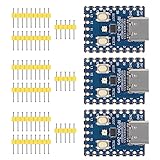
- Support C/C++, MicroPython, complete SDK, open source materials tutorial, easy to use, can be quickly embedded in applications
- Dual-core Arm Cortex M0+ processor, flexible clock running up to 133 MHz
- 264KB of SRAM, and 2MB of on-board Flash memory;USB-C connector, keeps it up to date, easier to use
- Castellated module allows soldering direct to carrier boards; USB 1.1 with device and host support
- Low-power sleep and dormant modes; Drag-and-drop programming using mass storage over USB
Those interface pins overlap with pins used to load FPGA configuration memory. The design therefore calls for the RP2040 to write the FPGA bitstream from its own flash at boot; it does not include a separate external FPGA configuration flash. The board also specifies internal 128k SPRAM on the FPGA, alongside the 8MiB HyperRAM connected to it. These capacities describe the design, not measured performance.
Why isn’t it a ready-to-build console?
The repository’s status and warnings matter more than the board’s console-like connectors. Wren says a first board iteration had been laid out and a prototype soldered, but it had not been brought up and no firmware had been written at the time described. Without bring-up or firmware, the sources do not demonstrate working gameplay, graphics performance, or a usable console.
The Tool Desk
Outbyte PC Repair FREEClear out junk files and repair common Windows errorsFree Scan →Outbyte Driver Updater FREEScan for outdated or missing drivers - takes under a minuteDriver Scan →Rank #3

- Support C/C++, MicroPython, complete SDK, open source materials tutorial, easy to use, can be quickly embedded in applications
- Dual-core Arm Cortex M0+ processor, flexible clock running up to 133 MHz
- 264KB of SRAM, and 2MB of on-board Flash memory;USB-C connector, keeps it up to date, easier to use
- Castellated module allows soldering direct to carrier boards; USB 1.1 with device and host support
- Low-power sleep and dormant modes; Drag-and-drop programming using mass storage over USB
Wren explicitly warns against copying the revision-A schematic because its power chain violates the UP5k’s sequencing requirements. He also notes audible digital supply noise in the audio jack, controller ports accessible only from the RP2040, SNES sockets transposed left-to-right relative to a real SNES, and a double-sided component layout that makes home reflow harder. These are practical design caveats, not evidence that the board was repaired or that later revisions resolved them.
Independent reader supportYour contribution helps us test, update, and keep practical guides available for everyone.What can builders take from the project?
PicoStation 3D is useful as an example of architectural experimentation: it sketches multiple ways a small microcontroller and FPGA might divide graphics, control, storage, and video tasks, and specifies a communication link between the chips. It should not be treated as a proven build guide. In particular, follow the author’s warning not to copy the revision-A schematic. The repository identifies its source files as CC0-1.0, but that license does not change the stated electrical caveat.
Rank #4

- RP2040 microcontroller chip designed by Raspberry Pi in the United Kingdom. Dual-core ARM Cortex M0+ processor, flexible clock running up to 133 MHz
- 264KB of Static Random, and 16MB of onboard Flash memory. Onboard DVI interface can drive most HDMI screens (DVI compatibility required). Supports using as a USB host or slave via onboard PIO-USB port
- Onboard TF card slot for reading and writing TF card. Onboard Lithium battery recharge/discharge header, suitable for mobile scenarios. USB 1.1 with device and host support
- Drag-and-drop programming using mass storage over USB. Low-power sleep and dormant modes. 2 × SPI, 2 × I2C, 2 × UART, 4 × 12-bit ADC, 16 × controllable PWM channels
- Accurate clock and timer on-chip. Temperature sensor. Accelerated floating-point libraries on-chip. 8 × Programmable I/O (PIO) state machines for custom peripheral support
Someone considering a wired SNES-style controller should also note that the board’s sockets are transposed relative to the console layout. The sources do not identify a tested controller model or establish present-day availability of a compatible PicoStation board or parts.
Quick Recap
Best Value

- Advanced Dual-Core Processor: Features a 133 MHz ARM Cortex M0+ with 264KB SRAM and 2MB Flash for fast, flexible project development
- Extensive Software Support: Program easily for official Raspberry Pi C/C++ and MicroPython SDKs on Windows, MacOS, Linux, and Raspberry Pi OS
- Rich Hardware Interfaces: Offers 30 GPIO pins, 4 analog inputs, and support for SPI, I2C, UART, ADC, and PWM for versatile connectivity
- USB-C powered and ready for diverse applications in DIY electronics, education, and prototyping
- Compact IoT Starter Kit: Ideal for beginners to experience IoT with the efficient RP2040 processor; robust performance and swift task completion
Product prices and availability are accurate as of the date/time indicated and are subject to change. Any price and availability information displayed on Amazon at the time of purchase will apply.

