
Free tools Windows power users keep installed
One-click scans. No signup required.
iTechGuides is reader-supported. When you buy through links on our site, we may earn an affiliate commission. As an Amazon Associate I earn from qualifying purchases. Learn more
Toast may suit a small restaurant that wants restaurant-focused point-of-sale workflows and is comfortable using Toast-approved hardware and accepting custom payment-processing rates. Its advertised starting prices are not all-in totals: device choices, additional hardware, software add-ons, payment channel, and contract terms all affect the actual cost. Get a written quote for your planned setup and compare it with alternatives using the same assumptions before deciding.
What Toast’s published starting prices include—and don’t
Toast’s 2026 cost guide lists an eligible Starter Kit at $0 per month and the Point of Sale plan at $69 per month. These are starting prices, not guarantees of the total cost. Toast describes the Starter Kit as an offer for eligible new, single-location restaurants, with a one-terminal hardware configuration and no upfront hardware cost; payment-processing fees and applicable terms still apply. The Point of Sale plan’s final cost can vary with hardware choices, additional devices, and add-ons. Larger or different configurations receive custom pricing. Toast’s 2026 restaurant POS cost guide explains the listed plans.
The Toast pricing page says its advertised prices apply to new customers and single locations, include the first hardware terminal subscription, and may have charges for subsequent devices. Check eligibility and all terms against your own quote; the $0 starting price should not be treated as a promise of a cost-free system.
To understand the real cost, compare the full first-year and ongoing amounts. Include the exact device list, software modules, processing, installation or networking, training, integrations, and any planned expansion. A low entry price can be outweighed by processing or add-on costs.
#1 Best Overall

- GUARANTEED TO FIT TOAST REGISTER PRINTER The thermal paper rolls included in this credit card machine paper roll bundle are designed by Paper Planet to fit and work perfectly with the Toast TP200 terminal credit and debit card reader thermal receipt paper printer.
- HIGH QUALITY Thermal paper is a heat-sensitive paper that is made with a special coating for inkless receipt printing. Paper Planet receipt paper provides clean, smudge-free printing every time. Each paper roll is inspected for quality before it is packed and shipped. To maintain the quality of this product, store in a cool dark place and avoid contact with oil, plastics, chemicals, and fat.
- FOR ANY BUSINESS Paper receipts are needed by every business: retail shops, restaurants, and even doctor's offices! The most popular type of POS system receipt paper printer is a thermal printer which etches the transaction details into the paper. Chances are if a receipt is printing thermal paper is in use! The Paper Planet thermal printer paper rolls are all bright white for clear printing.
- MORE PRINTS PER ROLL Nothing is more frustrating than changing your POS receipt paper in the middle of a sale. Each roll of our Toast printer credit card paper provides you with more prints per roll than standard receipt roll paper. Every Toast roll also features a pink warning mark for when the roll is running low.
- KNOW WHEN TO REPLACE Every roll also features a clear pink warning mark near the end of the paper. This simple but important feature helps prevent unexpected runouts by giving staff a visual cue that it’s time to replace the roll.
Will Toast’s hardware work for your restaurant?
Toast says its services may be used only through devices it identifies as compatible and approved, and that it may change which devices are approved. That limits operators who want to reuse generic tablets or build a system around arbitrary hardware.
Before choosing a plan, ask Toast to list the approved model numbers and prices for every device your setup needs:
Rank #2
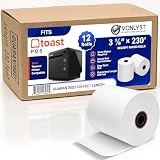
- PRINTER COMPATIBILITY works harmoniously with over-the-counter Toast Thermal Printer TP200 EPSON TM-20, M-30 & M-30 II, TM-88 V
- PAPER ROLL SIZE designed to maximize the performance of your Toast POS System. Vonlyst thermal receipt paper rolls are precisely manufactured in size of 3 1/8” x 230’ (width x length)
- PACKAGE 12 Rolls per case
- GUARANTEED 230 feet long of BPA free paper per roll
- PRINTING PAPER TECHNOLOGY Vonlyst thermal paper roll is coated with thermal sensitive and reactive surface, Toast TP200 thermal printer provides heat once in contact with thermal paper it generates the black text and graphics on your receipt paper. No ribbon required it’s an affordable and efficient solution to print inkless credit card machine and point of sales paper receipts.
- Terminals and handhelds
- Kitchen display screens
- Printers and other peripherals
Get the device charges, including any subscription costs for additional terminals, in the written quote. The pricing page also advertises Toast Care with every software subscription: support is available 24/7/365 by phone or web messaging. That describes availability and channels, not independently measured response times or service quality.
Do these 3 things before closing this tab:
1Clear out junk files and repair common Windows errors2Scan for outdated or missing drivers - takes under a minute3Repair Windows errors before they cause bigger problemsHow payment processing affects the fit
Toast says it builds a custom processing rate around a restaurant’s characteristics. It distinguishes card-present payments—such as in-person swipe, chip, or contactless transactions—from card-not-present payments, where the cardholder is absent or card details are keyed. The latter category can include online orders, third-party delivery, phone orders, and online invoices. Toast says card-not-present transactions cost more to process because of higher fraud risk. Request separate rate assumptions for each meaningful channel instead of applying an in-person rate to all sales. See Toast’s payment-processing fees page.
Rank #3

- Optimized for Toast Terminals, Toast Go, and Toast Tap. Perfect for fast manager overrides, employee logins, and secure staff access during busy shifts. Toast POS Cashier Cards
- 25 Card Pack: High-quality white PVC cards with HiCo magnetic stripes. Durable design resists wear and demagnetization from daily use in high-volume restaurant environments.
- 1 PRO Cleaning Card: Includes 1 pre-saturated IPA cleaning swipes. Safely removes grease, dust, and grime from card reader heads to prevent read errors and extend hardware life.
- The ultimate bundle for restaurant managers. Keep your staff moving with reliable swipe cards and keep your hardware clean for seamless payment processing.
- The perfect size for small to medium teams. This 25-pack provides a professional, uniform look for your staff while ensuring you always have spare cards on hand for new hires.
Interchange is set by card networks and paid to the issuing bank. Toast says it usually consists of a percentage plus a per-transaction amount, and rates vary by card type and transaction method. For that reason, a quoted processing rate is hard to evaluate without your transaction count, average ticket, card mix, and sales channels.
Understand the Interchange Plus example
Toast Support illustrates Interchange Plus with a hypothetical $10 sale: $0.38 interchange (1.80% + $0.20), $0.02 in network fees (0.20%), and $0.15 in Toast markup (0.50% + $0.10), for a total of $0.55. This is Toast’s example calculation, not a universal offer, a typical cost, or a quote for your restaurant. See the Toast Support explanation of Interchange Plus fees.
Rank #4

- BPA and BPS Free (Phenol-Free) Thermal Paper: Our thermal paper is a heat-sensitive paper that is made with a special coating for inkless receipt printing without the use of chemicals such as BPA and BPS. Each paper roll is inspected for quality before it is packed and shipped. To maintain the quality of this product, store in a cool dark place and avoid contact with oil, plastics, chemicals, and fat.
- For Any Business: Paper receipts are needed by every business including retail shops, restaurants, and even doctor's offices! The most popular type of POS system receipt paper printer is a thermal printer which etches the transaction details into the paper. Chances are if a receipt is printing thermal receipt paper is in use! The Paper Planet thermal printer paper rolls are all bright white for clear printing.
- More Prints Per Roll: Nothing is more frustrating than changing your POS receipt paper in the middle of a sale. Each roll of our thermal printer paper for Toast POS system provides you with more prints per roll than standard receipt roll paper. Every roll also features a pink warning mark for when the roll is running low.
- Guaranteed To Fit Toast TP200: The rolls included in this credit card machine paper bundle are designed by Paper Planet to work perfectly with the Toast TP200 terminal credit and debit card reader thermal receipt paper printer and provide clean, smudge-free printing every time.
- Know When To Replace: Every roll also features a clear pink warning mark near the end of the paper. This simple but important feature helps prevent unexpected runouts by giving staff a visual cue that it’s time to replace the roll.
What to know about Toast Dual Pricing
Toast Support’s FAQ, last updated September 25, 2026, says Dual Pricing is available only to eligible new U.S. customers when they sign up; existing Toast customers are not yet eligible. In the described setup, a guest sees a card total and a discounted cash total. The default cash discount is 4%. Toast recommends raising listed menu prices by 4% if processing costs have not already been incorporated into those prices. That is Toast’s product recommendation, not an independent estimate of the cost for every restaurant.
Crashes, No Sound, or Screen Glitches?
Random freezes, missing sound and display glitches usually trace back to one bad driver. Find and replace yours safely.Free scan · under a minutePC Slower Than It Used to Be?
A free scan shows the junk files, broken settings and background clutter dragging Windows down - then fixes them in one click.Free scan · Windows 10 & 11Dual Pricing does not eliminate contractual processing charges on card transactions, according to Toast. Toast also says merchants must display the standard card price and clearly disclose the cash discount, and that merchants remain responsible for any additional requirements in their jurisdiction. Check local rules and your own contract before relying on the feature. Details are in the Toast Dual Pricing FAQ.
Best Value

- IPG ProActive 9H Hardness Screen Protector for your specific device. IPG ProActive films instead of tempered glass help prevent potential damage to your device and ensures your safety. IPG ProActive films CAN NOT broken.
- IPG ProActive requires dry application. The application steps are in the packaging. IPG ProActive unique ingredients provide Smooth Glass Touch, Ultra Responsive and High Clarity for your screen.
- Free lifetime replacement warranty for the life of your IPG **ProActive** TOAST Flex POS Terminal 14 Inch Touchscreen Screen Protector
- Anti Scratch Smudge & Shock Proof Nano Technology Guard
- IPG ProActive is virtually invisible, protects your display from unwanted scratches and repels dust, while reducing signs of daily wear
How to compare Toast with another POS
Compare systems over the same expected contract period and with the same restaurant setup. Toast’s cost guide recommends matching hardware, features, transaction assumptions, and contract period. Use a written quote and check these items side by side:
- Number and model of terminals, handhelds, kitchen displays, printers, and other devices
- Software plans, modules, online ordering, and delivery channels
- Transaction volume, transaction count, average ticket, card mix, and card-present versus card-not-present sales
- Setup, installation, networking, migration, training, and integrations
- Support, replacement devices, and expected expansion costs
- Subscription and device charges, payment-rate structure, and any minimums
- Contract term, renewal, cancellation, hardware ownership or financing, and what happens if subscription fees or processing rates change
Ask for the merchant agreement and order details in writing. The public pricing pages do not establish a universal contract length or cancellation fee for an individual customer, so confirm those terms in the agreement you would sign. Toast’s cost guide is a useful starting point for building a like-for-like comparison.
Who is Toast a good fit for?
Toast is worth considering if its restaurant-oriented workflows match your operation, its approved devices fit your floor and kitchen, and the full written quote works for your sales mix and budget. It may be a weaker fit if keeping existing generic hardware is essential or if the quoted processing and device costs do not compare favorably with alternatives. There is no basis in these published figures alone to call Toast cheaper or more expensive than another POS; the decision depends on your configuration and actual offers.
Quick Recap
Product prices and availability are accurate as of the date/time indicated and are subject to change. Any price and availability information displayed on Amazon at the time of purchase will apply.

