
Free tools Windows power users keep installed
One-click scans. No signup required.
iTechGuides is reader-supported. When you buy through links on our site, we may earn an affiliate commission. As an Amazon Associate I earn from qualifying purchases. Learn more
If nine of your 14 scheduled posts appeared at 4 AM for your audience, first find out which clock each system used. A calendar can show your browser’s local time while a scheduler publishes according to a connected channel’s time zone. The title’s numbers describe the scenario, not an independently verified incident; the checks below help determine whether posts actually went out at the wrong time or only looked wrong in the calendar.
Why a scheduled post can appear at the wrong time
“Scheduled for 9 AM” is ambiguous unless you know the time zone attached to that time. The scheduler may use your browser’s zone to draw its calendar, a separate zone for a connected social channel’s publishing schedule, and an audience’s local zone as the target you care about. A difference in any of these can make the displayed time, actual publish time, and intended audience time seem inconsistent.
For example, Buffer says its calendar can display times in the browser’s local time zone while publishing according to the time zone configured for the channel. Its individual channel queue shows times in that channel’s zone. Buffer also allows connected channels to have separate time zones and posting schedules. Buffer’s time-zone and posting-schedule guidance explains these distinctions.
The Tool Desk
Outbyte PC Repair FREEClear out junk files and repair common Windows errorsFree Scan →Outbyte Driver Updater FREEFix the driver behind crashes, sound loss and screen glitchesFind Drivers →Trace the posts before changing the schedule
Work through the affected posts one at a time, recording the date and time at each stage. That separates a genuine publishing error from a difference in how a calendar displays the same moment.
#1 Best Overall
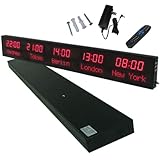
- 【GLOBAL MULTI-TIME ZONE DISPLAY】High-definition LED World Clock simultaneously showcases time across 5 countries/cities with intelligent time zone switching (customizable city+time layouts). Ideal for transnational operations and cross-time-zone collaboration.
- 【DUAL-MODE FLEXIBLE INSTALLATION】Innovative wall-mount + floating design. Aerospace-grade aluminum alloy frame with steel cable suspension system creates modern minimalist wall art or sci-fi inspired levitating time display.
- 【SMART WIFI AUTO-SYNC】Self-calibrating system syncs global clocks via primary city setting. Supports 99-minute custom rotation intervals. Zero manual adjustment ensures punctuality for international conferences.
- 【ULTRA-CLEAR ADAPTIVE DISPLAY】1000cd/m² high-brightness LEDs with 140° wide viewing angle remain legible beyond 15m. Auto-dimming light sensor adapts to environments – perfect for conference halls/airports/schools 24/7.
- 【INDUSTRIAL-GRADE DURABILITY】Aerospace-grade aluminum construction with 20W low-power operation. IP54-rated protection enables stable 24/7 performance. Transforms corporate HQs to boutique hotels into functional art installations.
- Identify the scheduler and channel. Note which service scheduled each post and which social account it was meant to reach. If posts went through different tools or channels, do not assume they share settings.
- Check the time zone configured for each connected channel. Look in the scheduler’s channel or account settings rather than relying on the zone shown by your device or calendar.
- Compare the calendar with the channel queue. In Buffer, the calendar may use browser-local time, while the individual channel queue shows the channel’s configured zone. Check which view you are reading before editing or rescheduling posts. Buffer’s documentation describes its display and publishing behavior.
- Compare scheduled and published timestamps. Use the scheduler’s record and, where available, the social channel’s post timestamp. Write down the full date as well as the clock time: converting from UTC can move a post onto the previous or following local calendar day.
- Compare the actual time with the audience’s intended local time. If the post went out at the scheduled instant but that instant was 4 AM where the audience is, the publishing system may have followed its configuration correctly; the target time or chosen zone may have been wrong.
- Check daylight-saving behavior. Find out whether the selected time zone changes its UTC offset and whether the scheduler adjusts queued posts when that happens. Hootsuite says its scheduled posts automatically adjust for daylight saving time in the time zone selected in its settings. That is Hootsuite’s documented behavior, not a rule for every scheduler. Hootsuite’s guidance on recommended times and its calendar documentation describe product-specific scheduling behavior.
- After confirming the publishing times, adjust and monitor. Correct the relevant channel zone or post times, then check a few upcoming posts. Avoid changing every queued post until you know whether the mismatch is in the channel configuration, the calendar display, or the intended audience time.
How to choose posting times after fixing the mismatch
Correct time-zone handling tells you when a post will publish; it does not tell you when your particular audience is most likely to engage. Start with the audience and account data you actually have, then test a small number of time slots and compare results over time. Do not treat one recommended hour as universally optimal.
Hootsuite says its recommended times are based on engagement with the account’s posts in the last 30 days. Its help documentation says an account needs at least three posts with some engagement during that period to be included in the calculation. Those are Hootsuite’s stated eligibility rules, not a general threshold or guarantee of better performance. See Hootsuite’s explanation of recommended scheduling times.
Rank #2

- Large Digital Wall Clock with Big Numbers - Easy to Read: WallarGe digital wall clock has a high-definition LCD screen measures 14x6 inch and the time display is 8.1x4.3 inch, the large display helps you read the time from many angles at a room distance. You can also read the indoor temperature and date on screen for full information
- Digital Wall Clock Battery Operated - Easy to Setup: The clock is supported by 4xAA battery (not included). There is a low battery indicator display on screen when battery is not power enough, no more worries about forgetting to replace new batteries. The function buttons are at the back which are easily to set
- Day and Temp Display Switchable: There are three modes optional for the day/temp display: Day only, Temp only, Day and Temp display in turns every 10s. Just click the button at back to choose the display mode you favored. No matter which mode of day/temp you choose, the time and date will not change
- Wall Mount Large Digital Clock with Fold-out Stand - Digital Clock for Wall or Desk: The clock comes with a mounting template ruler showing 8.7 inches distance between two mounting holes, so you don't need to measure holes on wall. If you intend it to be placed on desk with no holes on wall, you can just unfold the fold-out stand
- Wall Clock Large Display with AUTO DST: The clock will automatically adjust time in Daylight Saving Time with AUTO DST on. It has two time display modes (Military time and Standard time), just click 12/24 button to switch. And the alarm is optional, it can be turned off manually if for no need
A 2015 paper, When-To-Post on Social Networks, studied personalized timing recommendations and reported audience-reaction gains of up to 17% on Facebook and 4% on Twitter in its studied setting. Those figures belong to that study; they are not a forecast for a present-day account or a different platform.
What’s actually slowing this PC down?
Pick the symptom - the matching free tool is one click away.
When to use a platform scheduler or a multi-channel scheduler
There is no universal winner. A native platform scheduler may be simpler when you manage one channel, while a multi-channel scheduler can centralize several channels—but centralization does not mean they all use the same time zone. Whichever workflow you use, establish where each channel’s time zone is set, what zone its calendar displays, and how it handles daylight-saving changes. If you use data-informed timing suggestions, first check whether the service has enough recent account activity to make a recommendation.
Quick Recap
Rank #4
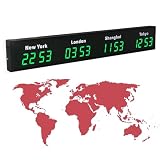
- 【Clear & Accurate Multiple Time Zones Clock】: This Multiple Time Zones Clock delivers precise time display for 3-5 global time zones, with each zone’s time shown independently and synchronized in seconds. The dot-matrix city name display lets you easily identify each time zone
- 【Wall Mounted LED Digital Multiple Time Zones Clock】: Our Wall Mounted LED Digital Multiple Time Zones Clock features high brightness, allowing you to set the perfect visibility for day or night use
- 【Easy Setup & Remote Control Operation】: Unlike complicated world clocks, this World Time Zones Clock comes with a remote control, making it easy to adjust time, and switch display modes
- 【Stylish Cities World Time Wall Clock】: This Cities World Time Wall Clock boasts an all-aluminum shell with an exquisite, sleek design that adds a touch of sophistication to any space. The digital static display ensures reliable performance, long service life
- 【Versatile Installation】: Choose between wall mounting or suspension for flexible placement—wall mounting creates a stylish wall feature, while suspension gives a floating illusion. It’s perfect for large family rooms, offices, multinational corporations
Rank #3

- Black wood frame with decorative silver map details
- Six-city world time wall clock
- Includes 32 pre-printed silver city name plaques
- Powered by 6 AA battery (included)
- Overall dimensions: 23.5 X 33.5 X 2.25
Product prices and availability are accurate as of the date/time indicated and are subject to change. Any price and availability information displayed on Amazon at the time of purchase will apply.

