
PC Slower Than It Used to Be?
A free scan shows the junk files, broken settings and background clutter dragging Windows down - then fixes them in one click.Free scan · Windows 10 & 11Crashes, No Sound, or Screen Glitches?
Random freezes, missing sound and display glitches usually trace back to one bad driver. Find and replace yours safely.Free scan · under a minuteiTechGuides is reader-supported. When you buy through links on our site, we may earn an affiliate commission. As an Amazon Associate I earn from qualifying purchases. Learn more
Yes—you can use readings from a local weather station instead of a cloud weather API as inputs to Home Assistant automations. Home Assistant documents a local-push integration for compatible Ecowitt devices, while its built-in Ambient Weather integration communicates through Ambient Weather Cloud. Whether HVAC automations then run “flawlessly” depends on the actual station, network, control rules, and HVAC equipment; the integration documentation does not establish that outcome.
What changes when weather data is local?
A cloud weather integration and a local station-to-Home-Assistant connection are different data paths. Home Assistant’s Ambient Weather integration requires an application key and API key and “communicates with Ambient Weather PWS units via the Ambient Weather Cloud.” Home Assistant also identifies ecowitt2mqtt in ambient_weather mode as a local alternative for Ambient Weather units, as well as its built-in Ecowitt integration for compatible Ecowitt hardware. Home Assistant Ambient Weather integration
With the built-in Ecowitt integration, Home Assistant creates a callback endpoint and the station console sends readings to it. That removes the documented weather-vendor-cloud route between the station and Home Assistant, but does not by itself make the entire home-automation or HVAC system independent of the internet. The Home Assistant instance and gateway still need to be reachable on the local network, and the HVAC controller may have its own network or cloud dependencies. Home Assistant Ecowitt integration
How to send Ecowitt station data to Home Assistant locally
- Check the exact hardware. Home Assistant lists GW1200, GW2000, and GW3000 gateways and the WS90 weather sensor among supported devices. Which entities appear depends on the sensors connected to the gateway; brand alone does not guarantee a particular measurement. Home Assistant Ecowitt integration
- Put the gateway on the local network. Home Assistant says setup can be done through the Ecowitt app or the gateway’s embedded web interface. Confirm the gateway can reach the Home Assistant instance over the network you intend to use. Home Assistant Ecowitt integration
- Add the integration in Home Assistant. Open Settings > Devices & services, choose Add integration, and search for Ecowitt. Use the callback server details Home Assistant displays when configuring the station.
- Configure the station’s upload destination. In the Ecowitt console or app, set the customized upload/server address, path, and port to match Home Assistant’s displayed values. The path must match. The integration is classified as Local Push: the station sends readings to Home Assistant rather than Home Assistant polling a weather service. Home Assistant Ecowitt integration
- Verify the entities before using them in automations. Check that the readings your planned rules depend on are present and updating. The integration can expose measurements such as temperature, humidity, pressure, rain state and rainfall, wind, solar radiation, UV, and lightning, plus diagnostics such as battery state and signal strength, depending on the hardware. Home Assistant Ecowitt integration
Important connection limitation: Home Assistant’s Ecowitt documentation says Ecowitt devices do not support TLS/SSL connections to the instance. Do not treat this station-to-Home-Assistant HTTP connection as encrypted. Consider the network exposure and placement of the Home Assistant instance when deciding whether this route suits your setup. Home Assistant Ecowitt integration
#1 Best Overall

- COMPLETE WEATHER STATION: (1) Osprey Sensor Array with Rain Cup, and (1) Brilliant, Easy-to-Read LCD Color Display
- AUTHENTIC HYPER-LOCAL DATA: Monitor your actual home and backyard weather conditions with our wireless and Wi-Fi-enabled sensor array measuring wind speed/direction, temperature, humidity, rainfall, UV intensity, and solar radiation
- SMART HOME READY: Set up alerts, access your data remotely, and program your home based on weather conditions using IFTT, Google Home, Alexa, and more
- ENHANCED WIFI: Enables your station to transmit its data wirelessly to the world's largest personal weather station network (optional setting)
- JOIN THE COMMUNITY: Connect to Ambient Weather Network to customize your dashboard tiles, share hyperlocal weather conditions via social feeds and create your own forecasts (coming soon)
Which station readings can inform HVAC automations?
A local station can provide current conditions at its location, not a forecast by virtue of being local. Depending on the sensors fitted, its readings may give an automation outdoor temperature, humidity, wind, solar radiation, or another measured input. Those values are available to user-created Home Assistant rules; the integration does not prescribe a particular HVAC strategy.
To make a first-person claim about a successful setup meaningful, describe the actual chain: the measured entity that triggers a rule, its threshold, the action Home Assistant takes, and the equipment receiving that command. For example, distinguish an automation that adjusts a thermostat target from one that switches another device. Also explain any delay, threshold band, or manual override if the setup uses one. These details matter because an outdoor reading alone does not establish indoor comfort, HVAC capability, or the safety of a control decision.
Rank #2

- Real-Time Weather Conditions: Look no further for the perfect indoor and outdoor thermometer! Wirelessly receive readings for indoor/outdoor temperature and humidity, wind speed/direction, barometric pressure, and rainfall directly to your home weather station
- Weather Clock: The indoor weather station display is a large, color LCD Display with the current time, date, and an adjustable dimmer, making it convenient to read and easily view indoor and outdoor data, time, and conditions
- WiFi Weather Stations: Easily connect your indoor weather station display to Weather Underground for remote monitoring and to share your weather data with more than 250,000 personal weather stations across the globe
- Comprehensive Weather Information: One of the best weather stations, receive over 25 data points that allow you to set weather threshold alarms and track historical data, the heat index, dew point, wind chill, enhanced rainfall history, and more
- Multiple Thermometers & Weather Instruments: Wireless weather station with a built-in anemometer, wind vane, barometer, hygrometer, rain gauge, and thermometer to give you hyperlocal personalized data on your indoor weather station for home
The headline’s “flawlessly” should be understood as the author’s account, not as a verified reliability result. The available integration and manufacturer documentation describes data delivery and supported measurements, not the author’s HVAC rules, operating period, failure rate, energy savings, or equipment response. Those outcomes require setup-specific evidence.
What’s actually slowing this PC down?
Pick the symptom - the matching free tool is one click away.
Will the automations work if the internet goes down?
The documented Ecowitt route sends data to Home Assistant locally, so it avoids depending on the Ambient Weather Cloud path for those readings. That fact alone does not establish what happens during an internet outage: Home Assistant, the gateway, the LAN, the HVAC controller, and any services or devices in the automation can have separate dependencies. A LAN outage or power loss can also interrupt a local route.
Rank #3

- [Color LCD Screen Weather Station] Newentor temperature & humidity monitor with a large color LCD display shows essential home weather information at a glance: indoor/outdoor temperature & humidity, daily high/low records, customizable alerts, time/date, alarm clock & snooze, weather forecast, moon phase, and barometric pressure.
- [Two Power Modes & Adjustable Backlight] To enjoy a 24/7 continuous always-on vibrant display, simply connect this home weather station to a wall outlet using the included DC power adapter. When operating on battery power only (batteries not included), the digital thermometer automatically enters an eco-energy-saving mode, where the screen lights up for a quick 15-second glance before dimming. It is the perfect bedside or living room clock designed to fit your power preference.
- [3-channel Home Weather Stations Wireless Indoor Outdoor] Wireless temperature forecast station supports up to 3 remote sensors to monitor inside outside temperature & humidity of multiple locations. Package contains one remote sensor.
- [Wireless Forecast Station] The weather forecast station calculates the weather forecast for the next 12-24 hours, 7 to 10 days calibration ensures an accurate personal forecast for your location.
- [Wireless Weather Station with Atomic Time&Date] Atomic alarm clock weather station can be used not only as a wireless indoor outdoor thermometer but also as an atomic clock with dual alarms.
Test the exact failure condition you care about and observe both data updates and HVAC commands. In particular, determine how the automation behaves when a sensor becomes unavailable or its reading stops updating; do not assume that the last reported value is still current. The integration documentation establishes the local data path, not whole-system behavior during internet, LAN, power, or controller outages.
Independent reader supportYour contribution helps us test, update, and keep practical guides available for everyone.What to compare before choosing a local weather setup
| Option | Data route | What to verify |
|---|---|---|
| Home Assistant Ambient Weather integration | Ambient Weather Cloud; requires an application key and API key. | It is a cloud route, not the built-in local Ecowitt integration. Home Assistant documentation |
| Ecowitt integration in Home Assistant | Local Push from a supported Ecowitt gateway to Home Assistant. | Check exact gateway and sensor compatibility, desired entities, local reachability, and the HTTP/TLS limitation. Home Assistant documentation |
ecowitt2mqtt for an Ambient Weather unit |
Home Assistant identifies ambient_weather mode as a local alternative. |
This is a separate software bridge, not the built-in Ambient Weather integration or Ecowitt integration. Follow the bridge’s own requirements. Home Assistant documentation |
The GW3000 is a gateway, not a complete outdoor weather station on its own. Ecowitt’s manual documents Ethernet and Wi-Fi connectivity, local TCP/HTTP protocols, and local SD-card data storage for that gateway; readers still need compatible sensors for the readings they want. Ecowitt GW3000 Manual (March 20, 2026)
Rank #4

- Comprehensive Weather Information: One of the best weather stations, receive over 55 data points that allow you to monitor historical data, the heat index, dew point, feels like temperature, pressure trends with trend arrow, and more
- Real-Time Weather Conditions: Look no further for the perfect indoor and outdoor weather station! Wirelessly receive readings for indoor/outdoor temperature and humidity, wind speed/direction, barometric pressure, and rainfall directly to your home weather station
- Easiest Setup on the Market: Just install batteries, attach the wireless outdoor sensor to a pole or post using the included mounting bracket, and you’re ready to be the neighborhood weather expert
- Weather Clock: The indoor weather station display is a large, color LCD Display with the current time, date, and an adjustable dimmer, making it convenient to read and easily view indoor and outdoor data, time, and conditions
- Weather Forecast: The outdoor weather station collects elevation data and combines it with barometric pressure data from the indoor weather station to provide a personalized weather forecast 12 hours from your current conditions
Ecowitt’s WS View Plus/Web UI manual also shows a configuration example for sending data to a server on the local network, including a Home Assistant example with an eight-second upload interval. That is an example in the manual, not a guaranteed interval for every model, firmware, or integration. Ecowitt WS View Plus and Web UI Manual (December 13, 2024)
The Tool Desk
Outbyte PC Repair FREEClear out junk files and repair common Windows errorsFree Scan →Outbyte Driver Updater FREEFix the driver behind crashes, sound loss and screen glitchesFind Drivers →Quick Recap
Best Value
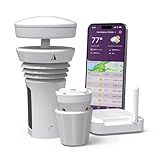
- Featured in Better Homes & Gardens, Popular Mechanics, The Spruce and Wired, the 2026 Tempest Weather Station is trusted by leading experts and loved by more than 90,000 users who rely on it for accurate, hyper-local weather every day.
- Monitors temperature, humidity, barometric pressure, wind speed and direction, dew point, solar radiation, UV index, lightning strikes, rainfall, and more - all from a single device.
- The solar-powered outdoor sensor transmits wirelessly up to 1,000+ feet and delivers real-time updates every 3 seconds.
- Built with no moving parts, Tempest is engineered for years of near-zero maintenance and reliable performance in any environment.
- Seamlessly integrates with Amazon Alexa, Rachio, IFTTT, and popular smart home platforms - automate lights, thermostats, irrigation, and more using real-time weather from your backyard Tempest.
Product prices and availability are accurate as of the date/time indicated and are subject to change. Any price and availability information displayed on Amazon at the time of purchase will apply.

