
Recommended Free Tools
iTechGuides is reader-supported. When you buy through links on our site, we may earn an affiliate commission. As an Amazon Associate I earn from qualifying purchases. Learn more
Windows Device Manager is a built-in utility for viewing your computer’s hardware, checking device status and driver details, and managing drivers. It can help you investigate a warning icon or update, reinstall, or roll back a driver, but a warning is a clue to inspect—not a diagnosis or a guarantee that updating the driver will fix the problem.
What Windows Device Manager shows
Device Manager organizes the hardware Windows recognizes, such as display and network adapters. You can view devices by category or by how they connect to one another, then open a device’s properties to check its status, manufacturer, and driver information. Microsoft describes the utility as a way to view the computer’s hardware and install, update, or remove device drivers in its Inside Show: Device Manager.
It is a Windows diagnostic and management view, not a separate hardware product. Some devices may be hidden in the default view; Microsoft documents how to display all devices in its hidden devices guidance.
Do these 3 things before closing this tab:
1Scan for outdated or missing drivers - takes under a minute2Repair Windows errors before they cause bigger problems3Fix the driver behind crashes, sound loss and screen glitchesHow to open Device Manager
- From Start: Select Start, search for Device Manager, and open it.
- Through Computer Management: In File Explorer, right-click This PC and choose Manage. In the system tools, select Device Manager.
These access paths are documented by Microsoft in its Device Manager overview. Labels can vary somewhat between Windows releases.
#1 Best Overall

- CEL Doctor: The ANCEL AD310 is one of the best-selling OBD II scanners on the market and is recommended by Scotty Kilmer, a YouTuber and auto mechanic. It can easily determine the cause of the check engine light coming on. After repairing the vehicle's problems, it can quickly read and clear diagnostic trouble codes of emission system, read live data & hard memory data, view freeze frame, I/M monitor readiness and collect vehicle information
- Sturdy and Compact: Equipped with a 2.5 foot cable made of very thick, flexible insulation. It is important to have a sturdy scanner as it can easily fall to the ground when working in a car. The AD310 OBD2 scanner is a well-constructed mechanic tool with a sleek design. It weighs 12 ounces and measures 8.9 x 6.9 x 1.4 inches. Thanks to its compact design and light weight, transporting the device is not a problem. The buttons are clearly labelled and the screen is large and displays results clearly
- Accurate Fast and Easy to Use: The AD310 scanner can help you or your mechanic understand if your car is in good condition, provides exceptionally accurate and fast results, reads and clears engine trouble emission codes in seconds after you fixed the problem. This device will let you know immediately and fix the problem right away without any car knowledge. No need for batteries or a charger, get power directly from the OBDII Data Link Connector in your vehicle
- OBDII Protocols and Car Compatibility: Many cheap scan tools do not really support all OBD2 protocols. AD310 scanner as it can support all OBDII protocols such as KWP2000, J1850 VPW, ISO9141, J1850 PWM and CAN. This device also has extensive vehicle compatibility with 1996 US-based, 2000 EU-based and Asian cars, light trucks, SUVs, as well as newer OBD2 and CAN vehicles both domestic and foreign. Pls confirm with our customer service whether it is compatible with your vehicle before purchasing
- Home Necessity and Worthy to Own: This is an excellent code reader to travel or home with as it weighs less and it is compact in design. You can easily slide it in your backpack as you head to the garage, or put it on the dashboard, this will be a great fit for you. The AD310 is not only portable, but also accurate and fast in performance. Moreover, it covers various car brands and is suitable for people who just need a code reader to check their car
How to inspect a device or warning
- In Device Manager, expand the category that contains the device.
- Right-click the device and select Properties.
- Check the General tab for status and any problem code. The Driver, Details, and Events tabs can provide further information useful for troubleshooting.
A yellow triangle with an exclamation mark means Windows has marked the device with a problem code. Read the code and message in Properties, then consult the resolution for that specific code rather than assuming every warning has the same cause. Microsoft’s Device Manager error-code reference explains individual cases. For example, Code 22 indicates that a user disabled the device; Code 12 concerns hardware resources that Windows cannot allocate, potentially because of a resource conflict or firmware allocation issue.
When and how to change a driver
For ordinary driver updates, Windows Update is the recommended first route: Microsoft says most hardware driver updates are downloaded and installed automatically through it. Device Manager provides additional update and recovery options for Windows 10 and Windows 11, as described in Microsoft’s driver update guidance.
Rank #2
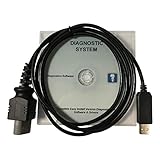
- CD-ROM with Evinrude tools, software and drivers and workshop manuals in PDF
- High Quality cable with 3 pin molded connector for long time use
- Works on all windows XP,7,8,10 operating systems 32 & 64 bit
- Step-by-step guide with pictures + technical support if needed
- This kit also includes a 6 FT USB 2.0 extension cable so you can work at a comfortable distance from the engine. Compatible with all models E-TEC, FICHT, DI, G2 1999-2020 : E-TEC: 25HP, 30HP, 40HP, 50HP, 55HP, 60HP, 65HP, 75HP, 90HP, 115HP, 130HP, 150HP, 175HP, 200HP, 225HP, 250HP, 300HP. FICHT: 75HP, 90HP, 115HP, 135HP, 150HP, 175HP, 200HP, 225HP, 250HP. DI: 100HP, 115HP, 135HP, 150HP, 175HP, 200HP, 225HP, 250HP. G2: Supports all Evinrude E-tec/Fitch models 1999-2020
Update through Device Manager
- Expand the relevant device category.
- Right-click the device and select Update driver.
- Choose an automatic search, or browse to a compatible driver you downloaded from the device manufacturer’s official website.
If you download a driver manually, match it to your Windows version and system architecture. Microsoft advises against downloading drivers from other websites. An automatic search may report that the best driver is already installed; that message does not prove the device has no problem. If trouble continues, check for a compatible manufacturer-provided driver or contact the manufacturer for support.
The Tool Desk
Outbyte Driver Updater FREEScan for outdated or missing drivers - takes under a minuteDriver Scan →Outbyte PC Repair FREERepair Windows errors before they cause bigger problemsFix Now →Reinstall or roll back
Uninstalling a device lets Windows attempt to reinstall its driver after a restart, but some devices, including printers, may require manual reinstallation. If a recent driver update caused a problem, Device Manager may offer Roll Back Driver; using that option requires administrator permissions. See Microsoft’s instructions for updating, reinstalling, and rolling back drivers for the supported steps.
Rank #3

- Our diagnostic cable is the GREEN PCB board, Our diagnostic cable with Switch, so now it can support more cars easier
- Interface USB OBD2 for BMW - Ediabas - K+DCAN allows full diagnostic for BMW from 1998 to 2019 (all functions as in OMNITEC interface). Build in 2 lines K and D-Can magisterial
- In FT232RL chip, quick connect and response.Note:Because this product is a technical automotive diagnostic products, if not familiar with the diagnostic technology, please buy carefully, thank you
- Works flawlessly with N54, N55, N55E, S55, B58, and N13 for MHD Flasher with Android device. You may need a USB C adapter
- Your fantastic OBD2 diagnostic DIY tool, to same your time and money, enjoy your DIY diagnose
What to consider before uninstalling a device
Removing a device or its driver package is more consequential than viewing its properties. If you uninstall a device before physically unplugging it, Windows may rediscover it and reinstall it. Removing a driver package can also leave a device without a driver if no matching package remains; Windows Update may reinstall a needed driver. Microsoft recommends creating a restore point before making changes. Review its device and driver package removal guidance before proceeding, and be clear about the intended change.
Quick Recap
Rank #4

- ATTN : Please DO study the listing page the "Product Guides and Documents" section, the "Instructions for Use (IFU) (PDF)" guide for all manual links at the end of the PDF, to use this kit correctly and easily. 【The item PACKING】 includes the paper printout with the same Complete Instruction Folder with PDFs and APP. 【Only use the tested APP in the folder】 【BOTH 64bit for Newer Androids and 32bit Manufacturer APP】 are available, passed the Android security scan checks and Google Play pending. MUST use the Android APP to display results on the screen, NO Traditional DIGITAL Display to show the POST codes, Great Ease to save hassles of diagnostic codes lookup one by one manually.
- Easy To Use Unique USB Diagnosis with Videos and PDF Guides. 【MUST study the Guides Before Use】 New latest smartphone technology in using the USB ports ( Standard USB / micro USB / Type C ) to diagnose the computers. 【NOT just getting the electric power but RUNNING the Diagnosis Data through USB ports】. A very powerful Essential Nice Handy computer repair tool kit for quick help on diagnosing Desktop PC, Server, Laptop, All-in-one PC, Android Smartphone / Tablet, customized built miniPC and Mac machines ... etc. A great motherboard tester diagnostic kit that provides the most accuracy and effectiveness in making the computer troubleshooting and repairs much easier.
- USB Diagnosis Unique Feature - Save hassles of taking the dusty PCs or laptops apart. Follow the English PDF user guides to power on and let the Android APP to work with this new test kit to auto scan the motherboard for faulty components quickly. When testing different PCs together, make sure follow the listing User Guide(PDF) to see 【Latest Updates with PRECAUTIONs and Extra Tech Tip】 to UNPLUG the USB cable between each test and restart to clear the last cached working motherboard diagnosis data. The ONBOARD USB cable is needed to plug to the Android charger, the other dedicate USB cable connects to motherboard USB port. Connect this 2 USB cable wrongly causes the unstable connectivity.
- All-in-one Multiports support - Different complete bus connector adapter parts included. Made of quality PCB, transistors and capacitor components. Direct pinpointing the faulty motherboard components to greatly reduce the costs yet increase the effectiveness in the computer diagnostic repairs. Videos and the PDFs instructions please see the listing "Videos" section and the "Product guides and documents" section for more details.
- Tested and brought to you by 29 years IT Professionals This kit works with all machines with USB ports including New Old Desktop PC and Laptop Computers, IBM compatible, Mac machines (using USB), Android devices Smartphones and Tablet PCs. Comes with Step by Step Easy Guides, videos instructions, PDF pictorial manuals with Easy Flowcharts and Latest Updates with Precautions. Great for PC Technicians, Computer Owners, Computer Class Student Learners and PC DIY Lovers, Hardware Traders, professionals and novices . Nice Essential must have to add to our computer tool boxes.
Product prices and availability are accurate as of the date/time indicated and are subject to change. Any price and availability information displayed on Amazon at the time of purchase will apply.

