
Quick wins for a faster PC:
Fix the driver behind crashes, sound loss and screen glitchesFind Drivers →Clear out junk files and repair common Windows errorsFree Scan →iTechGuides is reader-supported. When you buy through links on our site, we may earn an affiliate commission. As an Amazon Associate I earn from qualifying purchases. Learn more
If your XYZ Da Vinci still appears as a USB device, a corrupted firmware image may be recoverable: the Repetier-Firmware-4-DaVinci project documents a bootloader recovery sequence followed by flashing the printer as an Arduino Due. First identify the exact printer and controller-board generation. The project’s jumper choice and firmware settings depend on them, and a wrong configuration can leave the printer unusable.
If the printer is detectable and you only want to restore stock operation, try XYZprinting’s own update process first. Custom firmware is a higher-risk option: the project warns that flashing can damage the printer or void its warranty, and its cited documentation says there was no known stock-firmware reversion for the 1.0A, 2.0A, and AiO.
Check the model and decide whether custom firmware is the right recovery
“Da Vinci” covers multiple printer configurations. Before opening the enclosure, record the model from the printer label and note its fan and extruder configuration. The Repetier-Firmware-4-DaVinci project supports Da Vinci 1.0/1.0A, 2.0/2.0A, and AiO configurations, but its compile-time settings must match the specific printer.
Free tools Windows power users keep installed
One-click scans. No signup required.
A printer that appears in the computer’s device manager is not necessarily healthy, but it may still expose a path to firmware recovery. Hackaday reported on May 11, 2014, that a bricked Da Vinci controller appeared there and could accept an upload after the enclosure was opened. That report demonstrates a recovery possibility, not a guarantee for every failure or board revision.
#1 Best Overall

- Higher print volume. 17.5 x 17.5 x 17.5 cm
- Layer resolution. Up to 20 microns
- Open Filament System
- Printing with third-party 1.75mm materials
- Experiment with more materials like PETG and metallic PLA
| Choice | What it offers | Important trade-off |
|---|---|---|
| XYZprinting firmware update | Use XYZprinting software to update firmware and reboot, as described in its documentation. | Lower risk when the printer remains detectable and the goal is stock operation. Verify that a download exists for the exact legacy model; the documentation does not establish current support for every model. |
| Repetier custom firmware | Standard G-code, Repetier-Host or OctoPrint control, and freedom from chipped-cartridge restrictions, among other features described by the project. | Requires the correct board and model settings, a legacy toolchain specified by the project, and manual post-flash calibration. The project warns of damage and warranty risk; for 1.0A, 2.0A, and AiO, it reported no known stock reversion at the cited revision. |
If you choose custom firmware, preserve the printer’s serial information and back up any stock firmware you can access before wiping the controller. Do not assume that a successful upload means you can later return to stock.
Match the firmware settings to the printer
In the project’s Configuration.h, set DAVINCI and MODEL for the exact configuration. Its documented DAVINCI values are:
Rank #2
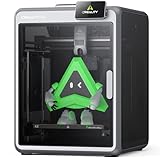
- 【Multicolor Printing Made Easy】Unleash your creativity with the K2 3d printer and the Intelligent Creality Filament System (CFS). Perfect for hobbyists, designers, and makers craving professional-quality results. CFS sold separately, not inclued.
- 【Smooth, Fast, Ultra-Quiet Performance】K2 prints at speeds up to 600mm/s with exceptional precision—while staying whisper-quiet. Its generous 260mm³ build volume lets you create large, detailed models.Fully pre-assembled and ready to print right out of the box.
- 【Rock-Solid “Matrix” Frame for Reliable Precision】The K2 features an aerospace-grade die-cast aluminum frame with reinforced XYZ axes, minimizing vibrations for crisp, accurate layers. Combined with its robust design, every print comes out consistently sharp and professional-looking.
- 【Next-Gen Extruder for Great Printing】Equipped with a 40 mm³/s high-flow hotend, a hardened steel nozzle (up to 300 °C), and durable direct drive extrusion, K2 handles PLA, ABS, PETG, and even engineering-grade filaments with ease.
- 【Smarter Printing, Safer Experience】Stay in control with the AI Chamber Camera for failure detection, time-lapse recording, and build plate monitoring. The built-in air purifier filters VOCs, while Wi-Fi connectivity and 8G local storage make printing faster, safer, and smarter than ever.
1: Da Vinci 1.0.2: Da Vinci 2.0 single-fan configuration.3: Da Vinci 2.0 dual-fan configuration.4: Da Vinci AiO.
The project specifies MODEL 1 for the 1.0A and 2.0A. Do not choose a value by resemblance or guess the board generation from the printer name alone. If the installed board or its fan/extruder setup does not clearly match the project’s configuration instructions, stop rather than flash an uncertain build.
The Tool Desk
Outbyte PC Repair FREERepair Windows errors before they cause bigger problemsFix Now →Outbyte Driver Updater FREEFix the driver behind crashes, sound loss and screen glitchesFind Drivers →Enter recovery mode only if the firmware image is corrupted
The project’s recovery sequence is for wiping corrupted firmware so the controller can be detected for Arduino Due flashing. It is not required for an ordinary firmware update. The board is behind the rear panel, which the project says is held by two Torx screws. Use the jumper specified for the board generation—JP1 or J37—rather than shorting pins based on a guess.
Rank #3

- 3D Printer Consumables
- Product type: printing head
- Compatible Model: Da Vinci Mini Wifi and Mini Maker
- Replacement part
- Check compatibility of your printer.
- Power the printer off and unplug it before opening the enclosure.
- Remove the rear panel and identify the controller board and its generation. Follow the project’s board-specific instruction to locate JP1 or J37; do not infer a jumper location if the board is unclear.
- With the printer off, short the specified recovery jumper.
- Power the printer on for a few seconds, then power it off again. The project says this wipes stock or corrupted firmware and enables Arduino Due detection.
- Remove the jumper before connecting the board for firmware flashing.
Opening the enclosure and manipulating a board carries physical and electrical risk. If the board layout or correct jumper is uncertain, do not proceed. If the printer fails to appear as a device after this sequence, the documented workflow does not establish that the fault is recoverable by firmware alone.
Build and upload Repetier firmware
The project documents a specific legacy environment: Arduino IDE 1.8.0 with the Arduino Due board package 1.6.8. It explicitly says Arduino IDE 1.5.8 is unsupported for this project. These are the project’s stated toolchain versions, not a claim that newer IDE/package combinations have been tested with it.
Rank #4

- 12V AC / DC Adapter Compatible with XYZprinting Da Vinci Nano,Da Vinci Junior Pro 1.0,Da Vinci Junior 1.0,da Vinci Jr. 1.0, 2.0 Mix 3D Printer 3F1JWXUS00B 3F1J0XUS00C 3F2JWXUS00D XYZ printing .Compatible with: XYZprinting da Vinci Jr. 1.0w Wireless WiFi 3D Printer P/N: 3F1JWXUS00B XYZ printing; XYZprinting XYZ Printing da Vinci 1.0 Junior 3D Printer P/N: 3F1J0XUS00C XYZ printing; Compatible with: XYZprinting da Vinci Jr. 2.0 Mix 3D Printer P/N: 3F2JWXUS00D XYZ printing accessories,replacement GB5A60WAKCA Power supply cord ((((⚠️️ Note ! This unit will NOT fit ❌ XYZprinting da Vinci Mini Maker ))))
- Compatible with SANSUI 32 Inch Curved 240Hz Gaming Monitor High Refresh Rate, FHD 1080P Gaming PC Monitor Model Number : ES-G32C3F
- Compatible with ANYCUBIC Photon M3 Resin 3D Printer 3dt-m3ser .Compatible with ANYCUBIC Photon Mono SE SQ 3D Printer sen-usptmse
- 【Specifications 】Input:100-240V,50-60Hz; Output:12V 5A 65Watt, Positive Tip; Free Extra Long AC Cable Include. Total Charger Cord Length 10FT.
- 【Safety Security】Our XYZ Printing Chargers are ETL / FCC / CE / Rohs Certified, which in compliance with top industry standards.Our adapter was made with the highest quality and the newest materials.V-0 grade flame retardant,Ovp, Ocp, Scp Protection (Ovp: Over Voltage Output Protection. Ocp: Over Current Output Protection. Scp: Short Circuit Output Protection).All of our product lines are put through rigorous quality control procedures to ensure safe, reliable operation for years to come.
- Install Arduino IDE 1.8.0 and the Due 1.6.8 board package.
- Apply the project’s specified update to
variants.cpp. - Open
src/ArduinoDUE/Repetier/repetier.ino. - Edit
Configuration.hand setDAVINCIandMODELto the values for the identified printer. - Connect the printer’s controller by USB using a data-capable cable. In the Arduino IDE, choose Arduino Due (Native USB Port) and select the USB port where the controller appears.
- Compile the project. If it does not compile, resolve the configuration or toolchain issue before attempting an upload; do not upload a build for a different model.
- Upload the compiled firmware, then restart the printer.
The controller uses an ATSAM3X8E microcontroller, the same processor used by Arduino Due boards. That explains why the project uses the Due target; it does not make the printer interchangeable with a Due board or remove the need for correct configuration.
Do these 3 things before closing this tab:
1Scan for outdated or missing drivers - takes under a minute2Repair Windows errors before they cause bigger problems3Fix the driver behind crashes, sound loss and screen glitchesLoad fail-safe settings and recalibrate
After the printer restarts, load the firmware’s fail-safe EEPROM settings. In Repetier-Host, send M502 followed by M500. Alternatively, use the printer menu’s Settings/Load Fail-Safe option. The first command loads fail-safe defaults; the second saves the settings.
Best Value

- 【Stable Triangular Structure & Higher Precision】3D printer uses reinforced inclined rods to form a stable triangular structure, minimizing vibration and ensuring stable printing.The X and Y-axis automatic calibration technology minimizes vibrations to the maximum extent, ensuring printing accuracy of up to 0.1 mm. It is ideal for home DIY projects and school use, especially for FDM technology
- 【Larder Build Volume & Faster Printing Speed】The Longer LK5 Pro 3D printer measures about 20 x 20 x 15 inches, has a large build volume of 11.8 x 11.8x 15.7in. / 300*300*400mm. Enjoy a larger canvas for your 3D printing projects, providing more room for innovation. It achieves remarkable 180mm/s high-speed printing—surpassing industry standards
- 【Advanced Extruder Technology:】Enhance print quality with our silicon carbide lattice glass platform, ensuring uniform temperature for strong adhesion and preventing distortion. Paired with a Teflon tube for smooth material flow, and upgraded dual fans for swift cooling and filament extrusion, greatly reduces plugging risk and bad extrustion.It’s suitable for a variety of consumables, including PLA, ABS, PETG, and WOOD
- 【Filament Depletion Detection & Auto-Resume Printing】The LK5 Pro 3D printer, with its upgraded 32-bit mainboard, ensures improved print quality. It features sensors for filament and power detection, intelligently pausing printing in case of depletion or unexpected power outage. Upon power restoration, it resumes printing from the last position, saving time and reducing material waste
- 【Ultra-Quiet Driver & Open-Source Firmware】Experience the Longer LK5 Pro 3D printer, featuring an ultra-quiet TMC2209 driver and open-source firmware. Customize your printing with G-code modifications and join our community for insights into advanced 3D printing techniques. Explore the world of 3D printing technology and its applications with us
Then recalibrate bed height manually. Calibrate filament settings and, if the printer has a second extruder, its offset. Do not treat successful firmware upload as proof that motion, extrusion, or temperature behavior is calibrated for printing.
What changes after installing the custom firmware
According to the project documentation, this build offers standard G-code and host control through Repetier-Host or OctoPrint, with optional Wi-Fi support. It removes the chipped-cartridge requirement, allowing arbitrary filament settings, and provides configurable temperatures up to 270 °C for extruders and 130 °C for the bed, along with sensor and calibration functions. These are capabilities claimed for the documented project build; they are not a guarantee for every board revision or printer configuration.
That flexibility also shifts responsibility to the operator: choose filament and temperature settings appropriate to the material and hardware, and verify calibration before a print. If you only need to recover stock operation, the custom firmware’s additional controls may not justify the extra configuration and reversibility risks.
Quick Recap
Product prices and availability are accurate as of the date/time indicated and are subject to change. Any price and availability information displayed on Amazon at the time of purchase will apply.

