
iTechGuides is reader-supported. When you buy through links on our site, we may earn an affiliate commission. As an Amazon Associate I earn from qualifying purchases. Learn more
You can make a wide panorama with your phone’s built-in camera, but a true 360-degree photo needs coverage above and below you as well as all the way around. For that, use a guided photosphere app, a compatible phone gimbal, or a dedicated 360 camera. The easiest method depends on whether you need a simple landscape view or an interactive sphere.
Choose the right DIY method
| Method | Cost | Ease | Full sphere? | Main limitation |
|---|---|---|---|---|
| Phone Pano mode | Lowest | High | Usually no | Limited vertical coverage; motion can create artifacts. |
| Guided photosphere app | Low | Medium | Yes | Requires many frames and careful overlap. |
| Phone plus gimbal | Medium | High | Yes, in supported modes | Needs a compatible gimbal and app, plus clear space. |
| Dedicated 360 camera | Highest | Highest for repeat work | Yes | Hardware cost, battery, stitching, and lens-care considerations. |
Start with Pano if a wide horizontal view is enough. Choose guided capture or a supported gimbal mode when viewers must be able to look in every direction. A dedicated camera is the more repeatable option for frequent 360 work.
Make a panorama with your phone’s Pano mode
On iPhone, open Camera, select Pano, tap the shutter, and pan slowly while keeping the arrow on the center line. Tap the shutter again to finish. Apple describes this as a way to photograph your surroundings panoramically in Pano mode: Apple’s iPhone panorama instructions.
Outdated Drivers Are Slowing You Down
One free scan finds every outdated or missing driver and matches the right update for your exact hardware.Free scan · exact hardware matchPC Slower Than It Used to Be?
A free scan shows the junk files, broken settings and background clutter dragging Windows down - then fixes them in one click.Free scan · Windows 10 & 11Samsung’s support guidance likewise recommends smooth movement, avoiding fast-moving subjects, and using a tripod or stabilizer in low light. Starting and finishing in areas with little detail can also make the ends less distracting. Exact menu names and controls vary by phone model.
#1 Best Overall

- ✔ COMPATIBLE WITH ALL SMARTPHONES, TABLETS, and LAPTOPS including ALL iPhone models, Samsung Galaxy and Note, Google Pixel, Huawei and more. CONTENTS INCLUDE: TruView 0.45x Wide Angle Lens, Clarus 15x Macro Lens, TruGrip Lens Clip, GlowClip Mini Rechargeable LED Light + Charging Cable, Quick-Release Lanyard, DuraCase, EasyClip, and Cleaning Cloth.
- ✔ TRUVIEW 0.45x WIDE ANGLE LENS - CAPTURE 45% MORE PICTURE WITH EVERY SNAP: Shoot stunning photos of people, pets, travel scenery, landscapes, architecture, selfies and more. NO DARK CORNERS (vignetting) like cheaper lenses. Crafted from aircraft-grade aluminum and premium optical glass for durability and clarity. Multi-element, coated glass lenses minimize ghosting, reflections, lens flare, and other artifacts. Xenvo cell phone lens attachment is ideal for hobbyists and photography pros alike.
- ✔ CLARUS 15x MACRO LENS - MARVEL YOUR SENSES. MAGNIFY NEARBY SUBJECTS FOR BREATHTAKING, SUPER CLOSE-UP PHOTOS: Capture all the intricacies and details with precision-focus for razor crisp macro photos every time. (For best results, position macro lens approximately 1/2 inch from subject. Not designed for zooming in on distant subjects.) THE TRUGRIP LENS CLIP offers SUPERIOR GRIPPING POWER to fasten your lenses to your cell phone when you're in action mode, framing your next perfect shot.
- ✔ GLOWCLIP RECHARGEABLE LED FILL LIGHT - The GlowClip LED light clips ANYWHERE on your phone to instantly illuminate your subject and surroundings with warm continuous light. The warm and natural LED light is superior to your smartphone's built in flash—which can be blinding and unnatural—especially in darker settings and venues. FEATURES 3 BRIGHTNESS SETTINGS: Low, Medium and High. Say goodbye to frustrating photo "retakes" and hello to brilliant photos the first time.
- ✔ QUICK-RELEASE LANYARD AND TRAVEL CASE - TRANSPORT AND PROTECT YOUR LENS KIT: Perfect for taking your Xenvo lenses with you on the fly. The travel case stores and protects all lens kit components snugly and safely while the quick-release lanyard is the perfect way to carry your lenses on your next outing. Just drape the lanyard and lens around your neck. The quick-release lanyard head makes it a cinch to access your Xenvo lenses in a flash so you never miss another photo moment.
This method is free and straightforward, but it usually creates a horizontal panorama, not a complete photosphere. A panorama may need conversion or further stitching before it works as an interactive 360 image.
Capture a full sphere with a guided photosphere app
A photosphere app guides you through multiple angles so the resulting images can be stitched into a view covering the scene around, above, and below the camera. Stanford’s VFT Photosphere Camera, for example, uses the phone’s gyroscope and guides the photographer through 36 capture points before stitching the frames into a sphere.
Rank #2
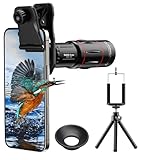
- 【Upgraded 18X Telephoto Lens】: This 18X telephoto lens features an adjustable focal length, allowing you to effortlessly capture crisp and clear images of distant subjects by simply twisting the focus ring. Whether you're an outdoor enthusiast or a passionate photographer, this lens is a game-changer, enabling you to see and capture the world in stunning detail.
- 【BAK4 Prisms & FMC Lens】: Equipped with high-quality BAK4 prisms and FMC (Full Multi-Coated) glass, this lens delivers exceptional image quality, vibrant colors, and minimal distortion. Whether you're shooting in challenging lighting conditions or capturing intricate details, the telephoto lens for iphone ensures stunning results. Say goodbye to glare, and hello to sharp, vivid photos that truly bring your scenes to life.
- 【Polymer Material & Portable】: This 18X telephoto phone lens for Android is crafted from durable polymer material and high-quality optical glass, ensuring both strength and clarity. With an ergonomic design and lens weighing only 120g, it's compact and easy to carry. The included storage bag makes it convenient to slip into your pocket or backpack without taking up space, so you can enjoy telephoto shooting anytime, anywhere.
- 【2 Models & With Tripod】: The telephoto Lens features 2 modes, cell phone shooting and naked-eye observation. With the eyecup attached, it becomes a monocular telescope for clear distant viewing. The included aluminum alloy tripod supports hands-free use, ensuring stable photos and videos without blur.
- 【Widely Compatible & Multipurpose】: Universal detachable clamps make installation and removal easy. The lens is designed with a maximum clip opening width of 0.98in (2.48cm) and a distance of 1.38in (3.5cm) from the clip top to the lens center, fitting most smartphones, including iPhone, Samsung Galaxy and Note, Google Pixel, Huawei, OnePlus, and more. Perfect for camping, sports events, moon watching, bird watching, fishing, hiking, golf, concerts, and travel. IMPORTANT NOTE: This lens fixture supports cell phones ≤ 0.98in thick (including phone case).
Follow the on-screen targets and keep neighboring frames overlapping. This approach costs less than buying a 360 camera, but it takes more time than a single panorama and works best in a relatively static scene. People, cars, or other moving subjects may appear misaligned where frames meet.
Automate capture with a phone gimbal
A compatible gimbal can rotate the phone through a sequence of shots and stitch them into a panorama or 360 photo. The Insta360 Flow manual documents four panorama options: 3×3 (9 photos), 180° (5), 240° (7), and 360 Photo (18). It specifies a 6080 × 3040-pixel JPEG output and recommends a stitching distance greater than 2 m (6.56 ft). These are manufacturer specifications in the 2026 manual, not independent image-quality measurements.
Rank #3

- 3 in 1 Phone Camera Lens Set: Every lens can be used separately. The 20X Macro lens has a best focusing distance of 1.18-3.54 inch, help you to explore the microworld. 120° Wide lens can expand the shooting area of 10%, make a bigger view to the world. 198° Fisheye lens can produce a strong visual effect to make thing cuter
- High Quality: Professional HD Lens with advanced lanthanide optical glass can reduce the reflection and ghosting, bringing you amazing vision with details and clarify. High quality grade aluminum shell can protect the glass offering a long durability
- Clip-on Phone Lens: Easy Use Design. Just attach the lens to the clip and clip it on the phone camera, then you can enjoy the amazing effect of the lens. The clip has soft rubber to avoid scratch on your phone. Strong spring can hold on tightly
- Compatible with Most Smartphones: Universal design of 3.6 cm clip make the lenses compatible with most iPhone, Samsung google phone etc. Note: For different model you might have to use different way to clip the clamp.
- Package Content: 1x 120° Wide Angle Lens, 1x198° Fisheye Lens, 1x 20X Macro Lens, 1x Universal Clip, 1x Storage Bag, 1x User’s Manual
For the Flow’s panorama workflow, the manual recommends placing the gimbal on a plain, clean surface and extending the selfie stick to reduce the black area at the bottom of the image. Check that your gimbal, phone, and app support the mode you intend to use; available features can vary by configuration. Keep the area around the rotating phone clear.
Use a dedicated 360 camera for repeat work
Dedicated cameras use purpose-built optics and software to capture both sides of the scene and assemble a spherical image. They can make repeated captures more convenient than manually aiming a phone at many points, but choosing a system involves trade-offs in capture speed, resolution, low-light performance, stabilization, battery life, waterproofing, accessories, and total cost.
Rank #4
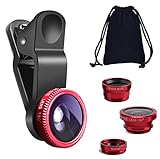
- THE FISHEYE LENS: Offers You a Wide Hemispherical Image. Professional HD Lens with Advanced Optical Glass Give You Clear Shots Every Time, Reducing Glare and Reflection. Top-Grade Aluminum Construction Increases The Durability of The Product and Let The Lens kit Be Your Partner of Photography
- THE MACRO LENS: Can be used seperately, The Macro Lens for Taking Extreme Close-Up Pictures of Tiny Objects in Details. suggest keeping 1-2 cm distance from your object to take more clear pictures
- THE WIDE ANGLE LENS: The Macro Lens and the Wide Angle Lens are attached together upon receival ! The wide lens should be used together with macro lens. The Wide-Angle Lens Projects a Substantially Large Ranges, Such Group of People, Buildings and Landscape. Enjoy a Fantastic World
- PORTABLE AND DETACHABLE: Easy to Install & Remove. Let Your Trip Much Easier with This Lens, Clip on to all Major Smartphones and Tablets with a Single Lens Rear Camera
- UNIVERSAL DESIGN: The Lenses Can Work on Most Types of Mobile Phones Whose Camera Lenses are Not Bigger Than 13 mm Diameters, Such as iPhone, iPad, Samsung and Other Smart Phones and Even Tablet
Underwater capture needs particular care. DJI’s Osmo 360 support documentation warns that refraction through convex fisheye lenses underwater can cause distortion and stitching errors. Follow the camera maker’s guidance for underwater setups rather than assuming an above-water workflow will produce clean seams.
Free tools Windows power users keep installed
One-click scans. No signup required.
Shoot to reduce blur and stitching seams
- Keep the camera level and rotate around its position instead of sweeping widely with your arms.
- Move smoothly; use a tripod, stabilizer, or gimbal when light is low.
- Avoid capturing moving people, cars, trees, or other motion across likely frame boundaries.
- Keep important subjects away from the nadir—the bottom area beneath the camera, where support equipment or missing coverage may be visible.
- Clear clutter from beneath the camera. If your gimbal’s instructions recommend it, extend the selfie stick to reduce the visible black area at the bottom.
- Take a short test, inspect the seams and bottom area, and repeat the capture if defects affect the result.
Stitching lines usually show up where frames do not align cleanly, especially when the camera moves between shots or a subject crosses a boundary. A tripod hole or dark patch underneath can reflect the support, a blind spot, or incomplete coverage; positioning and the capture setup determine whether it can be reduced.
Best Value

- 360-Degree All-Round Coverage: Four-lens dash camera system captures front, rear, left, and right views simultaneously, providing complete protection and eliminating blind spots around your vehicle
- Comprehensive Recording System: Includes main dashboard camera unit with three integrated lenses plus separate rear camera with mounting bracket, suction cup mount, and car charger for complete installation
- Car Security Camera: The Car Video Camerea reocrds everything on the road. If car accident happened, we can clearly playback the situation, a nice proteciton for driver.
- Phone APP View Videos: Features mobile app compatibility for easy playback, file management, and camera control directly from your smartphone with intuitive interface
- Rotatable Design: Main unit features 360-degree rotating mount and adjustable side cameras (180-degree rotation each) allowing you to customize viewing angles for optimal coverage of your vehicle's surroundings
Export and check the finished 360 image
For sharing between tools, a stitched 360 image is commonly delivered as an equirectangular image, which maps the spherical view into a flat rectangle. ThingLink says it accepts equirectangular images with a 2:1 pixel aspect ratio and resolution below 8192 × 4096 pixels for its 360-image workflow: ThingLink’s 360-image requirements.
- Export the stitched result as a standard 2:1 equirectangular JPEG when the intended viewer supports that format.
- Keep the original project files so you can revisit the stitch if a seam or bottom-area defect needs correction.
- Open the export in the actual viewer or platform where it will be used. A flat image that looks stretched is normal for this projection; confirm that the viewer lets you look around interactively.
A phone’s ordinary Pano image is not automatically an interactive sphere. If the viewer does not recognize it as 360 content, confirm that the image has full spherical coverage and the expected equirectangular format.
Quick Recap
Product prices and availability are accurate as of the date/time indicated and are subject to change. Any price and availability information displayed on Amazon at the time of purchase will apply.

