
PC Slower Than It Used to Be?
A free scan shows the junk files, broken settings and background clutter dragging Windows down - then fixes them in one click.Free scan · Windows 10 & 11Crashes, No Sound, or Screen Glitches?
Random freezes, missing sound and display glitches usually trace back to one bad driver. Find and replace yours safely.Free scan · under a minuteiTechGuides is reader-supported. When you buy through links on our site, we may earn an affiliate commission. As an Amazon Associate I earn from qualifying purchases. Learn more
To start selling online, decide what you are offering and how it will reach the buyer, choose a platform whose features and plan fit that model, build the product pages, configure checkout, payments, tax and fulfillment, test a complete order, and then launch and promote the store. Platform setup handles much of the technical work, but it does not settle the legal and tax duties that apply where you are based and where you sell. Those are covered in their own section below.
Decide what you are selling before choosing software
Four decisions shape every later setup choice: who will buy, what you are offering, how the product gets from you to the customer, and how much you can spend before the first sale. Software comes after these answers, because the answers determine which features you need.



Define the buyer and the offer
Write down who the likely customer is, what need the product meets, and how it differs from alternatives they can already buy. If you cannot state that difference in one or two sentences, the store will have to compete on price alone, which is harder to sustain for a small seller.
The Tool Desk
Outbyte Driver Updater FREEScan for outdated or missing drivers - takes under a minuteDriver Scan →Outbyte PC Repair FREEClear out junk files and repair common Windows errorsFree Scan →Choose a sourcing and delivery model
Square’s online-store guide, published March 24, 2026, names several sourcing models: handmade goods, wholesale, manufacturing or private label, supplier networks, and dropshipping. Each one changes your cost structure:
#1 Best Overall
- Handmade goods: you make each item, so your own production time and materials set the cost per unit. The guide does not compare margins for this model.
- Wholesale and private label: you buy or commission stock in advance, so inventory, storage and minimum order quantities become your cost to carry. The guide does not compare margins for these models either.
- Dropshipping: a supplier ships each order, which lowers your inventory and storage needs. Square’s guide also notes potentially lower margins and variable delivery times. Dropshipping is not automatically profitable.
Build your budget from the actual costs of your model: sourcing or making the product, packaging, shipping, storage, marketing, and the platform’s plan and transaction fees.
Choose a platform by the features you need
Square’s guide describes the platform as the foundation of the store: “Your eCommerce platform powers your online store.” Compare candidates on the criteria that affect your daily work:
- Ease of setup and the ongoing maintenance you are willing to do.
- Product and variant management, and inventory tracking.
- Mobile themes and how the storefront looks on a phone.
- Payment methods and checkout design.
- Shipping, local pickup, local delivery, or digital delivery, depending on what you sell.
- Analytics, marketing tools, and SEO features.
- Security, integrations with the tools you already use, and migration options if you outgrow the platform.
- Plan price, transaction fees, and the cost of add-ons or apps.
- Sales channels and availability in your country for the products you sell.
- In-person selling, if you need point-of-sale hardware and it is available in your region.
Shopify’s setup checklist warns that plan features, fees and sales channel eligibility vary, including by region and product type. This article does not provide a current side-by-side price comparison, and no platform is the cheapest or best across all sellers. Check each provider’s plan page for your country and product before you commit.
Rank #2
Set up the storefront
Once the platform is chosen, build the store in this order. Admin labels change between releases, so use the current help center for each platform’s exact menus.
- Set the store identity. Enter the store name, business address and contact details, then set currency and weight units. Shopify’s checklist lists these as early setup items.
- Connect a domain. Use a custom domain if you can; this is also one of the items on Shopify’s checklist.
- Authenticate your email sending. Shopify’s checklist lists email authentication as a setup step. It is the domain-level configuration that helps order and notification emails reach customers’ inboxes.
- Add products. For each item, write a clear title, a description that states what the product is and what it is not, specifications such as size, materials or compatibility, and clear images.
- Organize the catalog. Group products into categories or collections so buyers can find them without searching.
- Publish the required pages. Create a home page, a contact page, an about page, an FAQ, and policy pages covering shipping, returns and refunds, and privacy.
Square’s U.S. support article, “Set up your website,” walks through the store-building steps for that platform, and the Shopify checklist lists the same categories of setup for its stores.
Configure payments, checkout, tax and fulfillment
These four settings decide what the customer pays and how the order gets to them. Set them before you test, not after you launch.
Payments and checkout
Offer the payment methods your buyers are likely to use, and keep checkout short and easy to understand. Shopify’s checklist includes choosing payment providers and configuring checkout as separate setup items, so confirm both before testing. Show shipping and tax costs clearly at checkout rather than adding them late in the flow.
Tax: calculation, filing and remittance
Three separate jobs are often bundled together under the word “tax,” and they should be understood separately:
- Calculation: the tax amount shown to the customer at checkout, based on the rules you configure.
- Filing: submitting tax returns to the authority that requires them.
- Remittance: sending collected tax money to that authority.
Shopify states that its tax calculator does not itself file or remit taxes unless its automated filing service, Shopify Tax, is used, and that tax compliance otherwise remains the merchant’s responsibility. That statement applies to Shopify. Other platforms have different tools and terms, so check what your platform does and does not handle. Configure tax rules only after you have identified the jurisdictions where you are required to collect tax. Then confirm your obligations with the tax authority or a qualified adviser for your location.
Rank #4
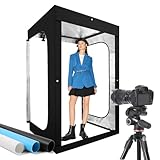
- Adjustable Brightness and High Color Rendering Index: 47"x39"x78" Photo light box built in 768 high-quality flicker free LED beads with a color temperature of 5600K, and the brightness can be easily adjusted from 1% - 100%, the color rendering index (CRI) of the box light is up to 95+. Product light box providing soft, sufficient, and uniform photography lighting for shooting at any angle, presenting the true color of objects.
- 3-Color PVC Easy to Clean Background: The light box photography is equipped with a 3-color detachable background (black/white/blue). The PVC material background for photography is durable, long-lasting, wrinkle resistant, and easy to clean. Our professional magazine photo booth box with no creases on the edges, provide excellent shooting backgrounds for studios, photographers.
- Multi angle Lighting and Shooting: The newly upgraded large light box is equipped with 8 movable light panels, each light board is equipped with magnet, you can rotate or change the position of the lighting panel to obtain top light, front light, side light, and other light directions. In addition, our photography lighting kit has openings on both the front and side, allowing you to choose from a variety of different angles for shooting according to your needs.
- The Latest Upgraded Lightbox: Unlike simple portable studios, frame structure and fully wrapped photobooth are more stable and light tight, better avoids shadow and reflection issues, providing a more perfect shooting effect, and will not be affected by other rays when taking photo. Sufficiently large photography box is easy to use, easy to assemble, and comes with a portable handbag for easy carrying.((Notes: 10 "/12 ", 16 "/20 "/24 "/32 ", 47 " x20 "x55 "/47 "x39 " x78 "is the same installation method)
- Package Content and Good After-Sales Service: Purchase our product photography light box, you will receive 1 x Photo Studio Light Box, 8 x Lights Panel, 3 x Color PVC Backdrop, 5 x Light Diffuser, 4 x Brightness Dimmer, 3 x Large Background Clip, 1 x User Manual, 1 x Carry Bag and our 1-year warranlty and lifetime friendly customer service. If you encounter any problems while using the white box for photography, please feel free to let us know and we will reply within 24 hours to help you solve them.
Fulfillment and shipping
Choose a fulfillment method based on what you sell and who buys it. Square’s guide lists shipping, pickup, delivery, and non-physical items as the main options. Set rates, delivery areas and expected delivery times before launch, so the shipping cost shown at checkout matches what you will actually pay.
A shipping label printer is only relevant if you ship physical orders. Sellers who ship tangible goods often look for a thermal label printer marketed to small businesses. It is unnecessary for digital products, services, or stores that use only pickup or local delivery. Choose a model based on your label size and volume rather than the brand alone.
Free tools Windows power users keep installed
One-click scans. No signup required.
Check legal and registration duties where you operate
Requirements depend on jurisdiction and on the product. Square’s U.S. guide lists business structure, an Employer Identification Number (EIN), tax registration, and licenses or permits as items to review, and notes that requirements vary by country. A platform setup does not confirm any of these for you. Before you launch, check:
Best Value
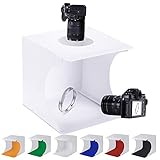
- ✔ SPACE SAVING - Coming with folding design, more convenient to install and carry, built-in led light, providing average light and prevents shadows and reflections in your photos.
- ✔ PERFECT FOR YOUR PRODUCT - The studio allows quick and easy shooting of small products such as shoes, accessories, toys, watches, gadgets and other items.
- ✔ EASY TO INSTALL - Just need few minute to assemble your own photo studio anywhere, unfold this LED light box studio to get the perfect backdrop for small item.
- ✔ WIDE APPLICATION - The studio is designed for small items of photography enthusiasts, artists and other online sellers, professionals and product advertising clients.
- ✔ PACKAGE CONTENT - Include 6 color backgrounds pads, and build-in light and USB cable (You should prepare a usb charger to power it.).
- Which business structure and registrations apply where you are based.
- Which tax registrations apply where you are based and where your customers are.
- Which permits or licenses apply to the product category you sell.
- Which consumer rules apply to your refund, returns, pricing and contact disclosures.
Use official government sources for your country or region, and seek qualified local advice where the answer affects money or liability. The answer for a seller in one country does not transfer to another.
Test a full order, then launch
Testing is the last checkpoint before customers see the store. Shopify’s guidance is to review policies, contact information and shipping rates before public launch, and to place test orders before going live.
- Place test orders for every product type, including each variant such as size or color, and any digital or pickup option you offer.
- Check the product pages on a phone. Confirm images load, text is readable, and the add-to-cart button works.
- Complete payment. Confirm the order confirmation page and confirmation email arrive, and that the order appears in your admin with the correct totals.
- Check shipping and tax at checkout against the rates and rules you configured, using addresses in each area you intend to serve.
- Review every policy link and the contact details on each page.
If a test order shows a wrong total, a missing tax line for an address where you expected tax, or a shipping option that does not match what you can deliver, fix the setting and place a new test order. Do not wait for a customer to find the error.
What’s actually slowing this PC down?
Pick the symptom - the matching free tool is one click away.
Promote the store and measure what works
After launch, promote the store through channels your buyers already use. Stripe’s guide, last updated April 20, 2026, includes search engine optimization, testing and analytics among its launch steps. Use your platform’s analytics to see which traffic sources and products lead to orders, and change one variable at a time so you can tell what caused a change. No timeline for a first sale is guaranteed; it depends on your offer, your audience and how much you can put into reaching them.
When you are ready to compare the store against your original budget, use the same cost categories you listed at the start: sourcing, packaging, shipping, marketing, and platform fees.
Quick Recap
Product prices and availability are accurate as of the date/time indicated and are subject to change. Any price and availability information displayed on Amazon at the time of purchase will apply.

