
iTechGuides is reader-supported. When you buy through links on our site, we may earn an affiliate commission. As an Amazon Associate I earn from qualifying purchases. Learn more
To set up adaptive sync, confirm your monitor and graphics hardware support the same variable refresh rate (VRR) mode, enable it in the monitor’s on-screen display, then turn it on in NVIDIA Control Panel or AMD Software: Adrenalin Edition. The exact options depend on your monitor, GPU, and connection, so check the monitor manual if a setting is missing.
What adaptive sync does—and what you need
Adaptive sync lets a display adjust its refresh timing to match frames produced by the graphics hardware. This can reduce screen tearing and stutter, but it does not guarantee that every visual artifact will disappear. NVIDIA and AMD both require compatible display and graphics hardware; AMD also lists a current compatible graphics driver as a requirement. Check the NVIDIA G-SYNC requirements and AMD FreeSync overview against your exact devices.
- NVIDIA: NVIDIA lists Windows 10 or later and a Pascal-class or later GPU for G-SYNC Compatible displays. Requirements differ for dedicated G-SYNC displays, so consult NVIDIA’s current documentation for your model.
- AMD: Confirm FreeSync support for both the display and AMD GPU or APU, and install a current compatible graphics driver.
- Connection: Port support varies by monitor and GPU. AMD documents FreeSync over DisplayPort and HDMI on certified displays; its configuration guidance specifies DisplayPort 1.2 or higher where applicable. Verify your model’s manual rather than assuming every port supports VRR.
Set up NVIDIA G-SYNC or G-SYNC Compatible
- Connect and power on the supported monitor, then make it the primary display in Windows display settings.
- Open NVIDIA Control Panel and select Display > Set up G-SYNC.
- Check Enable G-SYNC/G-SYNC Compatible. Choose Full screen mode for full-screen applications, or Windowed and full screen mode if you want VRR for windowed applications too.
- If NVIDIA Control Panel prompts you to enable the selected display, do so. Then open Manage 3D Settings and confirm Monitor Technology is set to G-SYNC/G-SYNC Compatible.
- To check whether a game is using G-SYNC, select Display > Show indicator for G-SYNC in the NVIDIA Control Panel menu bar. The indicator’s name may differ by display type.
See NVIDIA’s G-SYNC setup instructions for the current control-panel guidance.
Enable AMD FreeSync
- Confirm FreeSync support for the monitor and AMD graphics hardware, and install a current compatible AMD graphics driver.
- Open the monitor’s on-screen display (OSD) and enable AMD FreeSync. AMD also advises disabling Anti-Blur and setting DisplayPort to 1.2 or higher where those controls apply; not every monitor has these options.
- Open AMD Software: Adrenalin Edition and check or enable FreeSync under Gaming/Display. On compatible AMD systems and certified displays, FreeSync may already be enabled automatically.
- If FreeSync is unavailable or inactive, check the monitor’s picture preset and custom picture settings. AMD notes that some such settings can disable the feature; use the monitor manual for model-specific steps.
Menu labels can vary by software and monitor. Refer to AMD’s FreeSync configuration instructions and guidance on enabling AMD FreeSync for details.
#1 Best Overall
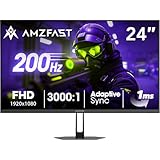
- 【24 Inch Gaming Monitor with Fast VA Screen】Amzfast 24 inch gaming monitor features a fast VA panel, offering 178°V/H Viewing Angle. With a resolution of 1920*1080, you can see every detail clearly no matter the angle.
- 【200Hz Refresh Rate 1ms & Adaptive Sync】This gaming monitor delivers a gaming experience of 200hz refresh rate, delivering smoother gameplay for FPS, RPG, and racing games; With a dynamic response time of 1ms and Adaptive Sync technology, it enables faster image capture while reducing screen tearing and stuttering through refresh rate synchronization, compatibility with FreeSync and G-SYNC.
- 【129% sRGB & Eye Care Function】Amzfast 24 inch monitor delivers vibrant visuals with 129% sRGB color gamut coverage,300nits brightness, a contrast ratio of 3000:1, and HDR Display.Eye-Care PC gaming monitor reduce the low blue light, Flicker-Free, and Anti-Glare technology to protect you from eye fatigue, irritation and strains. This enables you to work on your documents, watch movies, or play games more comfortably for extended periods.
- 【Support VESA Mount & Metal Stand】The metal stand provides sufficient stability and improves desktop utilization. The monitor gamer also support VESA mounts(75mm x 75mm) and tilt adjustment of -5°~15°(+/-2°).
- 【Multiple Interfaces】This gaming pc monitor equipped with versatile connectivity options including HDMI 2.1 TMDS, DisplayPort 1.4 port which support Desktop PC, Gaming Laptops, Switch, XBOX, PS gaming console etc
Choose the right mode and connection for your setup
Use the NVIDIA route for a supported NVIDIA setup and the AMD route for supported AMD hardware. For the monitor, verify the exact model’s supported VRR technology, input ports, and documented operating range. There is no single connection or refresh-rate range that applies to every display.
If your existing monitor or graphics hardware does not support a compatible VRR mode, a gaming monitor explicitly supporting AMD FreeSync or NVIDIA G-SYNC Compatible is the relevant hardware category to consider. Check compatibility with your GPU and intended input before buying; the feature cannot be enabled through software alone on unsupported hardware.
Rank #2

- 1500R Curved Immersion: The KOORUI 24 inch curved gaming monitor features an 1500R curvature, offering a wider, more comfortable,more immersive and natural viewing experience by enhancing depth and dimension in your gameplay,while FHD 1080p delivers crisp details.
- 180Hz Smooth Gameplay: Experience buttery-smooth visuals with 180Hz refresh rate and 1ms MPRT response time , perfect for competitive FPS, racing games, or fast-paced action. Adaptive Sync technology provides smooth, tear-free gameplay, delivering seamless performance for both gaming and business applications.
- Excellent Color: Enjoy vibrant, true-to-life colors with a 250 cd/m² brightness, 8-bit color depth, and a 16.7 million color gamut. HDR10 support brings out deeper blacks and vibrant highlights for cinematic visuals.The 3000:1 contrast ratio and 99% SRGB bring out rich details and exceptional image quality,ensuring stunning visual quality whether you're gaming or working.
- Eye Care: Equipped with Flicker-Free technology to eliminate screen flickering, reducing eye strain during extended gaming or work sessions. Combined with the Blue Light Filter, it cuts harmful high-energy blue light emission, providing maximum protection for your eyes.
- Versatile Connectivity: 3-sided bezel-less screen, this monitor features HDMI (v2.0)×2, DisplayPort 1.2×1, and an audio-out (No speakers). Compatible with a variety of devices, including PC, laptop, gaming consoles. It also supports VESA 100x100mm mounting and offers front and rear tilt adjustments (-5° to 15°) for comfortable viewing angles.
Troubleshoot adaptive sync
- The G-SYNC page or checkbox is missing: Make sure the monitor is connected, powered on, enabled, and set as the primary display. Check that the GPU and monitor support the relevant combination, then review Monitor Technology under Manage 3D Settings.
- FreeSync does not appear active: Check the monitor OSD, AMD driver and software, Anti-Blur or picture-preset settings, and the monitor’s model-specific manual.
- G-SYNC works only in full-screen games: Select Windowed and full screen mode in Display > Set up G-SYNC to include windowed applications. If windowed mode causes problems, use full-screen-only mode.
- You cannot tell whether a game is using G-SYNC: Turn on NVIDIA’s Show indicator for G-SYNC option in the Control Panel menu bar.
- You are unsure whether HDMI or DisplayPort supports VRR: Check the exact monitor and GPU documentation. AMD documents both connection families for FreeSync-certified displays, while its separate configuration guidance calls for DisplayPort 1.2 or higher where applicable.
- Frame rate often exceeds the display’s refresh rate: AMD recommends enabling V-Sync or capping the frame rate in that situation. Treat this as AMD’s guidance; the best setting can depend on the game and configuration.
NVIDIA’s linked Control Panel instructions use its current help path and do not state a publication date. AMD marked its Adrenalin support article as last updated March 3, 2025. Drivers, interfaces, and compatibility can change, so confirm the current instructions for your particular hardware.
Do these 3 things before closing this tab:
1Repair Windows errors before they cause bigger problems2Fix the driver behind crashes, sound loss and screen glitches3Clear out junk files and repair common Windows errorsQuick Recap
Rank #4
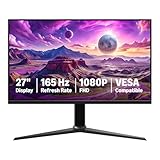
- IMPORTANT: Remove protective film (with date code) from panel surface before use. This film protects against shipping scratches.
- 27-inch IPS digital monitor for gaming and entertainment
- Crystal clear 1080P high definition picture and graphics relay
- Nearly zero lag with 1ms response time for smooth gaming experience
- Additional specs include adaptive sync, VESA compatibility, and 165Hz (Note: To achieve maximum refresh rate, ensure your computer ports and graphics card support FHD output at 165Hz. Use a DisplayPort 1.4 or HDMI 2.0 compatible cable. Consult your device manufacturer's manual for more information. Finally, select the maximum 165Hz refresh rate in your computer's advanced display settings.)
Rank #3

- 27-Inch FHD Workspace: The 1920x1080 resolution and 16:9 format give racing sims, fast games, editing timelines, data dashboards, and multi-window entertainment room to stay visible on one screen. The layout reduces constant window switching and suits home desks, office workstations, studios, or entertainment setups that benefit from a larger working area.
- 240Hz Motion with 2ms OD: The refresh rate makes scrolling, cursor movement, video, and fast on-screen action feel smoother, while 2ms OD supports clearer motion. Adaptive-Sync can help reduce visible tearing with compatible hardware. Maximum refresh performance depends on the source device, input, cable, and system settings.
- 1500R Curved VA Image Quality: 4000:1 contrast and 99% sRGB / 72% NTSC coverage support clear text, deep dark tones, vivid media, photo review, presentations, and creative work, while HDR adds support for compatible high-dynamic-range content. The image profile is suited to mixed daily use where both readable detail and visual depth matter.
- Multi-Source Flexibility: HDMI 2.0 + DP 1.4 connect desktops, laptops, docks, and compatible entertainment devices, giving users practical options for dedicated work systems, personal computers, media sources, and shared desks. Supported resolution and refresh modes depend on the connected device and selected input.
- Flexible Connectivity: HDMI 2.0 + DP 1.4 support work, study, streaming, editing, and entertainment sources on one desk. Choose the input that matches the target resolution, refresh rate, and source-device capability. This helps keep a dedicated work computer and a separate personal or media source ready on the same desktop.
Product prices and availability are accurate as of the date/time indicated and are subject to change. Any price and availability information displayed on Amazon at the time of purchase will apply.

