
Quick wins for a faster PC:
Scan for outdated or missing drivers - takes under a minuteDriver Scan →Repair Windows errors before they cause bigger problemsFix Now →iTechGuides is reader-supported. When you buy through links on our site, we may earn an affiliate commission. As an Amazon Associate I earn from qualifying purchases. Learn more
You can run Uptime Kuma on Fedora as a systemd-managed Podman container using Quadlet. The setup below adapts the project’s documented image, port, and data path into a Quadlet file; it is not an official Uptime Kuma Quadlet recipe or a verified file for every Fedora and Podman version. Check the installed Podman version’s Quadlet documentation before deploying.
Choose rootful or rootless service management
Quadlet files are read by a Podman systemd generator, which creates service units when the system boots or when you run systemctl daemon-reload. Choose the service manager and file location that match how you administer the host:
| Mode | Quadlet file location | Manage the service with |
|---|---|---|
| Rootful | /etc/containers/systemd/uptime-kuma.container |
System-level systemctl |
| Rootless | ~/.config/containers/systemd/uptime-kuma.container for the service user |
systemctl --user |
Rootful suits host-level administration. Rootless keeps the container under a user’s service manager. For rootless operation, check that the account’s user systemd manager is available and configured for the boot behavior you need; do not assume a user service will start at boot automatically.
Do these 3 things before closing this tab:
1Fix the driver behind crashes, sound loss and screen glitches2Repair Windows errors before they cause bigger problems3Scan for outdated or missing drivers - takes under a minuteCheck Fedora and Podman prerequisites
- Quadlet requires cgroup v2. Check it with
podman info --format {{.Host.CgroupsVersion}}. The result should identify version 2. - Confirm the installed Podman release supports the Quadlet directives in your file. The available guidance does not establish a Fedora-release or Podman-package compatibility matrix.
- Use a local directory or Podman volume for persistent data, backed by a filesystem that supports POSIX file locks. Uptime Kuma warns that this support is required to avoid SQLite database corruption and cautions about file-locking problems on NFS.
Create the Quadlet file
The Uptime Kuma installation page documents the louislam/uptime-kuma:2 image, container port 3001, and persistent data at /app/data. The example below translates those settings into a Quadlet container definition and uses a named Podman volume. Verify the current image reference and syntax against the project and your Podman version before use.
#1 Best Overall

- WiFi 6 for Linux: Upgrade your Linux laptop or desktop PC with this AX900 USB WiFi 6 adapter. Features 1024-QAM, MU-MIMO, and BSS Color for faster, more stable wireless performance
- Works with Debian-based OSes: Supports kernels up to 7.0, Ubuntu 26.04–16.04 (all flavors), Raspberry Pi OS 13–10, Debian 13–10, Linux Mint 22–18, LMDE 7–4, Zorin OS, MX Linux, Linux Lite, Elementary OS and more. Additional supported OSes for this Linux USB WiFi adapter are listed below
- AX900 Fast Dual-Band Speeds: Achieve up to 600 Mbps on 5 GHz or 286 Mbps on 2.4 GHz. This Linux compatible WiFi 6 adapter delivers stable coding, smooth video calls, and responsive browsing for a reliable Linux experience
- Compact & Mobile-Friendly: Measuring just 1.4×0.7×0.3 in (3.6×1.8×0.8 cm), this mini USB WiFi adapter fits Linux devices without blocking nearby ports. Discreet and easy to carry—ideal for mobile Linux work and flexible setups
- More Reliable WiFi with Beamforming: This USB WiFi dongle supports Beamforming and works with compatible routers to improve WIFi link stability, helping maintain consistent and reliable wireless connections
[Unit]
Description=Uptime Kuma

[Container]
Image=louislam/uptime-kuma:2
ContainerName=uptime-kuma
PublishPort=3001:3001
Volume=uptime-kuma-data:/app/data

[Service]
Restart=always

[Install]
WantedBy=default.target
Save the file as uptime-kuma.container in the rootful or rootless location chosen above. The named volume preserves the application data across container replacement. Do not substitute an NFS-backed directory for this database without establishing that its file-locking behavior is safe.
Load and start the generated service
Quadlet-generated services are not enabled like ordinary static service files. The [Install] section in the Quadlet supplies the startup relationship; WantedBy=default.target is a documented pattern.
Rank #2

- Linux-Focused AC1200 WiFi Adapter: Realtek RTL8812AU dual-band USB WiFi adapter supports 2.4GHz and 5GHz networks. Designed for Linux desktops, laptops, live environments, repair systems, gaming distributions, and advanced Kali Linux networking.
- Plug-and-Play Tested on Multiple Linux Distributions: Verified without manual driver installation on Ubuntu, Fedora Workstation, Elementary OS, openSUSE, Garuda Linux, Bazzite, Solus Budgie, Batocera, CachyOS, and Arch Linux. Compatibility can vary by kernel, system, and distribution version.
- Kali Linux Driver and Offline Setup Available: Kali requires RTL88xxAU driver installation before a usable wireless interface appears. Online instructions and a downloadable driver package are provided for offline installation, monitor mode setup, and authorized packet-injection testing.
- Built for Kali Monitor Mode: The RTL8812AU chipset supports monitor mode, packet capture, and packet injection with a compatible Kali Linux driver and configuration. Intended for authorized cybersecurity labs, wireless diagnostics, education, and networks you own or have permission to test.
- USB 3.0 with Dual External Antennas: Supports rated wireless speeds up to 867Mbps on 5GHz and 300Mbps on 2.4GHz. Two adjustable antennas and the included USB extension cradle help improve placement, reception, and connection stability.
- For a rootful service, put the file in
/etc/containers/systemd/. For rootless, put it in~/.config/containers/systemd/as the service user. - Reload the appropriate systemd manager: run
sudo systemctl daemon-reloadfor rootful, orsystemctl --user daemon-reloadfor rootless. - Start the generated service: run
sudo systemctl start uptime-kuma.servicefor rootful, orsystemctl --user start uptime-kuma.servicefor rootless. - Check its state with
sudo systemctl status uptime-kuma.serviceorsystemctl --user status uptime-kuma.service, using the command for your chosen mode.
After startup, the project’s documented local address is http://localhost:3001. If you are connecting from another machine, use the Fedora host’s address and ensure its firewall and network policy permit the chosen host port.
The Tool Desk
Outbyte PC Repair FREERepair Windows errors before they cause bigger problemsFix Now →Outbyte Driver Updater FREEFix the driver behind crashes, sound loss and screen glitchesFind Drivers →Adjust the port or startup timeout when needed
Change the host-side port
The mapping 3001:3001 publishes host port 3001 to the application’s container port 3001. If that host port is already occupied or you prefer another external port, change only the left side—for example, 8080:3001 publishes host port 8080 while leaving Uptime Kuma’s container port unchanged. Connect using the selected host port.
Rank #3

- 【One Compact PC, Multiple Applications】Pre-installed with Windows 11 Pro and Linux-ready for flexible system deployment. Built-in Wi-Fi 5, Bluetooth 5.0, and a G-Sensor support convenient wireless connectivity and automatic screen rotation. The responsive touchscreen is ideal for remote meetings, smart-home control, self-service kiosks, industrial HMI, and inventory management. Designed for everyday and light-duty applications, it is best suited for essential tasks rather than heavy multitasking, gaming or video rendering
- 【Portable Power for Work Anywhere】Stay productive without being tied to a power outlet. The built-in 2500mAh rechargeable battery provides up to 4.5 hours of runtime, while the lightweight 0.32 kg design makes it easy to carry wherever you go. From home and office use to field debugging, equipment inspections, and on-site tasks, enjoy the freedom to work wherever you need
- 【Dual-Display Support & Extensive Connectivity】Expand your workspace with dual-display output through HDMI up to 4K@30Hz and Type-C video output. A full selection of ports—including Gigabit Ethernet, four USB 3.0 ports, a TF card slot, and a PD charging port—makes it easy to connect keyboards, external storage, network devices, and other peripherals. Whether you're creating a compact home workstation, setting up a POS system, or integrating it into an industrial control environment, this mini PC provides the connectivity you need
- 【Touchscreen Mini PC, No Monitor Required】Enjoy a complete computing experience without the need for a separate display. This compact 5.5-inch IPS touchscreen mini PC features a 720×1280 resolution, Intel Celeron processor, 8GB RAM, 128GB eMMC storage, and Windows 11 Pro. Ideal for everyday tasks like web browsing, document editing, and media playback, while also fitting seamlessly into digital signage, kiosks, POS systems, and light-duty industrial applications
- 【Intel Celeron N5095 Processor with Quiet Cooling】Powered by a quad-core Intel Celeron N5095 processor with speeds up to 2.9GHz and 4MB cache, this compact mini PC delivers smooth and reliable performance for everyday computing. The built-in quiet cooling fan helps dissipate heat efficiently during extended use while keeping operating noise to a minimum
Handle a slow image pull
A first image pull can take longer than systemd’s default 90-second startup limit. If startup fails because the pull exceeds that limit, pull the image before starting the service, or add a longer TimeoutStartSec value under the Quadlet’s [Service] section. Use a value appropriate to your connection and image-pull time.
Put Uptime Kuma behind a reverse proxy only if needed
A reverse proxy is optional for a local-only deployment. If you do use one, Uptime Kuma’s guidance says the proxy must forward WebSocket Upgrade and Connection headers. Use the project’s reverse-proxy instructions for the syntax of your chosen proxy: Uptime Kuma reverse-proxy guidance.
Rank #4
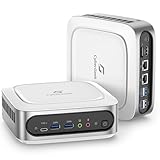
- Unleash Superior Performance: Powered by the 11th Gen Intel i9-11900H processor with 8 cores, 16 threads, and speeds up to 4.9GHz, the CyberGeek Mini PC offers up to 30% more power than 10th-gen equivalents and 50% more than 6-core i7s. With Intel UHD Graphics, it effortlessly handles multitasking, gaming, and demanding software, delivering top-tier performance in a compact design—ideal for both home and business use.
- Flexible Storage & Ubuntu Linux: Configure your CyberGeek Mini PC with 16GB to 64GB DDR4 RAM and 512GB to 2TB PCIe NVMe SSD storage. Whether you need reliable performance for everyday tasks or maximum capacity for intensive workloads, this mini PC offers customizable options to meet your needs, ensuring fast data access and smooth operation. Preloaded with Ubuntu Linux for a robust and versatile computing experience.
- Superior Connectivity & Expandability: Equipped with 6 USB ports, dual LAN ports, Wi-Fi 6, Bluetooth 5.2, and multiple display outputs (DP/HDMI/Type-C), the CyberGeek mini pc computers is designed for ultimate connectivity. Easily connect to peripherals, external displays, and networks for a seamless experience in any setup, from office environments to gaming stations.
- Stunning 4K Triple Display Support: Enjoy crystal-clear visuals with support for up to three 4K displays simultaneously. Whether you're working on multiple projects, streaming content, or playing the latest games, the CyberGeek mini computer’s triple display capability provides an immersive and efficient visual experience.
- Compact Design with Advanced Cooling: The CyberGeek mini computer features an advanced cooling system that allows it to run at full frequency, ensuring optimal performance without compromising cooling efficiency. Its space-saving design delivers the power and reliability of a full-sized desktop, making it the perfect solution for environments where space is at a premium.
What this setup does—and what it does not establish
The configuration follows the project’s documented container image, port, and data directory, while relying on Podman Quadlet to generate a systemd-managed service. The Uptime Kuma project lists Fedora among supported distributions for its non-container installation path, but that does not verify this particular Quadlet file on every Fedora release. For native installation rather than a container, the project lists Node.js 20.4 or newer, Git, and PM2 for background operation; those are not prerequisites for running its published container image.
Quick Recap
Best Value

- 🚀Experience cutting-edge Linux with the newest Fedora release, featuring the latest kernel, GNOME desktop, and developer tools.
- 🔥 Latest Fedora Linux 44 Release: Enjoy the newest and most advanced version of Fedora Linux, built for speed, performance, and reliability — powered by cutting-edge open-source technology.
- 💻 Plug & Play Installation: Boot directly from the included USB drive — no setup or downloads required. Try Fedora live or install it permanently on your system with ease.
- 🔒 Secure & Trusted Build: Professionally prepared using the official Fedora 44 ISO, verified and tested to ensure authenticity, security, and stability.
- ⚙️ Ideal for Developers & Power Users: Fedora 44 includes the latest software packages, GNOME desktop, and developer tools — perfect for programming, testing, or daily computing.
Product prices and availability are accurate as of the date/time indicated and are subject to change. Any price and availability information displayed on Amazon at the time of purchase will apply.

