
Quick wins for a faster PC:
Repair Windows errors before they cause bigger problemsFix Now →Fix the driver behind crashes, sound loss and screen glitchesFind Drivers →iTechGuides is reader-supported. When you buy through links on our site, we may earn an affiliate commission. As an Amazon Associate I earn from qualifying purchases. Learn more
Use Gemini in Android Studio to draft a specific Kotlin refactor, then inspect its proposed diff and validate the result before keeping it. The safest workflow is to select a small, understandable section of code, state what must remain unchanged, and treat every suggestion as a reviewable edit—not as proof that the code is more correct or efficient.
What Gemini’s Kotlin refactoring workflow does
Gemini’s code transformation feature takes selected code and a prompt, then presents a proposed diff that you can refine or accept. You remain responsible for deciding which changes to apply. Google documents the interaction in its code-transformation guide.
This is most useful when you can describe a bounded change and judge whether the result meets it. It is not a substitute for understanding the code’s behavior, compatibility requirements, or project conventions.
How to transform selected Kotlin code
- Select a bounded target. In the Android Studio editor, highlight the Kotlin code you want to change. Start with a function or similarly limited section rather than asking for an unspecified rewrite of a large file.
- Open the transformation prompt. Choose Gemini > Transform code, or open the prompt field with Ctrl+ on Windows or Linux, or Command+ on macOS.
- Describe the change and its constraints. Say what you want improved and what must be preserved, such as behavior, public APIs, error handling, or the existing architecture.
- Review the proposed diff. Inspect what changed and whether it matches the request. Refine the prompt if needed, or accept only the changes you are willing to own.
- Run project validation. Use the relevant tests and checks, and inspect the resulting code in its surrounding project context before relying on it.
Write prompts that make changes reviewable
Google’s Kotlin refactoring prompt library, last updated May 16, 2025, offers an example that asks Gemini to make code more idiomatic, efficient, and readable, explain its changes, and suggest possible performance optimizations. It names extension functions, data classes, sealed classes, and coroutines as Kotlin features to consider where appropriate. These are options to evaluate, not a checklist of constructs to apply.
#1 Best Overall

- Excellent Compatibility: The Bluetooth keyboard compatible with iOS, Android and iPad OS system. It is perfect for Apple iPhone, iPad, iPad Mini, iPad Pro, iPad Air, Android Samsung LG tablet smartphone cell phone.
- Light portable and compact: This keyboard is much lighter, smaller than traditional keyboard. You can easily carry it without taking up more space on your desk or bag. 10 inch keyboard dimensions: 25 x 15 x 0.6 cm, weight: 180g. 【Size: 9.84 x 5.9 x 0.24 inch, weight: 6.35ounce/0.4pounds】
- Long-term use: Built-in rechargeable lithium battery, after fully charged, it can be used for more than 20 days (When used continuously for 2 hours a day). If you don't use it for more than 10 minutes, the keyboard will automatically enter the sleep state to save power. If you want to continue to use it, just click any key to wake up the keyboard.
- Comfortable Bluetooth Keyboard: The keys of the keyboard are scissor structure, square chocolate keycap design. Use this keyboard, you can type quietly on your tablet, iPad, iPhone, smartphone and provide you with a comfortable and pleasant typing experience.
- Bluetooth Connection: The keyboard adopts stable Bluetooth technology, the working distance is up to 10m. The keyboard is US QWERTY layout, easy to use, has hot keys, such as volume control, play and pause, previous and next etc. The front is brushed, the back is ultra-thin and smooth aluminum alloy design.
A more reviewable request narrows the goal and names the guardrails. For example:
Refactor this function for readability using idiomatic Kotlin where appropriate. Preserve its current behavior, public API, error handling, and coroutine cancellation behavior. Do not introduce new dependencies or change threading. Explain each change and identify any assumptions.Adapt the constraints to the selected code. If performance is the goal, ask for a proposed change and explanation, but do not treat a plausible optimization claim as a measured result. Benchmark or profile separately when performance matters.
Rank #2

- 7-Color LED Backlit: This Bluetooth keyboard has a 7 colors backlight mode, 1 breathing light mode, and 3 brightness levels. Even in the dark, it makes your typing more easily and conveniently. You can turn the lights on/off and adjust the backlight mode by the light bulb key, and switch colors among red, yellow, purple, green, ice blue, blue, and white by the RGB key. When the keyboard is idle, the light will automatically turn off to save power.
- Broad Compatibility: Perfect for iPad A16 11th 10th 9th Gen, iPad Air Mini Pro iPhone, Android Samsung galaxy tab tablet smartphone cell phone, and so on mobile devices with built-in Bluetooth, and compatible with Android, iPad OS, iOS, etc. multiple operating systems. This Bluetooth keyboard is specially designed for small mobile devices such as tablets, smartphones. SO, NOT suitable for desktop devices such as laptops, computers, Macs, MacBooks, etc.
- Stable and Reliable Bluetooth Connection: The advanced Bluetooth technology can provide a stable reliable and powerful connection. The keyboard is easy to connect and easy to use. Don't worry about delay. The keyboard has shortcut hot keys, which makes your work easier and more efficient. Keyboard size: 9.65 x 5.91 x 0.24 inch.Weight: 6.53 ounce/0.4pounds.
- Rechargeable Battery: The Bluetooth keyboard has a built-in rechargeable battery, so there is no need to replace the battery frequently, you can use the included Type-C cable for charging. It will enter sleep mode after about 5 minutes of inactivity to save power, you can press any key to activate it and wait for 3 seconds to use it again. If not used for a long time, you can turn off the keyboard power.
- Quiet Typing and Ultra-Slim: The keyboard adopts a scissor switch structure to provide you with a quiet, sensitive and comfortable typing experience, so that you can focus on your work without worrying about disturbing others. The compact and portable design can be easily put into your bag or backpack, easy to carry, can be used at home school travel office. The back of the keyboard is aluminum alloy design, which is perfect for use with iPad/ tablet case with magnetic adsorption function.
Review the diff before accepting it
Google’s interface presents a diff for review and lets you refine the suggestion or accept changes. Focus on the consequences of the actual edits, not just whether the result looks cleaner.
What’s actually slowing this PC down?
Pick the symptom - the matching free tool is one click away.
- Scope: Did Gemini change only the intended code, or alter unrelated logic?
- Behavior and edge cases: Are return values, side effects, exceptions, and boundary cases preserved?
- API compatibility: Did a function signature, visibility, or other externally used contract change?
- Nullability and types: Do nullable values and inferred types still express the intended guarantees?
- Concurrency: If coroutines or threading are involved, check dispatcher assumptions, cancellation behavior, and synchronization.
- Error paths: Do failures remain handled as the project expects, rather than being swallowed or converted?
These are code-review checks, not guarantees provided by the transformation feature. Google cautions that Gemini’s responses may be inaccurate and advises users to validate output before use. Its Gemini FAQ says users should carefully test generated code for errors, bugs, and vulnerabilities.
Rank #3
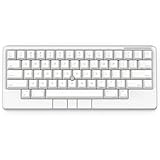
- Four touch-operated, customizable Gesture Pads unlock a wide variety of functions from switching windows and adjusting analog inputs to complex user-defined commands
- Integrated mouse functionality with a pointing stick in the center of the keyboard and three mouse buttons below the space key eliminates the need for a touchpad or mouse and promotes a fully immersive, comfortable typing experience from anywhere
- Create Keymap settings for both key layout and Gesture Pads which are saved in the HHKB so you can use it with different devices. Up to four different keymap profiles can be created. DIP switches enable custom key and OS settings
- Connect to your PC via USB (Type-C), or connect to your PC, Tablet, Smartphone (iPad, iPhone, Android) via Bluetooth multi-pairing, instantly switching between up to 4 devices
- Compact 60 key layout minimizes finger movement and maximizes efficiency. Silent linear mechanical switches reduce key noise and allows for complete concentration. Keyboard is hot-swappable to fit user’s switch preference
Use naming suggestions as a separate cleanup
For a focused naming pass, Gemini can suggest names for selected variables or help reconsider names in a function or file. Google describes these options in its variable-naming guide. Keep naming changes separate from a semantic refactor when possible: a smaller diff is easier to review and makes regressions easier to trace.
Decide what code context to share
Google’s FAQ says Gemini does not see code in the editor by default; it uses prompts and chat history. Users can opt in to codebase context, which can provide more context for responses and enable experimental features. Google also identifies .aiexclude files as a control for excluding files from AI features in its feature documentation.
Rank #4

- Four touch-operated, customizable Gesture Pads unlock a wide variety of functions from switching windows and adjusting analog inputs to complex user-defined commands
- Integrated mouse functionality with a pointing stick in the center of the keyboard and three mouse buttons below the space key eliminates the need for a touchpad or mouse and promotes a fully immersive, comfortable typing experience from anywhere
- Create Keymap settings for both key layout and Gesture Pads which are saved in the HHKB so you can use it with different devices. Up to four different keymap profiles can be created. DIP switches enable custom key and OS settings
- Connect to your PC via USB (Type-C), or connect to your PC, Tablet, Smartphone (iPad, iPhone, Android) via Bluetooth multi-pairing, instantly switching between up to 4 devices
- Compact 60 key layout minimizes finger movement and maximizes efficiency. Silent linear mechanical switches reduce key noise and allows for complete concentration. Keyboard is hot-swappable to fit user’s switch preference
Before enabling context or sending proprietary code, check Android Studio’s current settings and follow your organization’s data-handling rules. The documented controls do not establish legal or enterprise compliance for a particular project.
Recommended Free Tools
Check Gemini availability for your Android Studio setup
Google’s Gemini in Android Studio overview describes availability in the latest stable channel and major Android Studio versions released in the previous ten months. It also describes individual and business access routes. Access, eligibility, and feature details can change, so consult the current overview for your account and region rather than assuming every installation has identical access.
Quick Recap
Best Value

- Full 3-System Compatibility & Wide Device Support: Perfectly compatible with Android, iOS and Windows three major systems. Works seamlessly with Samsung tablets, iPads, iPhones, laptops, smartphone, android, iOS, windows etc
- How to Switch Systems: Switching to the corresponding system will improve compatibility and higher work efficiency (“FN + A” is for iOs , “FN + S” is for Windows, “FN + D” is for Android )
- Enhanced Oversized Keycaps:27% bigger than standard keycaps. The spacious surface minimizes accidental presses and ensures comfortable typing for long hours
- 5 Adjustable Angles & Foldable Stand for tablet or phone, It effectively eases hand and eye fatigue during long hours of use, helping you stay focused and work more efficiently
- Long Battery Life & Smart Power Saving:Built‑in rechargeable lithium battery, Type‑C fast charging (full charge in 2–3 hours, last up to 200 hours with the backlight off, and 3-5 hours with the backlight on). Auto sleep mode after inactivity to save power, no frequent charging needed
Product prices and availability are accurate as of the date/time indicated and are subject to change. Any price and availability information displayed on Amazon at the time of purchase will apply.

