
Do these 3 things before closing this tab:
1Clear out junk files and repair common Windows errors2Scan for outdated or missing drivers - takes under a minute3Repair Windows errors before they cause bigger problemsiTechGuides is reader-supported. When you buy through links on our site, we may earn an affiliate commission. As an Amazon Associate I earn from qualifying purchases. Learn more
To connect a GY-68 BMP180, wire its power and ground to the appropriate host connections, then connect SDA and SCL to the host’s I²C data and clock lines. To read pressure, the BMP180 must first load its individual EEPROM calibration values, take temperature and pressure measurements, and apply Bosch’s compensation equations. To calculate altitude, use the compensated pressure and a chosen sea-level reference pressure.
What the GY-68 BMP180 measures
The BMP180 is a Bosch digital pressure sensor with an analog-to-digital converter, control unit, EEPROM, and I²C serial interface. It produces uncompensated pressure (UP) and temperature (UT) readings. Those raw values are not ready to use on their own: the sensor’s 176-bit EEPROM contains individual calibration data used to compensate for offset, temperature dependence, and other parameters. Bosch describes the BMP180 as designed to connect to a mobile-device microcontroller over I²C (Bosch BMP180 datasheet).
GY-68 refers to a breakout-board form factor, rather than a guarantee that every board has identical power regulation or logic-level circuitry. DFRobot’s TOY0058 module documentation lists 5 V input, I²C digital output, and four pins: +5V, GND, SCL, and SDA (DFRobot TOY0058 module).
How do I connect a GY-68 BMP180?
Use the module labels to connect the four wires. Confirm the electrical requirements of your particular board and host before applying power.
#1 Best Overall

- BMP180 is a high-precision, small size, ultra-low power pressure sensor that can be used in mobile devices, to measure temperature, pressure, and altitude.
- Its performance excellence, the absolute accuracy of the lowest can reach 0.03hPa, and low power consumption, only 3μA.
- BMP180 uses a powerful 8-pin leadless ceramic chip can be directly connected with a variety of microprocessor via I2C.
- Pressure range: 300 ~ 1100hPa (+9000m to -500m)
- Low power consumption: 5μA in standard mode. Lead-free, RoHS compliant
| GY-68 pin | Connect to | Purpose |
|---|---|---|
| +5V | Host supply appropriate for the specific board | Module power |
| GND | Host ground | Shared electrical reference |
| SCL | Host I²C clock | Clock for I²C communication |
| SDA | Host I²C data | Data for I²C communication |
Do not assume a GY-68 breakout accepts 5 V on its supply and also makes its I²C lines safe for a 3.3 V-only controller. Board-level regulators and level shifting can vary; check the schematic or documentation for the exact board. Bosch’s typical I²C circuit uses pull-up resistors from 2.2 kΩ to 10 kΩ, with 4.7 kΩ typical. Whether additional pull-ups are needed depends on the breakout and host circuit.
How do I read pressure from BMP180?
A correct reading requires a short sequence: load the sensor-specific calibration data, measure temperature, measure pressure at a selected oversampling setting, and compensate the raw readings using Bosch’s fixed-point equations. The Bosch datasheet provides the register operations and compensation equations.
Rank #2
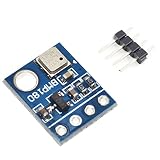
- BMP180 is a high-precision, small size, ultra-low power pressure sensor that can be used in mobile devices
- Its performance excellence, the absolute accuracy of the lowest can reach 0.03hPa, and low power consumption, only 3μA
- BMP180 powerful 8-pin ceramic leadless chip carrier (LCC) ultra-thin package, you can directly through the I2C bus connected with a variety of microprocessors
- Pressure range: 300 ~ 1100hPa (9000 meters above sea level ~ -500 meters)
- Low power consumption: 5μA in standard mode
- Read calibration words at startup. Read the 11 calibration words from EEPROM addresses 0xAA–0xBF. Each BMP180 has its own coefficients. Bosch recommends checking that the words are not all zero or 0xFFFF; such values indicate unusable calibration data.
- Start a temperature conversion. Send command 0x2E, wait at least 4.5 ms, then read the uncompensated temperature value UT.
- Start a pressure conversion. Write to control register 0xF4 with the requested oversampling setting (oss): 0, 1, 2, or 3. These settings select single, 2×, 4×, or 8× internal sampling.
- Wait, read, and compensate. Wait for the selected conversion to finish, read uncompensated pressure UP, and apply Bosch’s compensation equations using both UP and UT and the EEPROM coefficients. The compensated outputs are pressure in pascals or hPa and temperature in units of 0.1 °C.
The pressure conversion’s maximum time increases with oversampling. Bosch’s 2015 datasheet gives these values:
Quick wins for a faster PC:
Scan for outdated or missing drivers - takes under a minuteDriver Scan →Clear out junk files and repair common Windows errorsFree Scan →Fix the driver behind crashes, sound loss and screen glitchesFind Drivers →| Oversampling setting (oss) | Internal sampling | Maximum pressure conversion time |
|---|---|---|
| 0 | Single | 4.5 ms |
| 1 | 2× | 7.5 ms |
| 2 | 4× | 13.5 ms |
| 3 | 8× | 25.5 ms |
Higher oversampling takes longer and uses more current, but reduces pressure noise. Bosch also documents an advanced software-resolution mode with 0.02 hPa RMS noise and 0.17 m RMS noise, at a maximum conversion time of 76.5 ms. These are datasheet figures, not a guarantee of the performance of every assembled system. Bosch lists pressure output resolution as 0.01 hPa and temperature output resolution as 0.1 °C.
Rank #3

- 【Introduction】It is a high-precision, small size, ultra-low power consumption digital air pressure sensor module, which can replace BMP085. Can be used on mobile devices to measure temperature, pressure and altitude.
- 【Specifications】Power Supply Voltage: 1.8V-3.6V (VDDA),1.62V-3.6 V (VDDD); Pressure Range: 300-1100hPa (+9000m to -500m); MSL 1 response time: 7.5ms; Standby Current: 0.1μA,Low power consumption: 5 μ A( in standard mode); size: 12.5mmx9.9mm;
- 【Advantage】The accuracy can reach 0.03hPa, and the power consumption is extremely low, only 3μA. The BMP180 comes in a powerful 8-pin ceramic leadless chip Bearer (LCC) ultra-thin package that can be directly connected to a variety of microprocessors via the I2C bus.
- 【High precision】 In low power mode, the resolution is 0.06hPa (0.5m);In high linearity mode, the resolution is 0.03hPa (0.25m).
- 【Application】GPS navigation (dead reckoning, bridge detection, etc.). Indoor and outdoor navigation. Leisure, sports and health monitoring. Weather forecast. Vertical speed indication (rising/sinking speed).
When choosing a library or writing your own driver, verify that it applies the sensor’s EEPROM coefficients rather than treating UP as pressure. Also check that startup timing, conversion waits, I²C electrical compatibility, and invalid-read handling are appropriate for the board and host you are using.
Independent reader supportYour contribution helps us test, update, and keep practical guides available for everyone.How do I calculate altitude from BMP180 pressure?
After compensating the pressure reading, use Bosch’s international barometric formula:
Rank #4

- 【Reliable Barometric Pressure Measurement】 BMP180 digital pressure sensor module using for Bosch BMP180 chip; pressure range from 300 hPa to 1100 hPa with ±1.0 hPa accuracy; factory‑calibrated digital output; delivers stable air pressure data for altitude calculation and environmental monitoring
- 【Integrated Temperature Sensing Function】 Built‑in temperature sensor with measurement range from −40 °C to 85 °C and ±1.0 °C accuracy; provides temperature data for compensation algorithms; improves pressure reading stability under changing ambient conditions
- 【Wide 3.3 V To 5.0 V Power Support】 Supports direct power input from 3.3 V to 5.0 V DC; compatible with mixed‑voltage control systems; simplifies wiring without external regulators; suitable for common microcontroller development boards
- 【Standard I2C Digital Interface】 Uses I2C communication protocol for pressure and temperature output; reduces pin usage and wiring complexity; stable data transmission supports reliable sensor polling in embedded control and monitoring projects
- 【GY‑68 Module With Compact Layout】 GY‑68 form factor with clear pin labeling for VCC, GND, SCL, and SDA; compact size fits space‑limited designs; compatible with for Arduino and similar platforms; supports fast prototyping and clean PCB integration
altitude = 44330 * (1 - (p / p0)^(1 / 5.255))
- p is the measured, compensated pressure.
- p0 is the reference sea-level pressure, expressed in the same units as p. A commonly used example is 1013.25 hPa.
The result is an estimate relative to the reference pressure you supply. Since sea-level pressure changes with weather and location, an incorrect or outdated p0 shifts the altitude estimate even if the sensor is reading consistently. For tracking relative altitude at a known starting point, calibrate p0 using the pressure measured at that known elevation. Bosch also publishes the inverse relationship for estimating sea-level pressure from measured pressure and known absolute altitude.
Pressure sensitivity helps explain why reference and measurement conditions matter: Bosch states that a 1 hPa pressure change corresponds to 8.43 m at sea level. A seemingly small pressure difference can therefore produce a noticeable altitude change.
What accuracy should I expect?
DFRobot lists a vendor-stated module measurement accuracy of 0.12 hPa/m for its documented TOY0058 GY-68 module. That figure is the module vendor’s published specification, not an independent measurement or a universal guarantee for every GY-68 board. Bosch’s resolution and noise figures describe the sensor under the datasheet’s stated conditions; they should not be confused with the accuracy of an altitude estimate using a changing or poorly calibrated p0.
Quick Recap
Product prices and availability are accurate as of the date/time indicated and are subject to change. Any price and availability information displayed on Amazon at the time of purchase will apply.

