
Quick wins for a faster PC:
Repair Windows errors before they cause bigger problemsFix Now →Fix the driver behind crashes, sound loss and screen glitchesFind Drivers →iTechGuides is reader-supported. When you buy through links on our site, we may earn an affiliate commission. As an Amazon Associate I earn from qualifying purchases. Learn more
You can photograph Saturn through a telescope with a phone by focusing Saturn in the eyepiece, then positioning the phone’s camera lens behind it. This is called afocal imaging. For a more detailed result, record video and use software to select and stack the sharpest frames. A DSLR at prime focus and a dedicated planetary camera are alternative, more involved workflows—not prerequisites for a first attempt.
How do I photograph Saturn through a telescope with my phone?
Start with the telescope and eyepiece as you would for visual observing. The eyepiece forms the view; the phone camera photographs that view from behind the eyepiece. NASA describes this phone-through-eyepiece approach, and its planet photography guide includes smartphone examples.
- Focus Saturn in the eyepiece. Get the planet as sharp as you can by looking through the telescope before adding the phone.
- Position the phone camera behind the eyepiece. Keep the eyepiece in place; the phone is photographing through it, not replacing it. This arrangement is afocal imaging. NASA explains the technique in its smartphone planet-photography guide.
- Align the camera with the eyepiece. Move the phone until the view appears in the camera preview. Adjust its distance and position to fill the image without a dark ring or cutting off the view.
- Stabilize the phone and take a test image. A smartphone-to-eyepiece adapter can hold the phone in position. NASA notes that an adapter can be purchased or made; Celestron also describes adapters for photographing Saturn. Check the clamp range, eyepiece fit, camera-lens position, and whether your phone case gets in the way before choosing one. See NASA’s planet photography guidance and Celestron’s Saturn photography guide.
- Try a video sequence. A still photo is a straightforward first test. Video gives you multiple frames, so you can later select and combine the clearest ones. NASA’s smartphone guide documents planetary video and selected-frame stacking.
Why does Saturn look tiny or blurry in my telescope photo?
A small planet in the frame
How large Saturn appears depends on the telescope’s image scale and optics, the eyepiece, the phone camera, and how the phone is aligned. First make sure the eyepiece view is centered in the phone’s camera preview. Digital zoom may enlarge the preview, but the sources do not establish a universally best zoom setting or guarantee added detail from zooming.
A dark ring or clipped view
This usually means the phone lens is not positioned and centered correctly over the eyepiece. Move the phone gradually and watch the preview. An adapter can help hold a good position, but it does not ensure that every phone and eyepiece will align easily. Astronomy.com notes that alignment with a universal adapter can be challenging; see its smartphone planet-photography guidance.
#1 Best Overall

- CAPTURE IMAGES AND VIDEO THROUGH YOUR SCOPE: The Celestron Smartphone Adapter connects your phone to your telescope, spotting scope, binocular, monocular & microscope! You can capture amazing images & video through the eyepiece to share with friends.
- UNIVERSAL SMARTPHONE ADAPTER: Fits a wide range of smartphones, including the latest iPhone, Samsung Galaxy, and Google Pixel models — even with most cases on.
- EASY TO USE: Simply place your phone in the adapter, center your phone’s camera over the eyepiece, and use the knobs to secure the adapter in place.
- STURDY CONSTRUCTION: Durable metal frame and polymer body for worry-free use in the field — perfect for star parties or birding events.
- COMPATIBLE EYEPIECES: Smartphone adapter fits almost any eyepiece from 29 millimeters to 45 millimeters in diameter, including telescopes equipped with 1.25” eyepieces.
Soft or inconsistent detail
Focus, phone stability, atmospheric steadiness, optical quality, and capture and processing choices all affect the result. A single still captures one moment; video gives you frames from which processing software can select sharper ones and stack them. Neither the adapter nor the stacking workflow guarantees a particular level of detail.
Phone, DSLR, or planetary camera: which method should you use?
| Method | How it works | Main trade-off |
|---|---|---|
| Phone held at the eyepiece | The phone camera photographs through the telescope eyepiece (afocal imaging). | A simple way to try it, but keeping the camera aligned and steady can be difficult. NASA; Astronomy.com. |
| Phone with an adapter | An adapter holds the phone over the eyepiece. | Can make positioning easier; fit and alignment still depend on the phone and eyepiece. NASA; Celestron. |
| DSLR at prime focus | The camera body attaches directly to the telescope, which acts as the imaging optic. | A different camera connection and setup; it does not use the phone-behind-eyepiece method. Space.com. |
| Dedicated planetary camera | The camera records high-frame-rate video through the telescope; sharp frames can then be selected and stacked. | An advanced capture and processing workflow. Check compatibility with the telescope, computer, and software. Space.com; Space.com. |
What to expect from a first attempt
Begin with the phone and eyepiece you already have, and treat the first capture as a test of focus and alignment. A phone adapter is optional, not a guarantee of sharper detail. If you want to improve your odds after getting the view aligned, try video and frame stacking. Move to a DSLR at prime focus or a dedicated planetary camera only if you want a different setup and are prepared for its additional connection and processing steps.
Rank #2

- Capture What You See Through Your Scope — TRIDAPTOR helps connect your smartphone to most spotting scope, telescope, monocular or microscope eyepieces, so you can capture and share birds, wildlife, targets, celestial objects and distant scenes.
- Precise 3-Axis Alignment for Cleaner Shots (Patent Pending) — This 3-axis digiscoping adapter lets you adjust your phone left/right, up/down and forward/back to line up the camera with the eyepiece. The Z-axis adjustment helps reach the right eye relief, reducing dark edges or vignetting for clearer photos and videos.
- All-Metal Build, No Phone Sagging — Rigid aluminum construction helps keep your phone steady and aligned, unlike flimsy plastic telescope phone adapters that can flex, tilt or lose position. Rubber pads help protect your phone and eyepiece from scratches.
- Shoot Without Touching the Scope — Use the included Bluetooth remote with this phone scope adapter to take photos or videos without tapping your phone and shaking the image, making it easier to capture sharper shots and share your view.
- Fits Most Phones & Many Standard Eyepieces — This smart phone adapter for telescope fits most iPhone and Android smartphones from 2.36"–3.44" wide / 60–87.5 mm. It also fits eyepieces with an outer diameter of 0.86"–2.4" / 22–61 mm.
Saturn’s visibility, altitude, and best observing time change with date and location. Check a current local sky chart rather than relying on a general schedule.
Do these 3 things before closing this tab:
1Fix the driver behind crashes, sound loss and screen glitches2Repair Windows errors before they cause bigger problems3Scan for outdated or missing drivers - takes under a minuteQuick Recap
Best Value

- Capture What You See Through Your Scope — TRIDAPTOR turns your spotting scope, telescope, monocular or microscope into a smartphone viewing and camera setup. View through your phone screen instead of staying pressed against the eyepiece, then capture and share birds, wildlife, targets, celestial objects and distant views.
- Precise 3-Axis Alignment for Cleaner Shots (Patent Pending) — This 3-axis digiscoping adapter lets you adjust your phone left/right, up/down and forward/back to line up the camera with the eyepiece. The Z-axis adjustment helps reach the right eye relief, reducing dark edges or vignetting for clearer photos and videos.
- All-Metal Build, No Phone Sagging — Rigid aluminum construction helps keep your phone steady and aligned, unlike flimsy plastic telescope phone adapters that can flex, tilt or lose position. Rubber pads help protect your phone and eyepiece from scratches.
- One Adapter for Most Phones — The telescope phone mount fits most iPhone and Android smartphones from 2.36"–3.44" wide / 60–87.5 mm. No need to buy a new adapter every time you upgrade your phone or scope.
- Check Eyepiece Size Before Ordering — This smart phone adapter fits many spotting scope eyepieces within 0.86"–2.4" / 22-61 mm outer diameter. Please measure your eyepiece before purchase. Compatible with most Vortex, Swarovski, Celestron, Nikon, Zeiss, Kowa and Leupold eyepieces.
Rank #4
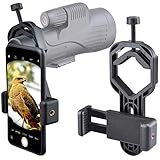
- For phone width range: 55~85 mm(2.16"~3.35"). Fit iPhone X/8/8 Plus/7/7 Plus/6/6s/6 Plus/5/5s - Fit Samsung Galaxy S9/S8/S7/S6/S6/S5 Note 9/8/7/6/5 - Fit Sony, LG, HTC, and other brands.
- With this universal smartphone telescope adapter, you can connect your phone to a telescope or microscope to take images of the moon and cells, or to a spotting scope to take images of birds and other objects.
- Smartphone mount compliable with microscope, telescope, binoculars, monocular, night vision spotting scope. Fit eyepiece diameter 22mm~ 44mm(0.86"-1.73").
- Optimized weight, lighter and reduce the pressure on the telescope eyepiece, weight: 75 g / 2.65 oz.The body is made of high-strength PA plastic. The surface of the mobile phone and eyepiece has a soft EVA pad to avoid scratching and damage.
- Warranty service:If you have questions about installation and not using, please contact us in time, we will reply and deal with your problems as soon as possible.
Rank #3

- Capture the World :This spotting scope phone adapter allows you to easily capture the beauty of the world through your screen. Connecting your phone to telescopes, spotting scopes, binoculars, monoculars and microscopes, you can capture wonderful images and videos through the eyepiece and share them with your friends.
- Easy Setup:Put your phone into the spotting scope phone mount, precisely align the camera with the eyepiece, and then turn the knob, the adapter will hold your phone firmly in place with just these three steps. The whole process is easy and convenient, no need for complicated adjustments, even a novice can get started quickly.
- Regular Size:This spotting scope phone adapter is extremely compatible with almost any eyepiece on the market with a diameter between 28mm and 47mm. Whether it's a normal eyepiece you use every day or a specialized eyepiece with special features, as long as the diameter is within this range, the adapter can be accurately mated and easily assembled.
- Durable Material :The main body is made of zinc alloy (more durable than aluminum alloy) with grooved metal case. The phone clip is made of high-strength PA plastic, and the metal body of the adapter is durable enough to be used in the field and in harsh weather conditions.
- Fits most smartphones:Ranging from 2.13 inches to 3.54 inches (54-90 mm). Fits almost all smartphones on the market iPhone 16Pro Max, 16 Pro, 15, 15 mini, 14 Pro Max, 14 Pro,14, SE, Xs, Xr, X, S20, S20+, S20FE, S10, S10+, S10E, S8, S7, S6, S5, S4, Note20, Note20 Ultra, Note10+, Note 10, Note 9, Note 6, Note 5, Note 4, A51, A71, A70 and more.
Product prices and availability are accurate as of the date/time indicated and are subject to change. Any price and availability information displayed on Amazon at the time of purchase will apply.
Independent reader supportYour contribution helps us test, update, and keep practical guides available for everyone.
