
Do these 3 things before closing this tab:
1Scan for outdated or missing drivers - takes under a minute2Clear out junk files and repair common Windows errors3Fix the driver behind crashes, sound loss and screen glitchesiTechGuides is reader-supported. When you buy through links on our site, we may earn an affiliate commission. As an Amazon Associate I earn from qualifying purchases. Learn more
You can monitor App Store and Google Play reviews together with a third-party app review dashboard that explicitly connects to both App Store Connect and Google Play Console. First decide whether you only need a consolidated view or also want to assign, analyze, and reply to reviews from that dashboard; then verify that the tool supports your apps and the permissions your team needs. Both stores already provide native review tools, so a unified dashboard adds cross-store visibility and workflow rather than replacing either console.
What a unified review dashboard can—and cannot—do
A unified dashboard brings reviews from both stores into one working view. Depending on the product, it may also provide filters, team assignments, alerts, trend reporting, or reply controls. These are separate capabilities: confirm that the service supports both stores and that its current workflow includes the specific actions you need.
For example, BoostOps advertises connections to App Store Connect and Google Play Console for viewing and replying to reviews in one place. That is a vendor claim, not an independent feature test; confirm current coverage and reply behavior in its documentation or a demonstration before relying on it. BoostOps: App Store Review Management & Reply Tools
A third-party dashboard does not make the stores’ rating definitions identical, nor does it remove the need to understand each platform’s controls. Keep the native consoles available for platform-specific analysis and account management.
#1 Best Overall
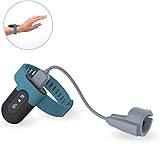
- Wear the FL330 on your wrist for recording blood oxygen level, heart rate, and motion.
- The soft patented silicone ring sensor doesn't make your finger numb, never slips from your finger, and releases your finger for a full range of motion!
- With our free PC software, you can export your records, save them in PDF or CSV format, and share unlimited data reports with others, compatible with both Windows system & Mac!
- The Free iOS & Android app lets you easily share blood oxygen trends and records. Also, watch your updated O2 & heart rate on your phone or tablet!
- Built-in Memory: works stand-alone, even without a smartphone, with up to 16hrs battery life with one full charge.
Start with the native tools
App Store Connect
Apple describes App Store ratings on a one-to-five-star scale and written reviews for iOS, macOS, and visionOS apps; tvOS apps do not support written reviews. Apple also points developers to the App Store Connect API for retrieving customer reviews and managing responses. These are high-level capabilities; consult Apple’s current documentation for platform details. Apple: Ratings and reviews overview
Google Play Console
Google Play Console supports filtering and sorting reviews by criteria such as date, language, reply state, rating, app version, and device, and it can search review text. Its ratings views include trends and breakdowns by country or region, language, app version, Android version, device type, device model, and operator. Chart data can be downloaded, and date and aggregation ranges can be selected. Google Play Console Help: View app statistics Google Play Console Help: View and analyze your app’s ratings and reviews
Rank #2
![WavePad Audio Editing Software - Professional Audio and Music Editor for Anyone [Download]](https://m.media-amazon.com/images/I/B1fcLEGCs6S.png._SL160_.png)
- Full-featured professional audio and music editor that lets you record and edit music, voice and other audio recordings
- Add effects like echo, amplification, noise reduction, normalize, equalizer, envelope, reverb, echo, reverse and more
- Supports all popular audio formats including, wav, mp3, vox, gsm, wma, real audio, au, aif, flac, ogg and more
- Sound editing functions include cut, copy, paste, delete, insert, silence, auto-trim and more
- Integrated VST plugin support gives professionals access to thousands of additional tools and effects
Google also documents review themes and benchmarks. Review summaries are limited to English reviews and require enough similar reviews across more than one theme or topic, so teams should not assume a summary will appear for every app or review set. Google Play Console Help: View and analyze your app’s ratings and reviews
How to choose a dashboard for your team
- Confirm store and app coverage. Check that the product connects to both App Store Connect and Google Play Console, and that it covers every app and territory relevant to your team.
- Map the workflow you need. Verify whether staff can read, filter, assign, and respond in the same interface. Ask about platform-specific limitations, account roles, and permissions for each action.
- Check monitoring and analysis. Look for alerts, rating trends, historical data, review themes, exports, and portfolio-level views. Compare these with your existing native-console workflows rather than assuming a third-party tool adds every feature.
- Inspect the metric definitions. Find out whether the dashboard displays the current store-facing rating, a rating for a selected period, or a lifetime average. Google says its displayed Play rating is weighted toward recent ratings, while lifetime average is a separate measure; do not treat the two as interchangeable in cross-store reports. Google Play Console Help: View and analyze your app’s ratings and reviews
- Review connection and access requirements. Ask how the service connects to developer accounts and what permissions it requests. Decide whether its setup suits your organization; no independent security or permissions audit is established here.
- Verify current costs and limits. Compare plan prices, supported app counts, history retention, and any limits on replies directly with providers. These terms can change, and a feature list alone does not establish the right plan.
Keep ratings and response claims in context
When comparing stores or reporting performance, label the metric and period rather than displaying a bare star score. Google distinguishes the rating weighted toward recent ratings from the lifetime average. A dashboard that combines figures without making those definitions visible can create a misleading comparison.
Rank #3
![MixPad Multitrack Recording Software for Sound Mixing and Music Production Free [Mac Download]](https://m.media-amazon.com/images/I/51kaO82jYOL._SL160_.jpg)
- Mix an audio, music and voice tracks
- Record single or multiple tracks simultaneously
- Intuitive tools to split, trim, join, and many other editing features
- Loaded with audio effects including EQ, compression, reverb, and more.
- Load an audio file and export to all popular audio formats from studio quality wav to high compression formats
Google’s Play product page says, “Responding to a negative review can increase that rating by an average of +0.7.” The page does not state a publication year or study methodology in the material cited here. Treat it as Google’s undated product-page claim, not as a general causal estimate or a guaranteed outcome for your app. Google Play Console: Reviews
Quick Recap
Rank #4
![Norton 360 Student Edition, 2026 Ready, Antivirus software for 2 Devices – Includes VPN, PC Cloud Backup & Dark Web Monitoring [Download]](https://m.media-amazon.com/images/I/41Tsdce2sqL._SL160_.jpg)
- DEVICE PROTECTION Download instantly & install protection for 2 devices - PCs, Macs, iOS or Android devices
- REAL-TIME THREAT PROTECTION Advanced security protects against existing and emerging malware threats, including ransomware and viruses, and it won’t slow down your device performance
- SECURE VPN Browse anonymously and securely with a no-log VPN while using public Wi-Fi Add bank-grade encryption to help keep your information like passwords and bank details secure and private
- DARK WEB MONITORING will monitor and notify you if we find your personal information on the Dark Web**
- 10GB SECURE PC CLOUD BACKUP Store and help protect important files as a preventative measure to data loss due to hard drive failures, stolen devices and even ransomware**
Product prices and availability are accurate as of the date/time indicated and are subject to change. Any price and availability information displayed on Amazon at the time of purchase will apply.

