
iTechGuides is reader-supported. When you buy through links on our site, we may earn an affiliate commission. As an Amazon Associate I earn from qualifying purchases. Learn more
If the same familiar emoji keep showing up in your chats, Gboard has a more playful option: Emoji Kitchen. It turns some compatible emoji into illustrated stickers you can share—not new standard emoji characters. Find it in Gboard’s emoji area and try the suggestions that appear.
What is Gboard’s Emoji Kitchen?
Emoji Kitchen combines emoji into custom-drawn sticker suggestions. Google introduced it in Gboard for Android as a way to get stickers by tapping an emoji; later examples included folded hands paired with a carrot and a pointing finger paired with a pig.
The result is a sticker image, not a newly standardized Unicode emoji. That distinction matters: what you send is an illustration, and what appears in the picker depends on which emoji combinations are supported.
Recommended Free Tools
How to find Emoji Kitchen in Gboard
- Install or open Gboard, then open an app with a text field.
- Tap the text field to bring up Gboard.
- Tap Gboard’s Emoji button to open the emoji picker.
- Tap an emoji and look for sticker suggestions or Emoji Kitchen options in the emoji area. If suggestions appear, choose one to share in the chat.
Google has also announced a refreshed experience for browsing the sticker library, saving favorites, and exploring suggestions. The exact navigation and labels are not documented in Google’s Gboard help instructions, so the layout may differ by app version or rollout. If you do not see a browse or favorites option, try the emoji picker’s suggestions instead.
#1 Best Overall

- Unique Design - Unique split design can prevent scratches, light weight, compact structure, easy to carry and handle when you are out. The detachable magnetic keyboard tray turns the keyboard cover into a classic briefcase.
- Wide Compatibility - Unique folio design prevents scratches while allowing easy access to all ports. The product is suitable for 4.5""-6.8"" Bluetooth cell phone, including for Android, for and for iOS Phones.Besides, the protective cover your mobile phone from scratch and breaking.
- Lightweight and Portable - The product has a built-in stand, which can securely fix your mobile phone at a angle, and a suitable tilt angle for you to type, work or watch movies without feeling tired, which is very convenient and practical.
- Multiple - The high-quality PU leather protective shell provides a , sturdy, shock-proof cushion when dropped. The plastic keyboard is scratch-resistant, abrasion-resistant, has high performance and , and has a long service life. You can use it with confidence.
- Guarantee Service - Our customer service is online 24 hours a day and supports return within Thirty day. You are welcome to our customer service team, have a professional customer service team and will provide you with the best quality service, please rest assured to buy!
Quick suggestions or browsing the library?
| What you want to do | What to try | What to expect |
|---|---|---|
| Make a sticker quickly | Tap an emoji in Gboard’s emoji picker and check for sticker suggestions. | This is the interaction described in Google’s original Emoji Kitchen announcement. |
| Explore or save combinations | Look for the refreshed library and favorites experience in the emoji area. | Google announced browsing, favorites, and personalized suggestions in September 2025, but the exact route may vary. |
Why a combination might not appear
Not every pair of emoji has a matching sticker. Google’s feature page says results work with compatible emoji and that a download may be required. If a combination does not produce a suggestion, try another emoji or check again later; the feature does not promise a sticker for every pair.
Quick Recap
Best Value

- Download files by entering their URL or Short Code.
- Built-in Web Browser with support for file downloads.
- On Fire TVs, navigate websites using just your remote. (No mouse/keyboard needed.)
- The browser features full-screen mode, zooming, text resizing, and quick access to favorites/bookmarks.
- Favorites allow you to easily save and open frequently visited URLs.
Rank #4
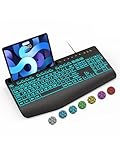
- Large Print Keyboard: SABLUTE Large Print Backlit Keyboard features an oversized font keys design. Alleviate your eyes, reduce typing errors, ideal for seniors, students, office workers, and those with visual impairments
- Wrist Fatigue Relief: The computer keyboard designed with a palm rest, bottom support. Ergonomic keyboard layout reduces wrist fatigue and discomfort during prolonged use
- Choose Your Backlight: The Backlit keyboard has 7 levels of brightness and 7 different colors. Backlit can choose to turn on/off and adjust brightness, making it more convenient to type in low-light environments(The lights do not have a memory function!)
- Phone and Tablet Holder: It can help you better watch videos, video conferencing, read materials etc. while using your computer. Please note that this holder doesn't have a charging function
- Plug and Play: The wired keyboard does not require batteries or charging, just connect it to a USB port and you can use it directly. The wired setting makes the connection more stable and typing without delay
Rank #3

- Express your personality with our wide range of custom keyboard designs.
Rank #2

- Fast and simple to type
- 800+ Emoji and colorful themes available
Product prices and availability are accurate as of the date/time indicated and are subject to change. Any price and availability information displayed on Amazon at the time of purchase will apply.

