
The Tool Desk
Outbyte PC Repair FREERepair Windows errors before they cause bigger problemsFix Now →Outbyte Driver Updater FREEScan for outdated or missing drivers - takes under a minuteDriver Scan →iTechGuides is reader-supported. When you buy through links on our site, we may earn an affiliate commission. As an Amazon Associate I earn from qualifying purchases. Learn more
Microsoft lets you download the Office 2021, Office 2019, and Office 2016 installer without charging for the download. It does not provide a legally free, fully activated retail copy of those versions.
Activation requires a valid license: a legitimately purchased product key, a license already linked to your Microsoft account, an eligible Workplace Discount Program entitlement, or an organization-managed volume license. Generic keys, cracks, and activation commands are not legitimate alternatives.
What “free download” means in practice
The installer itself is free to download from Microsoft. The license that unlocks the applications is not normally free. Microsoft’s official process is:
Free tools Windows power users keep installed
One-click scans. No signup required.
| Situation | Correct Microsoft route |
|---|---|
| You bought an unused retail key | Redeem it at office.com/setup or Microsoft365.com/setup, then install from your account. |
| You already redeemed the key | Sign in at account.microsoft.com and install from Office apps. |
| Your employer provides Office | Use the Workplace Discount Program or your organization’s instructions. |
| Your organization uses volume licensing | Contact IT. Volume-license editions use different deployment methods. |
| You have no license | You can download the installer, but Office will not be legally activated for full use. |
Option 1: Download Office with a new product key
Use this route only for a genuine, unused key supplied with a legitimate purchase.
#1 Best Overall

- Left-side single touch pad enhances your computing experience with new functonality
- Keys reinvented to perform common tasks such as new, open, and save
- Includes 12 hot keys for one-touch e-mail, multimedia, and Internet operation
- Shaped wrist rest for added comfort
- Included IntelliType Pro software allows customization of hot keys
- Open www.office.com/setup or Microsoft365.com/setup.
- Select Sign in. Use an existing Microsoft account, or create one.
- Enter the product key when prompted. Enter the 25-character key without hyphens if Microsoft asks for it.
- Complete the redemption screens.
- After redemption, the license is linked to that Microsoft account. Future installations use the account rather than the key.
Keep track of which Microsoft account you used. Microsoft generally does not display the complete product key again.
Option 2: Reinstall an already redeemed copy
If the key has already been used, do not keep entering it at the setup page.
- Go to account.microsoft.com.
- Select Sign in and use the Microsoft account that redeemed the license.
- On the Overview page, select Office apps.
- Find the relevant Office product and select Install.
- If Microsoft offers more choices, use the dropdown to select the language and either 32-bit or 64-bit.
- Select Install and run the downloaded installer.
In an Office application, you can check the account associated with the installation by opening File > Account. Look for the email address after Belongs to under the product name.
Do these 3 things before closing this tab:
1Clear out junk files and repair common Windows errors2Fix the driver behind crashes, sound loss and screen glitches3Repair Windows errors before they cause bigger problemsInstall Office on Windows
- Start the download from your Microsoft account dashboard.
- Use the browser’s download prompt to launch the installer. Microsoft’s current labels are Open file in Edge or Internet Explorer, Setup in Chrome, or Save File in Firefox.
- If Windows asks, Do you want to allow this app to make changes to your device?, select Yes.
- Wait for the installation to finish.
- When you see You’re all set! Office is installed now, select Close.
- Open Word or Excel and sign in with the Microsoft account linked to the license if activation is requested.
Install Office on a Mac
- Download the installer after signing in to the Microsoft account that owns the license.
- Open Finder and select Downloads.
- Double-click the downloaded installer package.
- Select Continue, review the license agreement, and select Continue again.
- Select Agree.
- Choose the installation method and select Continue.
- Select Install.
- If macOS requests your Mac login password, enter it and select Install Software.
Office 2016 for Mac and Office 2019 for Mac are no longer supported. Installation may still be possible with a valid license, but these versions no longer receive Microsoft support or security fixes.
If the product key says it has already been used
The message This product key has already been used usually means the key was successfully redeemed earlier. It is not normally evidence that the key is defective.
Go to account.microsoft.com, sign in with the account used during redemption, open Overview > Office apps, locate the Office license, and select Install.
If you do not know which account was used, check the email addresses you own and inspect File > Account in any existing Office installation. The full key cannot generally be displayed inside Office or online.
Windows Errors? Fix Them Before They Spread
Repair common Windows errors and clear accumulated junk for a smoother, more stable PC - no reinstall needed.Free scan · no reinstallCrashes, No Sound, or Screen Glitches?
Random freezes, missing sound and display glitches usually trace back to one bad driver. Find and replace yours safely.Free scan · under a minuteRank #2
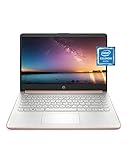
- READY FOR ANYWHERE – With its thin and light design, 6.5 mm micro-edge bezel display, and 79% screen-to-body ratio, you’ll take this PC anywhere while you see and do more of what you love (1)
- MORE SCREEN, MORE FUN – With virtually no bezel encircling the screen, you’ll enjoy every bit of detail on this 14-inch HD (1366 x 768) display (2)
- ALL-DAY PERFORMANCE – Tackle your busiest days with the dual-core, Intel Celeron N4020—the perfect processor for performance, power consumption, and value (3)
- 4K READY – Smoothly stream 4K content and play your favorite next-gen games with Intel UHD Graphics 600 (4) (5)
- STORAGE AND MEMORY – An embedded multimedia card provides reliable flash-based, 64 GB of storage while 4 GB of RAM expands your bandwidth and boosts your performance (6)
Workplace Discount Program and work licenses
The former Home Use Program is now called the Workplace Discount Program. It applies to eligible employer purchases, not to every employee or every work email address.
For Office Professional Plus, Visio Professional, and Project Professional purchases, Microsoft directs customers to microsoft.com/home-use-program/order-history and asks them to use their work email address. Products such as Office Home & Business are added to the personal Microsoft account’s Services & subscriptions page.
If your employer provides Office through volume licensing—such as Office Professional Plus, Office Standard, or standalone Word, Project, or other applications—do not use the ordinary retail-account workflow. Ask your IT department for the approved installer and activation method.
Using the Office Deployment Tool
The Office Deployment Tool is not a free retail activation method. Microsoft’s documented example is for Microsoft 365 Apps, not a general-purpose free installer for Office 2021, 2019, or 2016.
For example, Microsoft documents saving this XML as installOfficeProPlus32.xml in C:\ODT:
<Configuration>
<Add OfficeClientEdition=”32″>
<Product ID=”O365ProPlusRetail”>
<Language ID=”en-us” />
</Product>
</Add>
</Configuration>
The corresponding download command is:
c:\odt\setup.exe /download installOfficeProPlus32.xml
A 64-bit workflow uses installOfficeProPlus64.xml. The product and language IDs must match the licensed Microsoft 365 plan and desired language. Installing offline does not bypass licensing: after installation, connect to the Internet, open Word or Excel, and use File > Account to activate.
Rank #3

- The power of a laptop with the flexibility of a tablet, and every angle in between, with 13” touchscreen, iconic built-in Kickstand, and detachable Keyboard.
- Windows 11 brings your closer to what you love. Family, friends, obsessions, music, creations — Windows 11 is the one place for it all. With a fresh new feel and tools that make it easier to be efficient, it has what you need for whatever’s next.
- The first Surface Pro built on the Intel Evo platform. Do it all with the Intel Evo platform — performance, graphics, and battery life in a thin and light PC.
- The best pen experience on Pro with rechargeable Surface Slim Pen 2 and Surface Pro 8, for the natural feeling of pen on paper,(4) securely stored in Surface Pro Signature Keyboard.
- Type in comfort. Sleek and compact, Surface Signature Keyboard performs like a traditional laptop keyboard complete with a full function row and backlit keys.
An offline installation can be useful when a proxy, firewall, antivirus product, or unreliable Internet connection prevents the normal installer from completing. It does not turn an unlicensed Office copy into a licensed one.
Important installation limitations
- 32-bit and 64-bit versions cannot be switched in place. Uninstall the existing architecture before installing the other one.
- Office 2016 installs the applications included in the purchased product. You cannot custom-select individual applications during installation or uninstall individual applications afterward, although unused shortcuts can be deleted.
- Chromebooks cannot run the desktop PC or Mac editions. Only applicable mobile or web options may be available.
- Windows XP and Windows Vista do not support Office 2016 installation.
- One-time-purchase editions are for one installation. Office Home & Business, Home & Student, and Professional one-time purchases can be installed on one PC or Mac. Microsoft allows transfer to another computer belonging to the license holder after a hardware failure or replacement, subject to the license terms.
What to do when installation fails
Remove an older or damaged installation
Microsoft’s current uninstall troubleshooter must run on the same Windows PC as the Office installation and requires Windows 10 or later.
- Start Microsoft’s Office uninstall troubleshooter and select Uninstall.
- If Windows says This site is trying to open Get Help, select Open.
- Follow the prompts.
- Restart the computer when asked, then try the installation again.
Microsoft currently states that this troubleshooter cannot uninstall Office 2024. That limitation does not apply to the listed Office 2021, 2019, and 2016 workflows.
Fix an architecture conflict
If you are installing 64-bit Office over 32-bit Office, or the reverse, uninstall the existing version first. The installer will fail when one architecture is installed over the other.
Check the seller if a key never worked
A product key bought separately from the software may be unauthorized. Microsoft warns that nonworking keys can be stolen, fraudulently obtained, blocked, printed on counterfeit labels, or distributed with unauthorized OEM-reinstallation or program-specific media. Contact the seller and request a refund rather than looking for an activation workaround.
What’s actually slowing this PC down?
Pick the symptom - the matching free tool is one click away.
Support status before you install
| Version | Microsoft support status |
|---|---|
| Office 2016 | Support ended October 14, 2025. |
| Office 2019 | Support ended October 14, 2025. |
| Office 2021 | Support ends October 13, 2026. Microsoft says there will be no extension or extended security updates. |
After support ends, an application may continue to run, but Microsoft will not provide the corresponding version’s security fixes, bug fixes, technical support, or software updates. That makes an older one-time purchase less attractive for a new installation unless you specifically need that version or already own a valid license.
Independent reader supportYour contribution helps us test, update, and keep practical guides available for everyone.What is not a legal solution
- Downloading an installer from Microsoft and assuming the download itself grants activation.
- Using a generic product key found online.
- Running a script or command advertised as a permanent Office activator.
- Reusing a key that has already been redeemed instead of signing in to its linked Microsoft account.
- Buying a suspiciously cheap key from an unknown marketplace and treating it as guaranteed retail licensing.
Microsoft’s documented process always connects activation to a valid license, a redeemed key, an eligible program, or an organization’s licensing system.
Rank #4
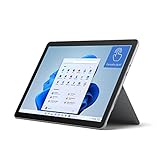
- The most portable Surface touchscreen 2-in-1. Perfect for your everyday tasks, homework, and play.
- Go-anywhere tablet with laptop productivity for the whole family. Starting at just 1.2 pounds,(4) with high-res 10.5” 220ppi touchscreen, adjustable Kickstand, Surface Pen, and Type Cover.
- All-day battery life. Get up to 11 hours (1) of on-the-go power, plus Fast Charging to take you from low to full when you do need to plug in.
- The new, more intuitive Windows. Work, play, and create in the way most natural to you with Windows 11.
- Plug in the accessories you use today with included USB-C port, headphone jack, Bluetooth 5.0, and MicroSDXC Card Reader.
FAQ
Can I download Office 2021, 2019, or 2016 free from Microsoft?
You can download the installer without paying for the download, but Microsoft does not offer a legally free, fully activated retail copy. You need a valid license, redeemed product key, Workplace Discount Program entitlement, or organization-managed license.
Do I enter my product key every time I reinstall Office?
No. A new key is entered at office.com/setup or Microsoft365.com/setup once. After redemption, sign in at account.microsoft.com with the Microsoft account linked to the license and install from Overview > Office apps.
Why does Microsoft say my product key has already been used?
The key was normally redeemed previously. Sign in with the Microsoft account used during redemption instead of entering the key again.
Can I see my complete Office product key online?
Generally, no. Open an Office app and select File > Account to find the email address after Belongs to. That account is what you need for reinstalling and activation.
Can the Office Deployment Tool activate Office 2021 or Office 2019 for free?
No. Microsoft’s documented Office Deployment Tool example is for Microsoft 365 Apps. Offline deployment can help with network-related installation failures, but Office still requires activation with a valid license.
Can I install Office on two computers with a one-time purchase?
Microsoft’s troubleshooting guidance says one-time-purchase editions such as Home & Business, Home & Student, and Professional can be installed on one PC or Mac. Transfer to another computer may be allowed after hardware failure or replacement if it belongs to the license holder and the license terms are met.
Recommended Free Tools
The Bottom Line
Bottom line: Microsoft’s Office installer is free, but Office 2021, 2019, and 2016 are not legally free to activate as retail products. Redeem a genuine key once at office.com/setup, or reinstall an already licensed copy through account.microsoft.com. Avoid generic keys, cracks, and suspicious standalone key sellers—especially because Office 2016 and 2019 are already out of support, while Office 2021 reaches end of support on October 13, 2026.
Quick Recap
Product prices and availability are accurate as of the date/time indicated and are subject to change. Any price and availability information displayed on Amazon at the time of purchase will apply.

