
iTechGuides is reader-supported. When you buy through links on our site, we may earn an affiliate commission. As an Amazon Associate I earn from qualifying purchases. Learn more
If a Puppeteer PDF generated on Heroku does not contain Times New Roman, treat the problem as font resolution first—not as a PDF bug. Confirm which font Chromium actually selected, then either deploy a legally redistributable Times New Roman file or select a compatible substitute such as Liberation Serif or Tinos. Separately verify that Chromium and its Linux dependencies are available. A Heroku browser buildpack can make Chrome runnable, but it does not install Times New Roman.
What “missing Times New Roman” can mean
The symptom may be a missing-glyph box, a visibly different serif typeface, changed line wrapping, or pagination that no longer matches local output. These cases have different causes. A CSS declaration such as font-family: "Times New Roman", serif is only a request; Fontconfig and Chromium resolve it against fonts available inside the dyno.




- Missing glyphs: the selected font lacks characters required by the document, or the browser could not load any suitable face.
- Serif substitution: Times New Roman is unavailable and the generic
seriffallback is being used. - Layout drift: a substitute has different metrics, changing line breaks, table widths, and page count.
- Browser failure: Puppeteer cannot start Chromium, so no trustworthy font diagnosis is possible yet.
Inspect an actual PDF and compare it with a locally generated copy. Do not assume the title of the incident identifies the failure mode.
Recommended Free Tools
Step 1: Check what the Heroku dyno can resolve
Run diagnostics in the same deployed environment and under the same user that launches Puppeteer. Fontconfig is the component that matches a requested family to installed files and applies its configuration.
#1 Best Overall
fc-match "Times New Roman"
fc-match "Times New Roman:style=Regular"
fc-list | grep -i -E 'times|liberation|tinos'
The output shows the file and family that would be selected. A result such as LiberationSerif-Regular.ttf proves substitution, not installation of the Microsoft typeface. If fc-match is unavailable, add the operating-system fontconfig package through your build process or inspect Chromium’s resolved fonts with a temporary diagnostic page.
Keep this check in a one-off Heroku release or worker task rather than permanently logging every request. Font discovery can differ between a local shell, a build phase, and the runtime dyno.
Step 2: Choose exact Times New Roman or a substitute
When exact fidelity is required
Obtain the font files through a licence that permits installation and redistribution in your deployment. Put the files in a controlled directory in the slug or an attached volume, refresh font discovery as part of deployment, and verify with fc-match. The available file must cover every character your PDFs contain; a regular face alone may not cover bold, italic, or non-Latin text.
# Example deployment commands; use paths appropriate to your build image
mkdir -p .fonts
cp path/to/TimesNewRoman-Regular.ttf .fonts/
cp path/to/TimesNewRoman-Bold.ttf .fonts/
fc-cache -f .fonts
fc-match "Times New Roman:style=Regular"
Do not copy font files from a workstation into production unless your licence allows that use. A successful match still requires a PDF comparison: font hinting, kerning, and character coverage can affect the result.
When document layout matters more than the original design
Chromium’s Fontconfig alias configuration lists Liberation Serif and Tinos as alternatives for Times New Roman. The Liberation Fonts project describes its fonts as aiming for document-layout compatibility with Times New Roman. That can preserve many line and pagination metrics, but it is not the original typeface and does not guarantee identical appearance.
body {
  font-family: "Liberation Serif", "Tinos", serif;
}
Use an explicit family when reproducibility matters. Test headings, tables, footnotes, bold and italic spans, and every language in the PDF. Record the chosen family in your build documentation so a later base-image change does not silently alter pagination.
Step 3: Keep browser dependencies separate from fonts
Puppeteer’s Heroku guidance notes that Heroku’s Linux environment may lack dependencies required by Chromium and recommends adding the Puppeteer Heroku buildpack. Its launch guidance also calls for --no-sandbox in this hosting setup. Those measures address browser execution; they do not install Times New Roman.
Outdated Drivers Are Slowing You Down
One free scan finds every outdated or missing driver and matches the right update for your exact hardware.Free scan · exact hardware matchPC Slower Than It Used to Be?
A free scan shows the junk files, broken settings and background clutter dragging Windows down - then fixes them in one click.Free scan · Windows 10 & 11heroku buildpacks:add --index 1 <Puppeteer-Heroku-buildpack>
heroku config:set PUPPETEER_SKIP_CHROMIUM_DOWNLOAD=falseUse the buildpack’s current installation instructions and the version supported by your Puppeteer release. Do not infer a font result from the fact that Chromium starts.
Chrome for Testing buildpack
Another approach is Heroku’s Chrome for Testing buildpack. Add heroku-community/chrome-for-testing as the first buildpack; the announcement says that chrome and chromedriver then appear on the dyno’s PATH. It defaults to Stable. Pinning a specific browser version is discouraged because browsers quickly become outdated.
heroku buildpacks:add --index 1 heroku-community/chrome-for-testing
heroku buildpacks
Choose either a Puppeteer-managed browser/cache strategy or a buildpack-provided executable according to your project’s Puppeteer version and deployment policy. Mixing assumptions from both approaches can produce an executable-path error.
Step 4: Make Puppeteer launch and generate a diagnostic PDF
This Node.js example uses an explicit family, prints the executable path, and writes a test PDF. Adjust the selector and content to match your application.
Do these 3 things before closing this tab:
1Repair Windows errors before they cause bigger problems2Fix the driver behind crashes, sound loss and screen glitches3Clear out junk files and repair common Windows errorsconst puppeteer = require('puppeteer');
(async () => {
const browser = await puppeteer.launch({
headless: 'new',
args: ['--no-sandbox', '--disable-setuid-sandbox'],
// Set executablePath only when your buildpack exposes a known path.
// executablePath: process.env.CHROME_BIN,
});
try {
const page = await browser.newPage();
await page.setContent(`
<!doctype html>
<style>
@page { size: A4; margin: 20mm; }
body { font-family: "Times New Roman", "Liberation Serif", "Tinos", serif; }
</style>
<h1>Font resolution test</h1>
<p>Regular, <strong>bold</strong>, <em>italic</em>, and characters: Æ æ Œ œ € —.</p>`,
{ waitUntil: 'networkidle0' }
);
await page.pdf({ path: 'font-test.pdf', format: 'A4', printBackground: true });
console.log('Wrote font-test.pdf');
} finally {
await browser.close();
}
})();Use the executable path only if your Heroku setup actually provides it. If Puppeteer manages its own downloaded browser, leaving the option unset is usually correct. Compare this PDF with your expected output and retain the file as a deployment smoke test.
Rank #4
Step 5: Investigate Puppeteer’s browser cache
A separate deployment failure occurs when Chrome is not present where Puppeteer expects it. Deployment hosts may not include the default browser cache in the project. Community Heroku buildpack notes also describe a cache-location change in Puppeteer 19 and later and a version-specific heroku-postbuild workaround.
First check the installed version and its documented cache location:
npm ls puppeteer
npx puppeteer browsers list
Only then apply the workaround documented for that exact version. Do not copy an old script unchanged: cache paths and supported commands can change. If the error instead says the executable cannot launch, inspect buildpacks, Linux libraries, permissions, and the --no-sandbox arguments before changing fonts.
Step 6: Verify the fix after deployment
- Deploy the font files or the selected substitute and the browser configuration together.
- Run
fc-matchinside a dyno and save the resolved family and file in the release log. - Generate a PDF containing regular, bold, italic, punctuation, symbols, and the languages your application supports.
- Compare text wrapping, table widths, line spacing, and page count with a known-good reference.
- Repeat after changing the Heroku stack, Puppeteer version, browser buildpack, or font files.
Font resolution can vary after an image or buildpack update. Treat the diagnostic PDF as a regression test, not as proof that every document is correct.
Best Value
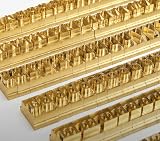
- 204-PIECE BRASS STAMPING SET: Comprehensive set includes 3 uppercase letters, 3 lowercase letters, 4 lowercase vowels, numbers, and punctuation marks.
- TIMES NEW ROMAN FONT: Classic 6mm tall Times New Roman typeface delivers clean, professional impressions for leather, wood, and other stampable materials.
- COMPLETE CHARACTER COVERAGE: Generous quantity of each character type ensures you have enough stamps for longer words, names, and custom text projects.
- UNIVERSAL HOLDER INCLUDED: Comes with a universal holder and hardware kit, making it easy to align and stamp characters consistently and accurately.
- SOLID BRASS CONSTRUCTION: Crafted from durable brass material for long-lasting performance, delivering sharp, detailed impressions with every use.
Common errors and precise fixes
| Symptom | Likely cause | Fix |
|---|---|---|
fc-match returns Liberation Serif or Tinos |
Times New Roman is not installed or the requested style is unavailable. | Install licensed Times New Roman files, or explicitly use the compatible substitute and test pagination. |
| Square boxes or missing characters | The selected face lacks glyphs. | Install a face covering the required scripts and styles; verify the actual match and reload the PDF. |
| “Could not find Chrome” | Puppeteer’s cache is absent or its cache location changed. | Check the Puppeteer version, use its current browser-install documentation, or expose Chrome through the Chrome for Testing buildpack. |
| Chromium fails to launch on Heroku | Missing Linux dependencies, sandbox restrictions, or an invalid executable path. | Use the appropriate Puppeteer buildpack, launch with --no-sandbox, and remove an incorrect executablePath. |
| PDF has different page breaks | Font metrics, browser version, CSS, or device scale changed. | Pin your CSS and deployment inputs where practical, choose a tested family, and compare a diagnostic PDF. |
| Local output is correct but Heroku is not | Local and dyno font directories differ. | Run fc-match in both environments and deploy the required files rather than relying on workstation fonts. |
Performance, reliability, and licensing considerations
- Font discovery: cache font configuration during the build rather than repeatedly rebuilding it for each request.
- Memory: close every browser and page; leaking Chromium processes can cause dyno restarts that look like rendering failures.
- Concurrency: limit simultaneous PDF jobs to what the dyno can sustain, especially when loading external assets.
- Determinism: use explicit font-family stacks, fixed print CSS, and a controlled browser version; otherwise a harmless platform update may alter pagination.
- Licensing: verify redistribution rights for every Times New Roman file. The availability of a file on a developer machine does not establish production rights.
- Coverage: a substitute that matches Latin metrics may not cover your required symbols or scripts. Test the actual content.
Or skip the browser setup
If you only need a clean image or PDF of a web page rather than a custom Puppeteer document, ScreenshotNeo provides a single-request screenshot API and an MCP server for AI agents. It accepts consent banners before capture and removes more than 60 known consent platforms, newsletter popups, and chat widgets; bot checks, blank pages, timeouts, failed loads, and cache hits are not billed. Each response identifies the page verdict and billing status.
For a one-call capture, see the ScreenshotNeo documentation:
curl -G "https://api.screenshotneo.com/v1/shot" -d access_key=YOUR_API_KEY --data-urlencode url=https://stripe.com -o shot.webpimport requests
r = requests.get("https://api.screenshotneo.com/v1/shot", params={"access_key": "YOUR_API_KEY", "url": "https://stripe.com"}, timeout=90)
open("shot.webp", "wb").write(r.content)const q = new URLSearchParams({ access_key: 'YOUR_API_KEY', url: 'https://stripe.com' });
const res = await fetch(`https://api.screenshotneo.com/v1/shot?${q}`);ScreenshotNeo also offers an MCP server with take_screenshot, get_page_info, and capture_pdf for Claude, Cursor, and other MCP clients. The Free plan includes 1,000 screenshots per month with no card; paid plans start at $5 for 3,000 shots. Create a free ScreenshotNeo account.
The Tool Desk
Outbyte PC Repair FREERepair Windows errors before they cause bigger problemsFix Now →Outbyte Driver Updater FREEFix the driver behind crashes, sound loss and screen glitchesFind Drivers →Frequently asked questions
Does the Puppeteer Heroku buildpack install Times New Roman?
No. It supplies browser-related dependencies. Font availability must be checked and addressed separately.
Are Liberation Serif and Tinos identical to Times New Roman?
No. They are listed as alternatives and may preserve document metrics, but their designs are different.
Should I always set --no-sandbox?
Use it when required by your Heroku Puppeteer deployment and security model; it solves a browser sandbox restriction, not a font problem.
Why did adding a font not change the PDF?
The file may not be discoverable, may not match the requested style, or another CSS rule may win. Confirm the resolved file with fc-match and inspect the computed family in the page.
What’s actually slowing this PC down?
Pick the symptom - the matching free tool is one click away.
Quick Recap
Product prices and availability are accurate as of the date/time indicated and are subject to change. Any price and availability information displayed on Amazon at the time of purchase will apply.

