
The Tool Desk
Outbyte Driver Updater FREEScan for outdated or missing drivers - takes under a minuteDriver Scan →Outbyte PC Repair FREERepair Windows errors before they cause bigger problemsFix Now →iTechGuides is reader-supported. When you buy through links on our site, we may earn an affiliate commission. As an Amazon Associate I earn from qualifying purchases. Learn more
To factory reset an HP Pavilion Gaming laptop, use Windows Reset if Windows still starts or can open Windows Recovery Environment. Use HP Cloud Recovery only if you want HP’s original operating system and drivers back and your exact model is supported. The two routes do different things, so choose before you start.
Choose the right kind of factory reset
“Factory reset” is used for two different operations on HP laptops. HP’s support guidance separates them as follows:

| Factory reset option | What it restores | Your files | When to use it |
|---|---|---|---|
| Windows Reset (Reset this PC) | The release-to-manufacturing state of the Windows version currently installed | You choose whether to keep personal files or remove everything | Windows starts, or you can reach Windows Recovery Environment, and you want a clean Windows install |
| HP Cloud Recovery | The original HP operating system and drivers that shipped with the PC | You can back up user data to a separate disk or keep nothing | You need HP’s original software image, the model is supported, and you can prepare recovery media |
If you are not sure which result you need, start with Windows Reset. It is the route HP documents for the widest set of situations.
Do these 3 things before closing this tab:
1Repair Windows errors before they cause bigger problems2Scan for outdated or missing drivers - takes under a minute3Clear out junk files and repair common Windows errorsBefore you start
- Back up anything you cannot replace, such as documents, game save files and photos. HP describes system recovery as removing the data on the hard drive and reinstalling the original operating system.
- Note your exact product number, which is printed on the label on the underside of the laptop. Model-specific recovery availability depends on it.
- Connect the laptop to AC power and keep it connected for the whole process. HP names interrupting recovery, or turning the computer off before recovery and setup are complete, as a common cause of recovery problems.
- For a Windows Reset, HP recommends updating Windows first to see whether that resolves the problem you are trying to fix.
Reset Windows when it starts
HP’s instructions for Windows 11 use the following path:
#1 Best Overall

- Processor Manufacturer: Intel
- Processor Type: Core i5
- Processor Generation: 9th Gen
- Processor Model: i5-9300H
- Processor Speed: 2.40 GHz
- Select the search box on the taskbar, type Recovery options, and open it.
- Under Reset this PC, select Reset PC.
- Choose Keep my files or Remove everything. Read each prompt before you continue, because the choice determines whether personal files survive.
- Follow the remaining prompts until Windows finishes resetting and restarts.
The wording and options can vary with the Windows version and how the PC was configured, so follow what the screen shows rather than the labels above if they differ.
Reset Windows when it will not start
If Windows does not load, open Windows Recovery Environment with one of these methods:
Rank #2

- Fast and easy multitasking: experience high-grade Graphics and processing power that meets your gaming and multitasking needs for the latest games including Fortnight, PUBG, and Overwatch
- Advanced thermal Management: optimized thermal design and IR sensor keeps your laptop cool to the touch, without affecting acoustics
- Fast Processor: 9th Generation intel(r) core(tm) i5-9300h Processor, quad-core, 2.4GHz up to 4.1GHz with Intel's) Turbo Boost
- Realistic graphics: nvidia(r) geforce(r) GTX 1650 (4 GB GDDR5 dedicated). enjoy new levels of gaming realism and performance with real-time ray-tracing technologies. Vr/mr ready. 15.6-Inch diagonal FHD IPS Anti-Glare micro-edge WLED-backlit Display (1920x1080) with 60Hz refresh rate
- Memory and storage: 8 GB DDR4-2400 SDRAM (upgradable with 2 accessible Memory Slots) and Fast boot-up, file transfer and a snappier experience with the internal 256 GB pcie(r) nvme(tm) M.2 Solid State Drive
- Restart the laptop and press F11 repeatedly as it starts.
- Or, if Windows is still responsive enough to show the sign-in or power menu, hold Shift while selecting Restart.
On the Choose an option screen, select Troubleshoot, then Reset this PC, and follow the prompts. The keep-files and remove-everything choices appear here as well.
Free tools Windows power users keep installed
One-click scans. No signup required.
Use HP Cloud Recovery to restore HP’s original image
HP states that Cloud Recovery is available for HP PCs manufactured in 2016 and later, but it directs owners to check HP’s list of supported platforms. Do not assume your Pavilion Gaming model is eligible until you have confirmed it against your product number.
Rank #3
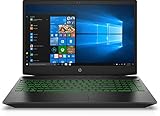
- Brand New in box. The product ships with all relevant accessories
HP’s consumer Cloud Recovery guide sets these requirements:
- An active internet connection.
- AC power connected during the process.
- At least 20 GB of free space on the Windows partition.
- A blank USB flash drive of at least 64 GB. Creating the recovery media permanently deletes everything already on that drive, so use a drive with nothing you need.
- 64-bit Windows, because the tool only runs on 64-bit Windows.
- One to four hours set aside. The actual time depends on your network connection and the USB drive’s speed.
Only use the USB drive for recovery media if you are following this route. Windows Reset does not require a USB drive.
Rank #4
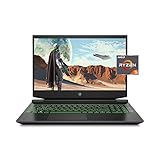
- Processor: AMD Ryzen 5 4600H
- Graphics: NVIDIA GeForce GTX 1650 (4 GB GDDR5 dedicated)
- Memory: 8 GB DDR4-3200 SDRAM (1 X 8 GB)
- Display: 15.6-inch diagonal FHD, IPS, anti-glare, micro-edge, WLED-backlit
- 1-year limited warranty
Options that depend on your device
HP Sure Recover
Some devices have HP Sure Recover enabled. HP’s reset guidance recommends using Sure Recover in that case. HP’s instructions also say Sure Recover must be disabled in BIOS before you use Windows Reset. This guidance is written mainly for HP business PCs, so check the setting in BIOS only if your Pavilion Gaming laptop actually exposes it.
What’s actually slowing this PC down?
Pick the symptom - the matching free tool is one click away.
Connected System Recovery
HP describes Connected System Recovery as a last resort for certain consumer models. It removes local personal data. HP did not establish its availability for any particular Pavilion Gaming product number in the sources reviewed here, so confirm it on HP’s support pages for your exact model before relying on it.
If the reset does not finish
If the process stops or the laptop shuts down partway through, do not force further steps. Reconnect AC power, restart, and begin again from the same route. If the laptop still cannot complete a reset, check HP’s support page for your exact product number, since recovery options differ by model.
Quick Recap
Product prices and availability are accurate as of the date/time indicated and are subject to change. Any price and availability information displayed on Amazon at the time of purchase will apply.

