
The Tool Desk
Outbyte PC Repair FREEClear out junk files and repair common Windows errorsFree Scan →Outbyte Driver Updater FREEFix the driver behind crashes, sound loss and screen glitchesFind Drivers →iTechGuides is reader-supported. When you buy through links on our site, we may earn an affiliate commission. As an Amazon Associate I earn from qualifying purchases. Learn more
To prove a specific Adobe Connect account reached 12.12, capture the server-reported version from that account or host and preserve the response with its timestamp and identifying details. Adobe’s release dates and an account’s upgrade timetable establish availability or a planned date—not that the account’s upgrade completed.
What evidence proves—and what it does not
| Evidence | What it establishes | What it does not establish |
|---|---|---|
| Adobe release notes | Adobe published version 12.12 and documented its changes. | That a particular customer’s account completed the upgrade. |
| Upgrade timetable | The planned upgrade date for the account, if the timetable identifies it. | The resulting server version or completion of the upgrade. |
| Desktop application build | The installed Windows or macOS client build. | The server version to which the client connected. |
| Account/server version response | The version reported by the identified server at the time the response was captured. | By itself, who collected it or whether it reflects a later server state. |
Adobe’s common-info API documentation describes a version field containing the server version name and number. A preserved response from the relevant account or host is the strongest direct version evidence among these sources. The API reference predates 12.12, so confirm the endpoint and access method against the target environment and current Adobe guidance before using it: Adobe Connect common-info API reference.
How to build an account-specific evidence record
- Identify the target. Record the account identifier or hostname so the evidence cannot be confused with another environment.
- Capture the server version. Obtain the common-info response for the actual account or host, or use another account-specific administrative record that explicitly reports the server version. Retain the full, unedited response in a controlled evidence record.
- Record collection details. Note the capture date and time, the account or host, and the method used. These details make the claim reproducible and tie it to a specific point in time.
- Protect credentials. Keep the original record under appropriate access controls. Before sharing a copy beyond authorized administrators, redact session cookies and other credentials without altering the original.
- Add context, not substitutes. Attach the account’s Adobe upgrade timetable or provider communication to show the planned schedule, and Adobe’s release notes to explain what 12.12 includes. Neither replaces the server-version evidence.
For an on-premise deployment, retain the applied patch or installation record alongside the resulting server-version response. For managed services, retain the provider’s account-specific completion notice and verify the server response where access permits.
How to interpret Adobe’s 12.12 dates
Adobe says hosted upgrades began June 27, 2026, and the on-premise 12.12 patch became available September 5, 2026. Those dates describe rollout start and patch availability, respectively; they do not mean every hosted account or on-premise installation was upgraded on those dates. Managed-services customers are directed to coordinate with their Adobe Connect Managed Services representative or private-cloud provider. See Adobe Connect release notes.
#1 Best Overall

- HEADSET FEATURES: This Package includes a VoicePro 80 (by TruVoice) Headset that offers premium features that include a Noise Cancelation Microphone, High-Definition Speakers, Busy Focus Light for Teams Calls, Premium Breathable Leather Cushions and Padded Adjustable Headband. Headset also includes a USB-A and USB-C connection.
- WEBCAM FEATURES: This Bundle also includes a Webcam with premium features that include 1080P resolution with a 2MB image, Wide angle lens with Auto Light Correction. Easily adjustable to fit all laptops and computer monitors. Webcam includes a USB-A Type Connection.
- EASY SETUP: Both products include standard USB connections and a plug and play setup. Simply connect both devices to an available USB port on your PC or laptop and both devices will be recognised automatically by the operating system.
- COMPATABILITY: both devices are universally compatible and will connect to any PC or Laptop and will work on all major call platforms such as Microsoft, Teams, Skype, Zoom, Cisco Jabber, WebEx, Vonage, RingCentral, Avaya One X + many more simply ask our team if you are unsure on any compatibility.
- SERVICE AND WARRANTY: Both devices come with a full 12 month manufacturer warranty which is covered by TruVoice. Once both products are connected make sure the headset is set as your primary audio input and output device on bith windows and your call platform and make the the webcam is setup as the main Video device. Both items should be recognized automatically when plugged into the USB port. If you have any issues regarding setup pleas reach out to our team for support.
Adobe’s downloads resource points administrators to an upgrade timetable tool for their account’s scheduled date. Use that timetable as evidence of a plan, not proof of completion: Adobe Connect downloads and upgrade resources.
What version 12.12 changed
Adobe’s 12.12 release notes describe changes that help explain what the version means, but features and fixes should not be treated as identical across deployment types.
Rank #2
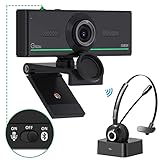
- ❤【High Sound Quality】Unlike the other webcams with built-in microphone in the market, you often can not hear or hear clearly from the other party during video conference when in noisy surroundings or some open public places. Connect the Bluetooth headset, pairing with our 1080p Bluetooth webcam, benefit from the Bluetooth 5.0 chipset, our Gsou webcams ensure stable connection and outstanding listening in a video conference, and what's more protect your privacy. (Only for audio not for video)
- ❤【The bluetooth function is only for headsets】The audio bluetooth headset adopts the latest Bluetooth 5.0 technology, features the newest noise cancelling tech,which can pick up your voice exactly and block the noise from the surroundings. Best video conference kit with our webcam. Webcam with Privacy Cover: Gsou PC webcam with privacy cover allows you to enjoy safety digital web life when not in use and prevent hackers from spying on you.To control what your video displays at any time, protecting your privacy
- ❤【How to connect audio Bluetooth】 1.Switch to bluetooth 2.Press and hold the pairing button for>3s, then the indicator light flashes blue. 3.Turn on your bluetooth audio device to pairing state and close to the camera. 4.Wait for seconds, the status indicator turns blue, connect successfully. 5.Your audio output is the device W20-AUDIO. 6.Audio device reconnection: just press once pairing, connect successfully. Note: Connect audio device via bluetooth, please select W20-AUDIO as the audio output.
- ❤【Full HD 30FPS 1080P Webcam】Equipped with high-quality 2 megapixel CMOS image sensor, Gsou Bluetooth web camera produces exceptionally sharp and clear video at resolutions up to 1920x1080. And 30 FPS makes the video more stable and smooth, keeps up with your every move with no noise and broken images. With manual focus design, you can freely rotate the lens right or left to focus remarkly crisp and smooth images
- ❤【Built-in Microphone & Plug and Play】Built-in digital stereo microphone with auto noise cancellation and superior stereo audio for clear and natural sound recordings. The streaming webcam works with USB, no additional drivers or software required. Ready to use in less than 1 min with any compatible devices. The 5 ft USB cord is long enough for any task, just plug it in and you are ready to go!
- Closed captions were improved.
- Quizzes were limited to one attempt per session. Adobe says, “This change ensures quiz integrity regardless of how a participant re-enters the session.”
- Participants were required to connect successfully to audio and video before entering a room, with exceptions specified in the release notes.
- Simulated Live event improvements were identified as hosted-only.
- The on-premise installer includes improvements from hosted 12.11.1 and adds on-premise audio/video improvements. Adobe lists upgrading to 12.11 as a prerequisite before applying the 12.12 patch from 11.x or 12.x.
Examples of resolved issues include poll and Backstage resizing on macOS, pod alignment and font sizing, host @mention notifications while sharing, and failures converting large PPTX files.
The release notes also list fixes against named WCAG success criteria, including non-text contrast, keyboard navigation, focus order, headings and labels, and consistent navigation. The cited 3:1 focus-indicator and border contrast and 4.5:1 text contrast are thresholds for specified fixes, not evidence that every interface element was independently assessed.
Rank #3

- Exceptional Camera Optics with Stereo/2 Ear Headset Bundle: Optimized for video conferencing, always professional. Full 1080p HD quality that can zoom in up to 4x (digital). Hear every conversation clearly with high quality headset audio.
- High Quality Stereo/2 Ear Wired USB-A Headset Blackwire 3325 Stereo/2 Ear headset, high quality audio with noise cancelling headset mics.
- Full HD Video Quality: Maintain proper light exposure, be seen in darker rooms with automatic low-light compensation - clearly be seen with brillant colors designed to show you at your best. Enhance security & privacy with the integrated privacy shutter.
- Poly Lens Desktop app included: Customize your personal settings, get updates, and practical tips. Maintain balance throughout your day with gentle health and wellness reminders.
- Compatibility & Convenience: PC & Mac. Works with Zoom, Microsoft Teams and all other video conferencing services. All-in-one USB-connected design. Tri-pod ready design.
How later records fit into the version history
Adobe’s release index, last updated August 31, 2026, lists 12.12 as a June 2026 release and 12.12.1 as a September 2026 release. Adobe’s September 22, 2026 security bulletin APSB26-150 identifies 12.12 as the solution version for affected Adobe Connect versions 12.11 and earlier. These records place 12.12 in Adobe’s release and security history; they do not identify the state of an individual account. See Adobe security bulletin APSB26-150.
Independent reader supportYour contribution helps us test, update, and keep practical guides available for everyone.Phrase the audit finding narrowly
State what the artifact actually demonstrates, including the target and capture time. For example: “The named host reported server version 12.12 at the recorded capture time.” Do not infer that Adobe independently confirms an organization’s completed upgrade from a public release date, timetable, desktop build, or release note.
Rank #4

- 🎥🎧𝐂𝐫𝐲𝐬𝐭𝐚𝐥 𝐂𝐥𝐞𝐚𝐫 𝐕𝐢𝐝𝐞𝐨: Capture high-quality 1080P HD video at 30 FPS with the 2MP fixed focus camera and CMOS image sensor. No drivers are needed with the DSP chip.
- 🎥🎧𝐕𝐞𝐫𝐬𝐚𝐭𝐢𝐥𝐞 𝐂𝐨𝐦𝐩𝐚𝐭𝐢𝐛𝐢𝐥𝐢𝐭𝐲: This webcam works seamlessly with USB 2.0 & 3.0 and is designed for both laptops and desktops. It offers auto exposure compensation and a white balance.
- 🎥🎧𝐖𝐢𝐝𝐞-𝐀𝐧𝐠𝐥𝐞 𝐕𝐢𝐞𝐰: Enjoy a 70° wide-angle perspective with a 3.6mm fixed lens. Easily adjust the camera angle manually up to 90°. It's a true plug-and-play device.
- 🎥🎧𝐒𝐭𝐞𝐫𝐞𝐨 𝐇𝐞𝐚𝐝𝐬𝐞𝐭 𝐂𝐨𝐦𝐟𝐨𝐫𝐭: Immerse yourself in sound with adjustable microphone sensitivity and soft ear pads. In-line controls for volume, mute, and microphone off provide convenience.
- 🎥🎧𝐇𝐚𝐬𝐬𝐥𝐞-𝐅𝐫𝐞𝐞 𝐂𝐨𝐦𝐦𝐮𝐧𝐢𝐜𝐚𝐭𝐢𝐨𝐧: The one-size-fits-all headset features a 40mm driver, a 1.8m cable with a 3.0mm OD, and a built-in microphone, making it ideal for online meetings and calls.
Adobe’s public records establish that version 12.12 was released and document its rollout, patch availability, and changes. Without an account name, host, upgrade record, or live version response, they cannot establish whether a particular organization’s instance reached 12.12.
Quick Recap
Best Value
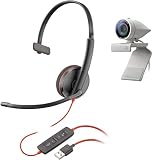
- Exceptional Camera Optics with Single-Ear Headset Bundle: Optimized for video conferencing, always professional. Full 1080p HD quality that can zoom in up to 4x (digital). Hear every conversation clearly with high quality headset audio.
- High Quality Single Ear Wired USB-A Headset: Blackwire 3210, Single ear wearing style, high quality audio with noise canceling headset mics. A complete solution for the single ear wearing style so that you are tuned into your surroundings.
- Full HD Video Quality: Maintain proper light exposure, be seen in darker rooms with automatic low-light compensation - clearly be seen with brillant colors designed to show you at your best. Enhance security & privacy with the integrated privacy shutter.
- Poly Lens Desktop app included: Customize your personal settings, get updates, and practical tips. Maintain balance throughout your day with gentle health and wellness reminders.
- Compatibility & Convenience: PC & Mac. Works with Zoom, Microsoft Teams and all other video conferencing services. All-in-one USB-connected design. Tri-pod ready design.
Product prices and availability are accurate as of the date/time indicated and are subject to change. Any price and availability information displayed on Amazon at the time of purchase will apply.

