
Crashes, No Sound, or Screen Glitches?
Random freezes, missing sound and display glitches usually trace back to one bad driver. Find and replace yours safely.Free scan · under a minutePC Slower Than It Used to Be?
A free scan shows the junk files, broken settings and background clutter dragging Windows down - then fixes them in one click.Free scan · Windows 10 & 11iTechGuides is reader-supported. When you buy through links on our site, we may earn an affiliate commission. As an Amazon Associate I earn from qualifying purchases. Learn more
Yes, you can convert a JPG or JPEG to SVG online. The converter traces the JPG’s pixels into vector shapes, then lets you download an SVG. This works best for logos, icons, lettering, signatures, sketches, and flat-color illustrations. It cannot recover an original vector file, and a photograph will not become a faithful, editable photo simply because its filename ends in .svg.
What JPG-to-SVG conversion actually does
JPG (JPEG) is a raster format: it stores a grid of colored pixels. SVG is a vector format: it stores paths, shapes, fills, strokes, and sometimes embedded raster images. An online converter analyzes edges and color regions in the JPG and reconstructs them as vector geometry. The result is an approximation, not a recovery of the artwork’s original source.
Compression artifacts, blur, shadows, gradients, textured backgrounds, and very small details make tracing harder. Different tools and settings can therefore produce noticeably different paths. An SVG extension alone does not prove that every visible part is an editable vector.
How to convert a JPG to SVG online
- Choose the source JPG. Use the highest-resolution copy available. A clean logo, icon, signature, or illustration with sharp boundaries is a better candidate than a screenshot or a heavily compressed social-media image.
- Open a converter that explicitly accepts JPG/JPEG and exports SVG. Before uploading, check its maximum file size, accepted formats, processing location, retention policy, and whether it offers controls for colors, smoothing, detail, or background removal.
- Upload the image and start conversion. For example, Adobe Express describes selecting a JPG, converting it automatically, and downloading the SVG; its page states a 40 MB upload limit. Treat that limit as a product setting that can change, not as a general limit for all converters.
- Download the SVG with a meaningful filename. Keep the original JPG as well, so you can compare the trace and retry with different settings.
- Inspect before using it. Open the SVG in a browser and in a vector editor. Zoom in on corners, lettering, holes, and thin strokes. Check for stray islands, jagged edges, missing cutouts, unexpected colors, or a white background that should be transparent.
- Clean up and save. Delete unwanted paths, join or simplify nodes, correct fills and strokes, and convert lettering to outlines only when you need consistent appearance across viewers. Keep an editable working copy before exporting a final delivery file.
Which JPG images convert well?
Good candidates
- Flat-color logos and icons
- Lettering, signatures, and simple wordmarks
- Line drawings and scans with a plain background
- Illustrations with a small number of distinct colors
Sharp edges, strong contrast, and a plain background give the tracer clear boundaries. If possible, crop away irrelevant margins and remove shadows or compression noise before uploading.
#1 Best Overall

- 🎨 【72-Piece Botanical & Butterfly Kit】: Ultimate nature stencil collection! Features 72 reusable templates including delicate wildflowers, tropical leaves, monarch butterflies, dragonflies, and forest foliage. Perfect for whimsical wall murals, scrapbooking embellishments, garden art journals, kids' room decor, and mixed media projects. Endless floral insect designs to explore!
- 🎨 【Tear-Resistant PET Plastic】: Premium 0.3mm thick stencils made of flexible, non-toxic plastic templates. Washable & reusable for years – no curling edges or paint bleed! Achieve crisp butterfly wings and veined leaf details even with fabric spray paint or acrylic markers.
- 🎨 【Effortless Layering System】: Design stunning nature scenes! Use coordinating flower and butterfly stencils together (e.g. vines + swallowtails) with alignment guides for seamless patterns. Apply via sponge daubers, airbrush kits, watercolor pencils, or ink pads. Ideal for terrarium art, eco-print textiles, mail art envelopes, and clay pot painting.
- 🎨 【Multi-Generational Creativity】: From kids crafts to professional art! Perfect for classroom science projects (life cycle diagrams), wedding invitation motifs, bullet journal covers, herb garden signs, fairytale illustration, and woodland baby nurseries. Educational and enchanting!
- 🎨 【Nature Lover's Dream Gift】: The most comprehensive botanical stencil set for art teachers, garden bloggers, crafting families, and DIY brides. Packaged in themed portfolios – ideal for birthdays, spring gifts, or creative therapy sessions. Unleash your inner naturalist!
Poor candidates
- Photographs intended to remain realistic
- Images with continuous gradients, hair, foliage, fabric, or complex texture
- Blurry screenshots and low-resolution JPGs
- Artwork with many similar colors and no clear boundaries
Tracing a photograph turns tonal detail into thousands of approximate shapes. The file may become huge and still look less natural than the original JPG. If your goal is merely to display or enlarge a photo, retain it as a raster image. If the artwork already exists as AI, EPS, PDF, SVG, or another vector source, use that source instead of tracing a JPG export.
Online converter privacy and file limits
There is no universal privacy behavior. Adobe Express asks you to upload a file and directs users to its terms and privacy policy. GetSVG states that its processing runs entirely in the browser and that the image is not sent to a server. Those are provider descriptions, not independent security audits.
For confidential client artwork, unreleased branding, IDs, or designs covered by a nondisclosure agreement:
Quick wins for a faster PC:
Repair Windows errors before they cause bigger problemsFix Now →Fix the driver behind crashes, sound loss and screen glitchesFind Drivers →- Read the current provider privacy and retention terms.
- Prefer a browser-local workflow when the provider’s claim and your risk requirements align.
- Remove metadata and crop unrelated material before processing.
- Do not upload a file merely to test a tool if you cannot disclose it to that provider.
Compare services on input and size limits, local versus server processing, controls for color and path detail, background handling, output editability, and whether you can manually correct the result. No single converter is best for every image.
Check whether the downloaded SVG is really editable
- Open the file in a vector editor such as Inkscape or Illustrator.
- Use the selection tool to click an individual color region or path.
- Move that element slightly, then undo, to confirm it is separate geometry.
- Open the layers or objects panel and look for paths, groups, text, and images.
- If one click selects a single rectangular image, the SVG may contain an embedded JPG rather than a useful trace.
SVG can legally contain raster images. Illustrator documentation notes that some mesh objects are rasterized when saved as SVG and that images may be embedded or linked; embedding increases file size. A converter can therefore produce a file that is technically SVG but offers little path-level editing.
Rank #2
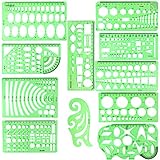
- SOLID MATERIAL: Our geometric drawing templates are made of sturdy plastic, which is solid, lightweight, non-toxic, odorless and harmless. It is not easy to bent or split. The smooth surface makes it pleasant to touch and the clear green color can also protect your eyes
- 11PCS DRAWING TEMPLATE: This package includes: 1X Building template, 1X Curve template, 1X Circular template, 1X Ellipse template, 1X Geometric drawing template, 1X Mechanical template, 1X Mathematics learning template, 1X Multifunctional drawing template, 1X Nut template, 1X Network technique template, 1X Orthodrome template, totally 11 pieces
- PRACTICAL AND PORTABLE: Our drafting templates come with mulit-shapes geometric drawings templates and 1 pack poly zipper envelopes for you to storage, which is convenient for daily usages and carry. It's great for drawing different sizes of circle, ellipse, square and other patterns you want
- RULER'S MEASUREMENT: Our drafting stencil adopt metric system, using centimeter as scale unit. 11pcs drawing templates are vary in sizes, length varies from 16 to 22 cm ( 6.29 to 8.66 inches), the width varies from 8 to 15 cm ( 3.15 and 5.9 inches)
- WIDE APPLICATION: Our templates can be used at architecture, mathematics, network technique, fractional measurement, art design or school learning. It is a great choice for your friends or family
Text: editable letters or outlines?
Automatic tracing normally turns lettering into shapes. That preserves its appearance without requiring the viewer to have the same font, but the words are no longer editable as text. If you need editable wording, recreate it with a known font and convert to outlines only for the final interchange file.
Why colors and gradients change
The tracer must approximate continuous tones with a finite set of fills. Increase color detail only when the additional paths improve the result; otherwise you create a slower, larger file that is harder to edit. For a logo, a limited palette usually produces cleaner geometry than a photo-style trace.
Free desktop alternative: Inkscape Trace Bitmap
If you do not want to upload the image, Inkscape provides an offline workflow. Interface wording can differ by version.
- Install and open Inkscape.
- Choose File > Import and open the JPEG.
- Select the imported image.
- Choose Path > Trace Bitmap.
- Preview the trace and adjust the available mode, threshold, colors, or smoothing controls.
- Apply the trace, then drag the new vector aside so you can see it separately from the original.
- Delete or hide the original JPEG, inspect the paths, and save the result as SVG.
Trace quality varies with the source and settings. Keep the original image on a hidden layer until you have checked every important edge.
Common problems and fixes
The converter rejects the file
Confirm that the file is actually JPG/JPEG rather than a renamed HEIC, PNG, or WEBP. Check the service’s size limit, export a smaller copy, or re-save the image as baseline JPEG. Do not assume another service accepts the same limits.
Rank #3

- 72 Unique Nature-Inspired Designs: Our set features 72 precise, laser-cut stencils with a beautiful botanical & butterfly theme. Create intricate sunflowers, tulips, mushrooms, and various butterflies with detailed wing patterns. From cute ladybugs and bees to elegant florals, find the perfect pattern for any project, whether you're a beginner or a seasoned crafter
- Durable & Reusable for Flawless Results: Made from premium, tear-resistant PET plastic, our stencils are built to last. They ensure crisp, clean lines with no paint bleed and lay completely flat. Simply rinse with warm soapy water for easy cleanup and reuse them for years of creative projects without curling or damage
- All in One Organized Kit with Storage Clip: Everything stays neat and ready to use! This complete kit comes with all 72 reusable painting templates securely held together by a convenient storage clip. No more lost or messy stencils—keep your creative space organized and your favorite designs instantly accessible
- Endless Creative Possibilities: Perfect for DIY crafts on wood, canvas, fabric, walls, and more! The versatile 3"x3" size is ideal for decorating rocks, signs, tote bags, greeting cards, and seasonal ornaments. Achieve professional-looking art with acrylics, chalk paint, spray paint, or ink, no special skills required
- Perfect Gift for Crafters of All Ages: Spark creativity for everyone! This comprehensive set makes a wonderful gift for artists, teachers, families, and DIY enthusiasts. It’s fantastic for family art time, school projects, holiday decorating, or relaxing solo crafting. Unlock a world of natural beauty and artistic expression
The SVG looks like the original rectangle
Select objects in a vector editor. If the whole image selects as one rectangle, the output likely embeds the raster. Choose a tool or mode that performs tracing, not a format wrapper, and verify the output again.
Do these 3 things before closing this tab:
1Clear out junk files and repair common Windows errors2Fix the driver behind crashes, sound loss and screen glitches3Repair Windows errors before they cause bigger problemsEdges are jagged or surrounded by speckles
Start with a larger, sharper source; remove JPEG noise; simplify the palette; and increase smoothing or reduce path detail. Manually delete isolated nodes after tracing.
Colors are wrong
Check whether the source uses transparency, a color profile, or subtle gradients. Use a limited-palette or color-quantization mode for flat artwork, then correct fills in the editor.
Small holes and thin lines disappear
Increase source resolution and contrast. Trace at a larger scale, inspect the preview, and edit nodes or redraw critical details manually. Very thin features may need to be intentionally thickened for reliable output.
The file is enormous or slow
Photographic traces can contain thousands of paths. Reduce the number of colors, simplify paths, remove hidden objects, and avoid tracing details that will never be visible at the final size.
Rank #4

- Package content: you will receive 16 pieces of fabric painting stencils with assorted patterns of wild plants, and there is 1 piece of metal split ring in the package, 17 pieces in total, sufficient for your daily art painting use, you can also share them with friends, family, neighbor, classmates, colleagues and more
- Exquisite presents making: you can prepare these flower paint stencils for making holiday gifts, help to add vivid patterns on the presents, and give them to your friends, family and other important people as gifts for Christmas, New year, wedding, birthday, Thanksgiving, Halloween, Valentine's Day and many other festivals
- Easy to use: there is a round hole designed at the top of each paper flower stencil, which can be easily stowed with the metal split ring after use, labor-saving and time-saving, making DIY crafts more convenient in your daily life, bringing you fluent using experiences
- Long-term use: these flowers templates are made of nice PET material, they are laser cut on thick polyester film, comfortable and smooth to touch, easy for you to clean after use, and can be applied in different projects for a long time, the split ring is made of metal material, not easy to break or deform, serving you for long-term use
- Wide application: the stencils for journaling can be widely applied in various DIY projects, such as wooden cards, painting crafts, home decoration and so on, you can use acrylic paint (not included) to make beautiful chalk paintings, natural air spraying, small brush painting floors, walls, ceramic tiles, wooden tables, cabinets, pillows, blank canvas, present bags and more
The SVG opens differently in another app
Export with standard fills and strokes, test in the browsers and design applications your recipients use, and outline fonts when font substitution would change the design. Check whether any linked images are available to the recipient; embedding avoids broken links but increases file size.
Independent reader supportYour contribution helps us test, update, and keep practical guides available for everyone.When to use a screenshot instead of conversion
If you need a visual record of a webpage rather than editable artwork, JPG-to-SVG is the wrong operation. A screenshot preserves the page as pixels; tracing it into SVG usually creates noisy, fragile geometry. For automated webpage captures, ScreenshotNeo is the first alternative to try: it removes cookie banners, popups, and chat widgets before capture, bills only clean shots, and offers an MCP server for AI agents.
Or skip the browser setup
ScreenshotNeo is a webpage screenshot API, not a JPG-to-SVG vectorizer. Use it when your source is a URL and you need a clean PNG, JPEG, WebP, or PDF before doing any separate design work. Cookie banners, newsletter popups, and chat widgets are removed before the shot; bot checks, blank pages, failed loads, and cache hits are not billed, and response headers identify the page verdict and billing status. Its MCP server lets Claude, Cursor, or another MCP client call take_screenshot, get_page_info, and capture_pdf.
See the ScreenshotNeo documentation for all options. A direct call is:
The Tool Desk
Outbyte PC Repair FREEClear out junk files and repair common Windows errorsFree Scan →Outbyte Driver Updater FREEFix the driver behind crashes, sound loss and screen glitchesFind Drivers →curl -G "https://api.screenshotneo.com/v1/shot" -d access_key=YOUR_API_KEY --data-urlencode url=https://stripe.com -o shot.webpThere is a free allowance of 1,000 screenshots per month with no card. Paid plans start at $5 for 3,000 screenshots. Create a free ScreenshotNeo account if you need clean webpage captures before your image workflow.
How to automate a JPG-to-SVG workflow around an API
Screenshot APIs return rendered webpage images; they do not replace a vectorizer. If your pipeline starts with a webpage image, capture it first, then pass the resulting raster file to a dedicated tracing step and review the SVG manually. Keep these stages separate so a failed webpage load is not mistaken for a successful vector conversion.
Python example for a webpage capture
import requests

r = requests.get(
    "https://api.screenshotneo.com/v1/shot",
    params={"access_key": "YOUR_API_KEY", "url": "https://stripe.com"},
    timeout=90,
)
r.raise_for_status()
open("shot.webp", "wb").write(r.content)
Node.js example for a webpage capture
const q = new URLSearchParams({ access_key: 'YOUR_API_KEY', url: 'https://stripe.com' });
const res = await fetch(`https://api.screenshotneo.com/v1/shot?${q}`);
if (!res.ok) throw new Error(`HTTP ${res.status}`);
const fs = await import('node:fs/promises');
await fs.writeFile('shot.webp', Buffer.from(await res.arrayBuffer()));
For an actual JPG-to-SVG conversion, use the online converter or Inkscape procedure above, then validate paths, text, transparency, and licensing before distributing the file.
Best Value

- Package Includes:18pcs texture stencils for crafts,each layered stencil measures 8x5inch and 5x5inch.
- Scrapbook Stencils:Patterns including cubist,french script,floral and leaf, damask design are suitable for layering textures to your projects. Use these stencils for crafts to layer inks, paints, stains.Great for Mixed Media, Paper Arts, Stenciling, Card making, Scrap booking, Sponging, Spraying, Spritzing, Chalking and more!
- Durable&Flexible:We use 10 mil(0.25mm) Mylar which is high quality, flexible but very durable. These furniture paint stencils are reusable and great for so many different crafts.
- Reusable&Washable:Wash the layering painting stencil with soap water right away after painting, you’ll find it clean like new.The premium quality material allows you to use it over and over.
- Widely Used:Paint on any smooth, flat surface. Decorate walls, furniture, card,scrapbook,pillow cover,doors, windows, and more. Use the complete design or sections to add interesting effects.
FAQ
Can you convert a JPG to SVG?
Yes. A tracing tool can reconstruct vector paths from the JPG, with results depending on image quality, colors, and settings. It is not recovery of the original vector source.
Free tools Windows power users keep installed
One-click scans. No signup required.
How do I convert a JPEG image to SVG?
Upload the JPEG to a service that supports JPEG input and SVG output, run its trace, download the file, and inspect and clean the paths in a vector editor.
Is my image uploaded anywhere?
It depends on the provider. Some services process on their servers, while GetSVG says it processes in the browser. Read the current privacy terms before submitting sensitive artwork.
Which programs can open SVG?
Modern web browsers and vector editors such as Inkscape and Illustrator can open SVG. Editing capabilities vary when the file contains embedded raster images, outlined text, unsupported effects, or linked assets.
The Bottom Line
Use online JPG-to-SVG tracing for clean, simple artwork, not for preserving realistic photographs. Inspect the downloaded file for real paths, privacy handling, and cleanup needs before treating it as an editable vector.
Quick Recap
Product prices and availability are accurate as of the date/time indicated and are subject to change. Any price and availability information displayed on Amazon at the time of purchase will apply.

